GB Studio 是一款面向 Game Boy 的复古游戏制作器,用拖拽式界面把场景、角色和对话拼起来,不用写代码就能做出可玩的游戏。它跨平台运行,支持导出 ROM、网页版和 Pocket 格式,适合想入门复古游戏开发的新手和做原型的设计师。
核心亮点:
- 拖拽式编辑,零代码拼出完整游戏
- 支持导出 ROM、网页和 Pocket 格式
- 内置音乐编辑器,可独立在线使用
- 提供命令行工具,方便批量构建与自动化
当前版本 v4.3.2(2026-06-22 发布),开源协议 MIT,GitHub 9,470 star。

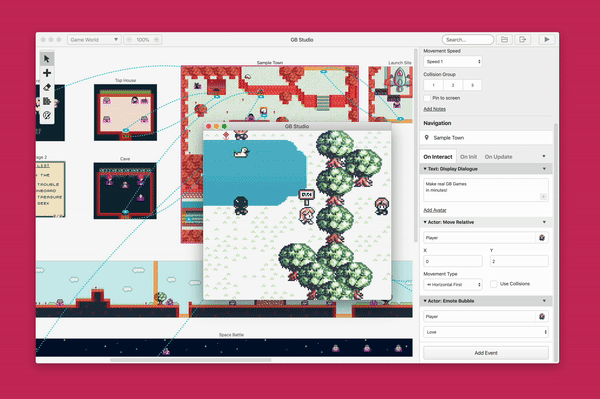
核心信息
| 软件名称 | Gb-studio(chrismaltby/gb-studio) |
| 当前版本 | v4.3.2 |
| 更新日期 | 2026-06-22 |
| 开源协议 | MIT |
| 软件分类 | 开源游戏 |
| 关键词 | 开源游戏 |
本次更新内容
- 调试器新增查看当前背景与叠加图块地图,排查画面问题更直观。
- 可从设置中导出网页模板并支持模板插件,方便自定义网页导出内容。
- 完善波兰语和日语本地化,相关语言用户界面更友好。
- 修复构建警告时日志不自动打开、多选删除后脚本事件无法删除等问题。
- 修复音乐编辑器播放中删除样式导致卡死、选择菜单文字被裁剪等稳定性问题。
查看官方英文更新日志(原文)
GB Studio is a quick and easy to use drag and drop retro game creator for your favourite handheld video game system.

## [4.3.2] - 2026-06-22

### Added

- Add ability to view the current background and overlay tilemap in the debugger [@pau-tomas](https://github.com/pau-tomas)
- Add ability to "Eject Web Template" from the Settings section, allowing packages created with "Export Web" to be customised
- Add support for web template plugins

# Changed

- Updated Polish localisation. [@ReptiIe](https://github.com/ReptiIe)
- Updated Japanese localisation. [@tomo666](https://github.com/tomo666)

### Fixed

- Fix issue preventing build log from opening automatically on warnings
- Fix issue where script events could not be deleted after deleting a multi selection
- Fix issue where deleting patterns in music editor during playback could cause application to freeze
- Fix issue where select input menus would often not be wide enough to display contents without cropping text
下载地址
以下为官方原包,本站不二次打包;多个文件为不同包型,按需选择其中一个下载即可:
gb-studio-windows-32bit-installer.zip(安装版 | 227.8 MB)
gb-studio-windows-32bit-standalone.zip(便携版·解压即用 | 116.7 MB)
gb-studio-windows-64bit-installer.zip(安装版 | 237.9 MB)
gb-studio-windows-64bit-standalone.zip(便携版·解压即用 | 122.1 MB)
✅ 上方 SHA256 与官方发布值一致,可自行核对。
快速上手
- 运行下载好的安装包,按向导完成安装并启动 GB Studio。
- 首次启动后进入主界面,选择新建项目,填写项目名称并保存到本地文件夹。
- 在项目编辑器中添加场景与角色,通过场景视图和事件编辑器搭建游戏内容。
- 使用菜单中的导出功能生成 ROM 文件,或选择导出为 Web 构建以便在浏览器运行。
提示:安装版与免安装版任选其一,免安装版解压后直接运行即可。
讨论(0 条)