Heroic 是一款开源的跨平台游戏启动器,能把 Epic、GOG 和 Amazon 三个平台的游戏统一到一个界面里管理。它基于 Electron 构建,支持 Linux、Windows 和 macOS,界面清爽、操作直观,适合不想装多个官方客户端、喜欢开源工具的游戏玩家。
核心亮点:
- 统一管理 Epic、GOG、Amazon 三个平台的游戏库
- 跨平台支持 Linux、Windows 和 macOS 系统
- 开源免费,界面清爽且支持多语言
- 内置下载、安装与启动游戏的一站式流程
当前版本 v2.22.4(2026-10-15 发布),开源协议 GPL-3.0,GitHub 12,567 star。

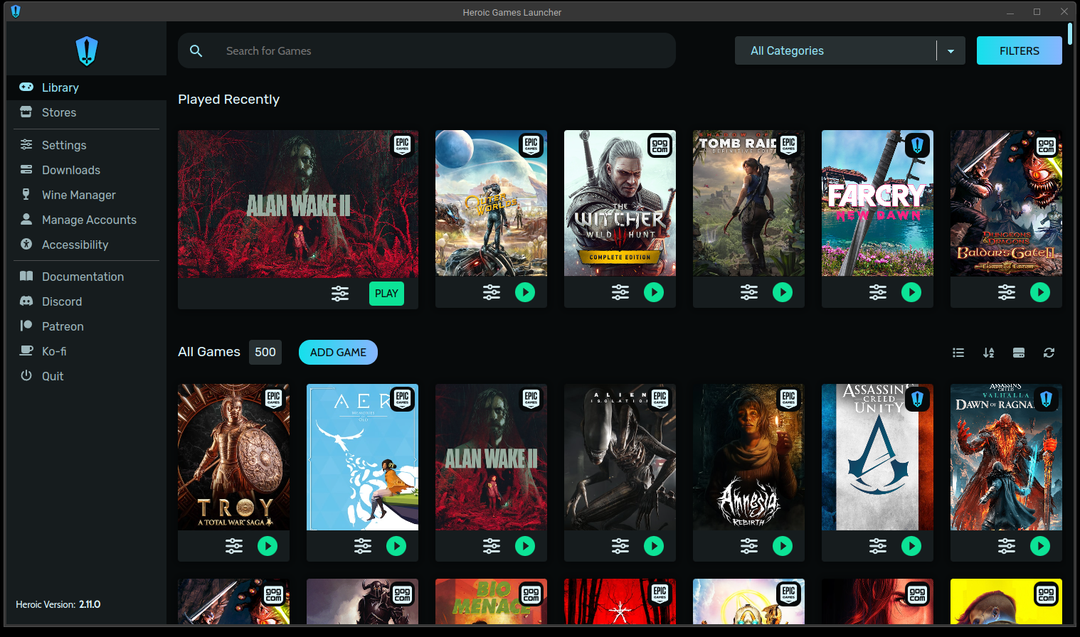
核心信息
| 软件名称 | Heroic(Heroic-Games-Launcher/HeroicGamesLauncher) |
| 当前版本 | v2.22.4 |
| 更新日期 | 2026-10-15 |
| 开源协议 | GPL-3.0 |
| 软件分类 | Windows 效率工具 |
| 关键词 | amazon-prime、electron、epic-games-launcher、epic-games-store、epic-store、gaming |
本次更新内容
- 修复 GOG 登录问题,此前版本中因验证拦截导致无法正常登录,现已恢复。
- 解决部分游戏启动兼容性问题,避免原生游戏被错误处理而影响运行。
- 优化退出时的文件处理逻辑,减少对系统原生程序的不必要改动。
- 新增对 ARM 架构设备的安装包支持,更多设备可正常安装使用。
- 更新多语言翻译,界面文字更准确友好。
查看官方英文更新日志(原文)
Small hotfix to fix the GOG Login and UMU issue.


## What's Changed
* fix: Don't try to `chmod` native Linux/macOS binaries on exit by @CommandMC in https://github.com/Heroic-Games-Launcher/HeroicGamesLauncher/pull/5918
* Add support for building ARM64 flatpak by @matte-schwartz in https://github.com/Heroic-Games-Launcher/HeroicGamesLauncher/pull/5891
* [FIX] Unset custom user agent to fix GOG login cloudflare check by @arielj in https://github.com/Heroic-Games-Launcher/HeroicGamesLauncher/pull/5979
* fix: Don't trust `isUmuSupported`'s return value if we're running a native game by @CommandMC in https://github.com/Heroic-Games-Launcher/HeroicGamesLauncher/pull/5915
* [i18n] Updated Translations by @weblate in https://github.com/Heroic-Games-Launcher/HeroicGamesLauncher/pull/5960

## New Contributors
* @wehrwolfmann made their first contribution in https://github.com/Heroic-Games-Launcher/HeroicGamesLauncher/pull/5793

**Full Changelog**: https://github.com/Heroic-Games-Launcher/HeroicGamesLauncher/compare/v2.22.3...v2.22.4
下载地址
以下为官方原包,本站不二次打包;多个文件为不同包型,按需选择其中一个下载即可:
Heroic-2.22.4-Portable-x64.exe(便携版·解压即用 | 147.5 MB)
Heroic-2.22.4-Setup-x64.exe(安装版 | 147.7 MB)
✅ 上方 SHA256 与官方发布值一致,可自行核对。
快速上手
- 运行下载好的安装包,按向导完成安装后启动 Heroic;也可直接双击便携版可执行文件打开。
- 首次启动后进入设置,在账号或商店相关选项中选择要登录的平台并完成登录。
- 登录成功后回到游戏库,等待已购游戏列表加载,点击游戏即可查看详情。
- 在游戏详情页点击安装,选择安装位置后确认,等待下载与安装完成。
- 安装完成后在库中点击该游戏启动,即可开始游玩。
提示:便携版与安装版功能一致,按需选其一即可,无需重复安装。
讨论(0 条)