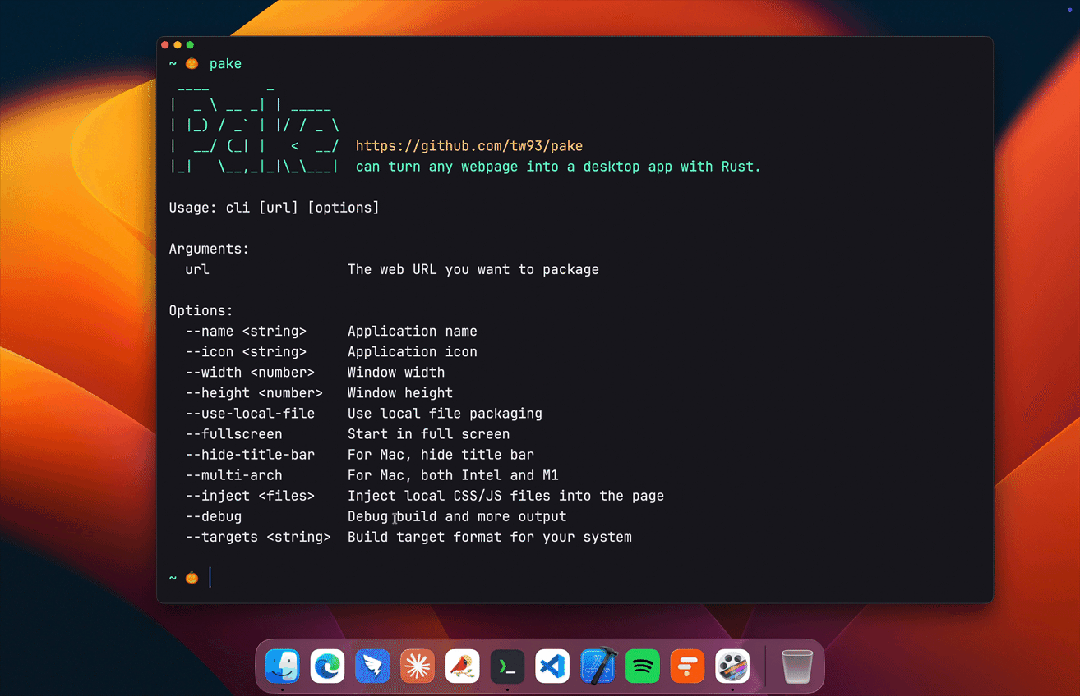
Pake 是个把任意网页一键打包成桌面应用的开源工具,基于 Rust Tauri 调用系统 WebView,不捆绑浏览器内核,所以体积小、启动快。命令行一条命令就能生成,也提供图形界面和现成应用库。适合想把 ChatGPT、Claude 等常用网站变成独立窗口的普通用户和开发者。
核心亮点:
- 一条命令把任意网址打包成桌面应用
- 基于系统 WebView,体积远小于 Electron
- 支持快捷键、沉浸窗口、拖拽和样式定制
- 提供图形界面与现成应用库,免命令行
当前版本 v3.21.0(2026-11-23 发布),开源协议 GPL-3.0,GitHub 63,967 star。


核心信息
| 软件名称 | Pake(tw93/Pake) |
| 当前版本 | v3.21.0 |
| 更新日期 | 2026-11-23 |
| 开源协议 | GPL-3.0 |
| 软件分类 | Linux 桌面 |
| 关键词 | chatgpt、claude、cli、desktop、desktop-app、electron-alternative |
本次更新内容
- 邮件里指向其他网站登录页的链接改为在默认浏览器打开,网站自身登录仍留在应用内,避免页面被替换。
- 按住修饰键或使用中键点击链接时,会像浏览器一样在默认浏览器中打开,操作更顺手。
- 回到首页的快捷键和菜单项不再影响网页自行打开的窗口,登录弹窗不会中途被带回首页。
- 新版本升级底层运行时并修复下载时可能让应用退出的安全问题,使用更稳定。
- 命令行工具需要更高版本的 Node.js 环境,使用前请先升级。
查看官方英文更新日志(原文)
<div align="center">
<img src="https://raw.githubusercontent.com/tw93/Pake/main/assets/logo.png" alt="Pake Logo" width="120" height="120" style="border-radius:50%" />
<h1 style="margin: 12px 0 6px;">Pake V3.21.0</h1>
<p><em>Turn any webpage into a desktop app with one command.</em></p>
</div>

### Changelog

1. A link in a mail to another site's sign-in page, such as `github.com/login` or a `/auth/verify` link, now opens in the default browser instead of replacing the page, as it did in an Outlook web mail app. A site's own sign-in still stays in the app.
2. A Cmd-click on macOS, a Ctrl-click on Windows and Linux, or a middle-click opens the link in the default browser, as in a browser.
3. Ctrl+Shift+H and the Home menu item leave a window the page opened alone, so a sign-in popup is never sent to the app's home page halfway through.
4. The runtime moves to Tauri 2.12.7, Wry 0.57.3 and url 2.5.9, which fixes RUSTSEC-2026-0592, where a nested `blob:` address could abort an app while downloading.
5. The CLI now needs Node.js 22.12 or later.

### 更新日志

1. 邮件里指向别的网站登录页的链接,比如 `github.com/login` 或 `/auth/verify` 这类,现在会在默认浏览器里打开,不再像之前在 Outlook 网页邮箱应用里那样把页面整个换掉,网站自己的登录还是留在应用里。
2. macOS 上按住 Command 点、Windows 和 Linux 上按住 Ctrl 点,或者用中键点链接,会和浏览器一样在默认浏览器里打开。
3. Ctrl+Shift+H 和菜单里的回到首页不再作用于网页自己打开的窗口,登录弹窗不会在登录到一半时被带回应用首页。
4. 运行时升到 Tauri 2.12.7、Wry 0.57.3 和 url 2.5.9,修复了 RUSTSEC-2026-0592,之前嵌套的 `blob:` 地址可能在下载时让应用直接退出。
5. CLI 现在需要 Node.js 22.12 或更高版本。

If Pake helps you, please consider giving it a star and recommending it to your friends.

### Pake App

If you would rather click than type commands, [Pake App](https://pake.run/) makes apps from a ready-made gallery or any URL on Mac, Windows and Linux, with no Node.js or Rust to install, and adds ad blocking and updates for the apps you made. You can [download it here](https://pake.run/). The CLI stays free and open source.

> https://github.com/tw93/Pake
下载地址
以下为官方原包,本站不二次打包;多个文件为不同包型,按需选择其中一个下载即可:
ChatGPT_x86_64.AppImage(官方原包 | 79.8 MB)
ChatGPT_x86_64.deb(官方原包 | 5.0 MB)
DeepSeek_x86_64.AppImage(官方原包 | 79.7 MB)
DeepSeek_x86_64.deb(官方原包 | 4.9 MB)
Excalidraw_x86_64.AppImage(官方原包 | 79.7 MB)
Excalidraw_x86_64.deb(官方原包 | 4.8 MB)
Flomo_x86_64.AppImage(官方原包 | 79.8 MB)
Flomo_x86_64.deb(官方原包 | 5.0 MB)
Gemini_x86_64.AppImage(官方原包 | 79.7 MB)
Gemini_x86_64.deb(官方原包 | 4.9 MB)
Grok_x86_64.AppImage(官方原包 | 79.9 MB)
Grok_x86_64.deb(官方原包 | 5.2 MB)
LiZhi_x86_64.AppImage(官方原包 | 80.3 MB)
LiZhi_x86_64.deb(官方原包 | 5.8 MB)
Notion_x86_64.AppImage(官方原包 | 79.8 MB)
Notion_x86_64.deb(官方原包 | 5.0 MB)
ProgramMusic_x86_64.AppImage(官方原包 | 79.7 MB)
ProgramMusic_x86_64.deb(官方原包 | 4.9 MB)
Qwerty_x86_64.AppImage(官方原包 | 79.9 MB)
Qwerty_x86_64.deb(官方原包 | 5.2 MB)
Twitter_x86_64.AppImage(官方原包 | 79.7 MB)
Twitter_x86_64.deb(官方原包 | 4.9 MB)
WeChat_x86_64.AppImage(官方原包 | 79.8 MB)
WeChat_x86_64.deb(官方原包 | 5.0 MB)
WeRead_x86_64.AppImage(官方原包 | 79.7 MB)
WeRead_x86_64.deb(官方原包 | 4.8 MB)
XiaoHongShu_x86_64.AppImage(官方原包 | 79.9 MB)
XiaoHongShu_x86_64.deb(官方原包 | 5.1 MB)
YouTubeMusic_x86_64.AppImage(官方原包 | 80.3 MB)
YouTubeMusic_x86_64.deb(官方原包 | 5.8 MB)
YouTube_x86_64.AppImage(官方原包 | 79.6 MB)
YouTube_x86_64.deb(官方原包 | 4.8 MB)
✅ 上方 SHA256 与官方发布值一致,可自行核对。
快速上手
- 运行下载好的安装包,按向导完成安装,安装结束后从开始菜单启动 Pake 桌面应用。
- 在应用内从现成应用库中选择想用的网站,或直接输入任意网址来创建桌面应用。
- 在设置中调整窗口样式、快捷键等选项,确认后生成并打开你的专属桌面应用。
- 需要为其他账号单独使用时,在同一窗口内再创建一个独立应用,互不干扰。
提示:应用基于系统 WebView 运行,体积小、启动快,无需额外安装浏览器引擎。
讨论(0 条)