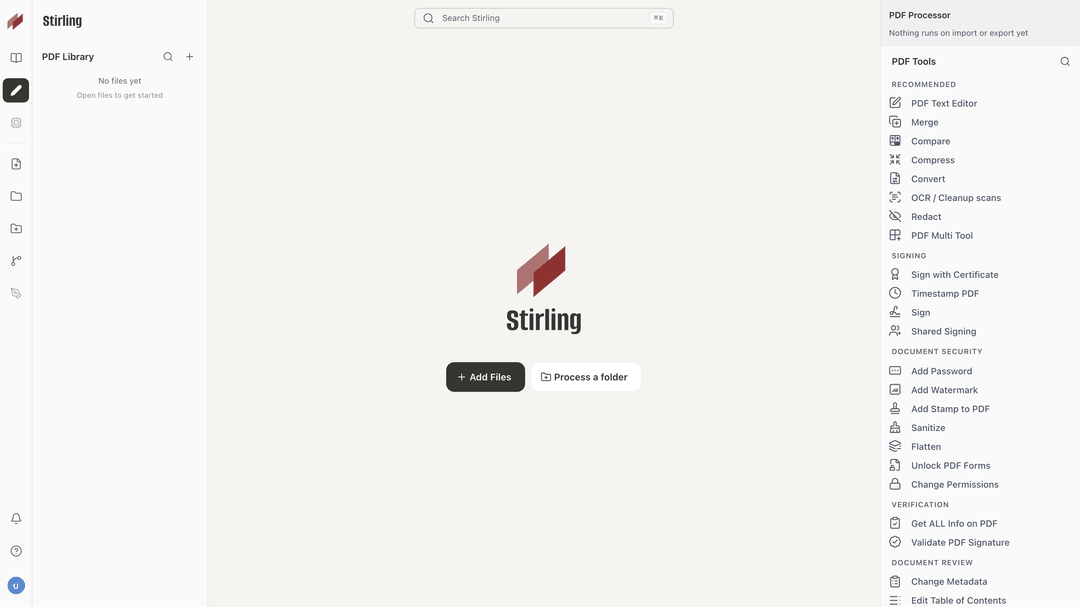
Stirling-PDF 是一款可自托管的开源 PDF 工具箱,把合并拆分、签名、涂黑、格式转换、OCR 识别、压缩等常用操作集中在一个界面里,文档全程留在自己的服务器或电脑上,不必上传第三方。它支持桌面端、浏览器和私有 API,适合注重隐私的团队、开发者以及需要批量处理 PDF 的个人用户。
核心亮点:
- 合并拆分、签名涂黑、转换压缩等工具集中一处
- 支持桌面端、浏览器界面与自托管私有 API
- 提供可视化流程编排,可批量自动化处理文档
- 内置单点登录、审计等企业级能力,界面多语言
当前版本 v3.5.0(2026-11-22 发布),开源协议 MIT,GitHub 97,232 star。
许可说明:站点收录社区版构建,代码主体采用 MIT 许可,仓库内个别目录另有各自条款,本站不改动官方安装包。


核心信息
| 软件名称 | Stirling-PDF(Stirling-Tools/Stirling-PDF) |
| 当前版本 | v3.5.0 |
| 更新日期 | 2026-11-22 |
| 开源协议 | MIT |
| 软件分类 | 自托管服务 |
| 关键词 | docker、hacktoberfest、java、pdf、pdf-converter、pdf-editor |
本次更新内容
- 办公文档转换引擎全面升级,转换更快、质量更好,容器体积大幅减小,欢迎继续反馈转换异常。
- 修复桌面端文档上传后自动重新加载并丢失进度的问题,查看器、文件列表等整体性能提升。
- 压缩功能改用新转换引擎,HTML 转 PDF 恢复缩放支持,管理员可限制同时转换数量并排队。
- 损坏的办公、电子书和 HTML 文件现在会给出清晰的无法读取提示,不再显示晦涩错误。
- 修复表单字段值重复显示、深色模式下表单值不可见、缩略图侧栏卡在加载状态等问题。
- 注意:不再支持导出旧版 Word 文档格式,部分文档格式不再接受转换,相关自动化调用会报错。
查看官方英文更新日志(原文)
Stirling Office Convert has now replaced Libreoffice in our docker containers!
Along with speed increases and better quality conversions it also means our docker going forward in 3.5.1 will be half the size!  Thank you to everyone who sent us example files, and please keep reporting any conversions that don't look right! We are hoping to get this perfect!

We have also made a big fix for desktop users whose documents were reloading a few seconds after upload, Thank you to everyone who reported this and great to see people using the new feedback button! (In bottom right)

With the Office Convert change (outside of the tools getting the toggle removed)
- Compress now uses Office Convert
- HTML to PDF supports zoom again
- New admin setting to cap how many Office conversions run at once and queue
- Damaged Office, ebook and HTML files now give a clear "could not be read" message instead of an error

Other changes are:
- Faster desktop PDF operations, with the PDF engine now pre-installed in the app
- Performance improvements across the viewer, file list etc
- JPDFium and other dependency updates causing various bug fixes and improvements

We also fixed some bugs including:
- Desktop documents reloading themselves and losing progress shortly after being opened
- Filled form fields showing their value twice in the viewer
- Form values being invisible in dark mode
- Thumbnail sidebar getting stuck on "Loading..." after applying changes

Note (breaking changes):
- PDF to .doc (Word 97-2003) output has been removed. Use docx or odt instead; API calls, pipelines and automations asking for `doc` will now return an error
- .wpd, .wps, .lwp, .abw, .hwp and .xps files are no longer accepted for conversion
- `groupsToRemove` entries for removed tools (LibreOffice, Calibre, Weasyprint, OpenCV, etc.) no longer disable anything.

<!-- Release notes generated using configuration in .github/release.yml at main -->

## What's Changed
### Bug Fixes
* fix(frontend): silence dev proxy ECONNREFUSED spam by @balazs-szucs in https://github.com/Stirling-Tools/Stirling-PDF/pull/8853
* fix(ui): align add-password advanced dropdown to be more consistent with the rest of the UI by @balazs-szucs in https://github.com/Stirling-Tools/Stirling-PDF/pull/8760
### Enhancements
* Support accessibility tagging of formulas in Text Editor by @EthanHealy01 in https://github.com/Stirling-Tools/Stirling-PDF/pull/8945
* Send self-hosted Enterprise buyers to the hosted Enterprise page by @reecebrowne in https://github.com/Stirling-Tools/Stirling-PDF/pull/8940
* Ask signed-out desktop users to sign in for tools that need an account by @Frooodle in https://github.com/Stirling-Tools/Stirling-PDF/pull/8952
* perf(analytics): start the PostHog client lazily and cut its queue thread wakeups by @balazs-szucs in https://github.com/Stirling-Tools/Stirling-PDF/pull/8562
* perf(viewer): decouple toolbar notifier subscriptions from state variables by @balazs-szuc
下载地址
以下为官方原包,本站不二次打包;多个文件为不同包型,按需选择其中一个下载即可:
Stirling-PDF-server.jar(官方原包 | 220.9 MB)
Stirling-PDF-with-login.jar(官方原包 | 397.9 MB)
Stirling-PDF.jar(官方原包 | 313.0 MB)
✅ 上方 SHA256 与官方发布值一致,可自行核对。
快速上手
- 首次启动前确认已安装 Java 运行环境,然后在命令行进入安装包所在目录,执行 java -jar Stirling-PDF.jar 启动服务。
- 启动后留意命令行输出的访问地址,在浏览器中打开本机地址和端口,进入 Stirling PDF 的网页界面。
- 在网页界面首页的工具列表中按需选择合并、拆分、签名、转换或压缩等 PDF 处理功能。
- 上传待处理的 PDF 文件,设置好对应选项后执行处理,完成后将结果文件保存到本地。
提示:处理敏感文档时建议在本机自托管运行,避免上传到外部服务。
讨论(0 条)