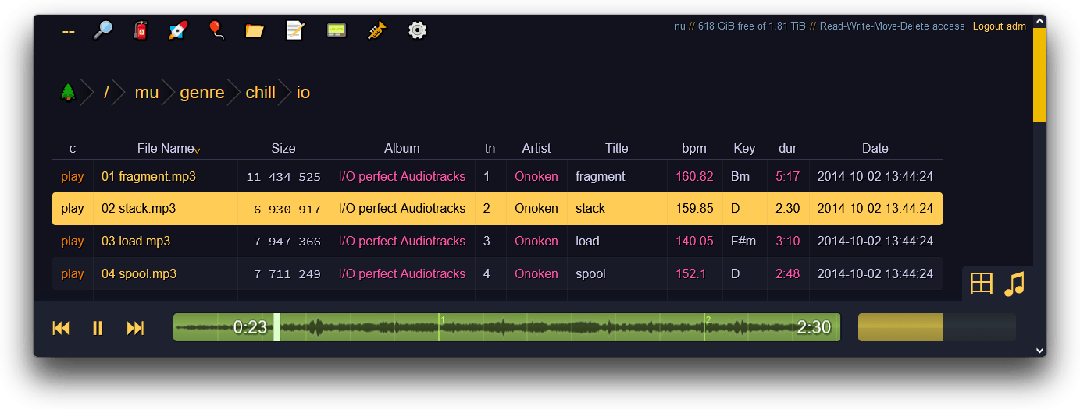
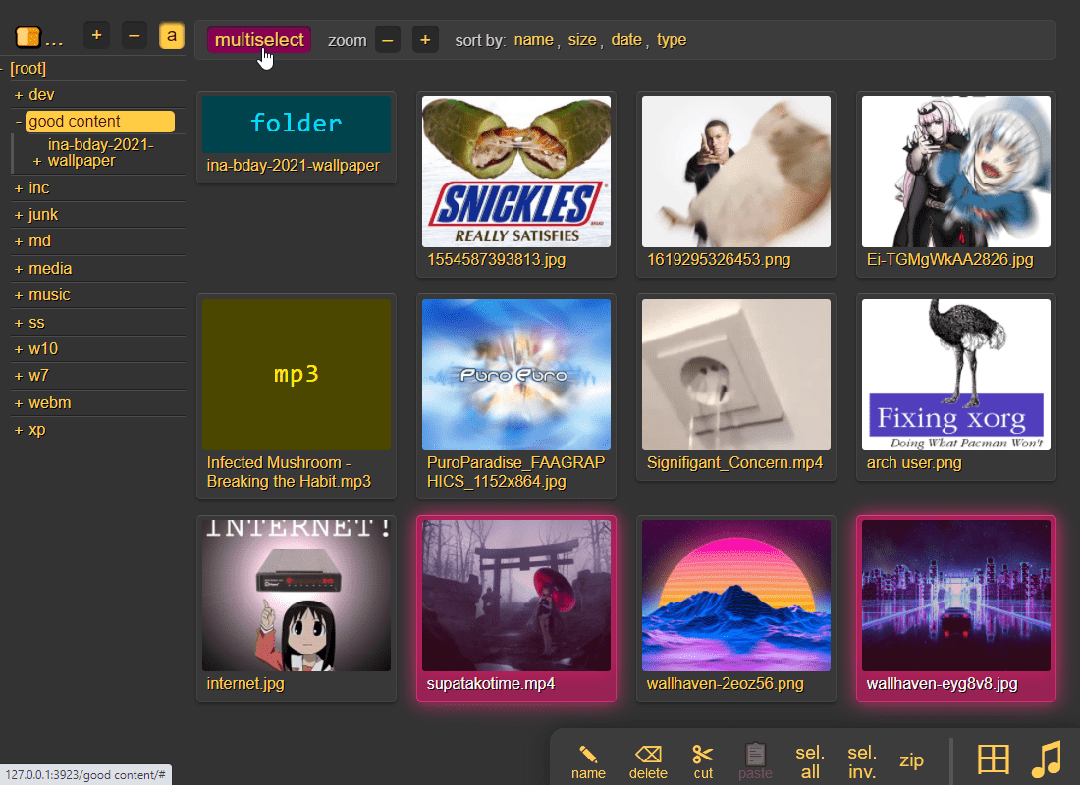
copyparty 是一款把几乎任何设备变成文件服务器的轻量工具,只需 Python 即可运行,依赖全部可选。它支持断点续传上传下载,并同时提供网页、WebDAV、SFTP、FTP、TFTP、SMB 等多种访问协议,适合想自建私有网盘、给 NAS 加前端或临时分享文件的用户。
核心亮点:
- 单文件启动,仅需 Python,依赖全部可选
- 支持断点续传的上传与下载,浏览器即可操作
- 同时提供网页、WebDAV、SFTP、FTP、TFTP、SMB 协议
- 内置缩略图、搜索、压缩包下载与临时分享链接
当前版本 v1.20.28(2026-11-24 发布),开源协议 MIT,GitHub 47,444 star。

核心信息
| 软件名称 | copyparty(9001/copyparty) |
| 当前版本 | v1.20.28 |
| 更新日期 | 2026-11-24 |
| 开源协议 | MIT |
| 软件分类 | 自托管服务 |
| 关键词 | copyparty、file-server、file-sharing、file-upload-server、ftp-server、nas-frontend |
本次更新内容
- 修复目录键相关安全漏洞,保障文件访问安全
- 解决视频处理兼容性问题,优化媒体文件预览体验
- 开发者暂停功能开发,专注修复严重漏洞与关键缺陷
查看官方英文更新日志(原文)
<img src="https://github.com/9001/copyparty/raw/hovudstraum/docs/logo.svg" width="250" align="right"/>

* read-only demo server at https://a.ocv.me/pub/demo/
* [docker image](https://github.com/9001/copyparty/tree/hovudstraum/scripts/docker) ╱ [similar software](https://github.com/9001/copyparty/blob/hovudstraum/docs/versus.md) ╱ [client testbed](https://cd.ocv.me/b/)

there is a [discord server](https://discord.gg/25J8CdTT6G) with an `@everyone` in case of future important updates, such as [vulnerabilities](https://github.com/9001/copyparty/security) (most recently 2026-11-24)

## 🩹 bugfixes

* GHSA-6442-xff5-p6c9 dirkeys (the `dk` volflag)
* workaround https://code.ffmpeg.org/FFmpeg/FFmpeg/issues/26292

## ☄️ facts

* already obvious, but here's the confirmation: I'm not able to spend time on copyparty at the moment, definitely until 2027-03, maybe longer. Fixing vulnerabilities and severe bugs in a timely manner is still target, but right now not much else
  * couldntve made a better dogwhistle if i tried

----

# 💾 what to download?
| download link | is it good? | description |
| -- | -- | -- |
| **[copyparty-sfx.py](https://github.com/9001/copyparty/releases/latest/download/copyparty-sfx.py)** | ✅ the best 👍 | runs anywhere! only needs python |
| [copyparty-en.py](https://github.com/9001/copyparty/releases/latest/download/copyparty-en.py) | ✅ also good | same but english-only, no i18n |
| [a docker image](https://github.com/9001/copyparty/blob/hovudstraum/scripts/docker/README.md) | it's ok | good if you prefer docker 🐋 |
| [copyparty.exe](https://github.com/9001/copyparty/releases/latest/download/copyparty.exe) |  ⚠️ [acceptable](https://github.com/9001/copyparty#copypartyexe) | for [win8](https://user-images.githubusercontent.com/241032/221445946-1e328e56-8c5b-44a9-8b9f-dee84d942535.png) or later; built-in thumbnailer |
| [u2c.exe](https://github.com/9001/copyparty/releases/download/v1.20.25/u2c.exe) | ⚠️ acceptable | [CLI uploader](https://github.com/9001/copyparty/blob/hovudstraum/bin/u2c.py) as a win7+ exe ((https://a.ocv.me/pub/demo/pics-vids/u2cli.webm)) |
| [copyparty.pyz](https://github.com/9001/copyparty/releases/latest/download/copyparty.pyz) | ⚠️ acceptable | similar to the regular sfx, [mostly worse](https://github.com/9001/copyparty#zipapp) |
| [copyparty-en.pyz](https://github.com/9001/copyparty/releases/latest/download/copyparty-en.pyz) | ⚠️ acceptable | english-only, no smb-server |
| [copyparty32.exe](https://github.com/9001/copyparty/releases/latest/download/copyparty32.exe) | ⛔️ [dangerous](https://github.com/9001/copyparty#copypartyexe) | for [win7](https://user-images.githubusercontent.com/241032/221445944-ae85d1f4-d351-4837-b130-82cab57d6cca.png) -- never expose to the internet! |
| [cpp-winpe64.exe](https://github.com/9001/copyparty/releases/download/v1.16.5/copyparty-winpe64.exe) | ⛔️ dangerous | runs on [64bit WinPE](https://user-images.githubusercontent.com/241032/205454984-e6b5
下载地址
以下为官方原包,本站不二次打包,点击直接下载:
copyparty-sfx.py(官方原包 | 1.2 MB)
✅ 上方 SHA256 与官方发布值一致,可自行核对。
快速上手
- 运行下载好的 copyparty-sfx.py 文件,它会自动启动本地文件服务器并显示访问地址
- 在浏览器中打开终端里显示的地址,进入 copyparty 网页界面浏览文件
- 把文件或文件夹拖入网页即可上传,支持断点续传和查看上传进度
- 按 g 键切换网格视图预览缩略图,选中文件后按 F2 可批量重命名
- 在网页中创建临时分享链接,把文件或文件夹分享给他人
提示:保持终端窗口开启,关闭后服务器会停止运行
讨论(0 条)