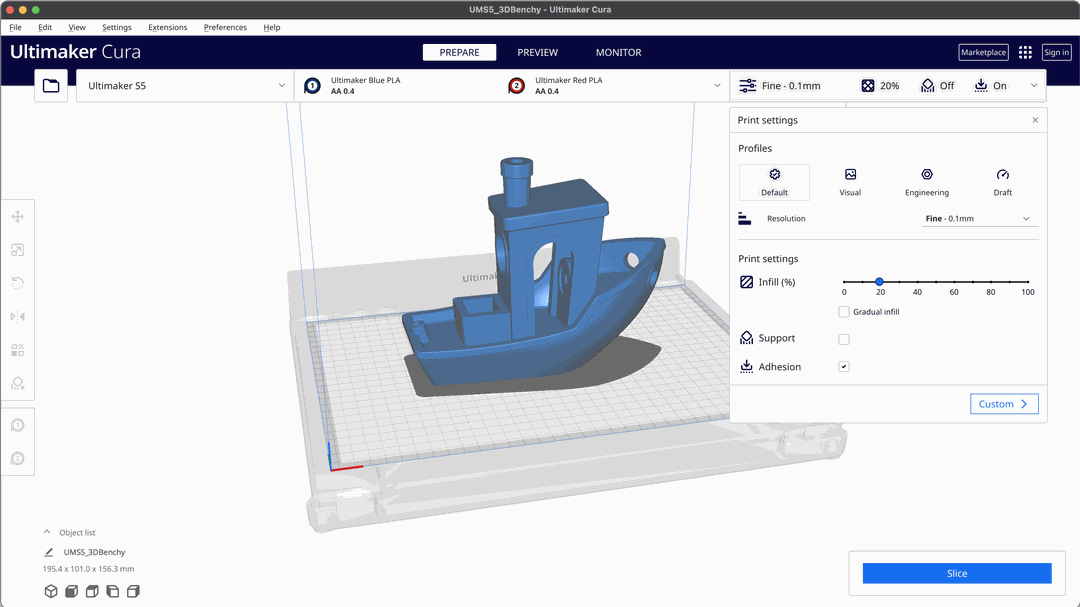
Cura 是 Ultimaker 开源的 3D 打印切片软件,把三维模型转成打印机可读的 G-code。它提供海量可调参数和社区维护的打印配置,界面基于 Qt 构建,跨平台可用。适合从入门到进阶的 3D 打印玩家,尤其是想精细控制打印质量、又不想被商业软件绑定的用户。
核心亮点:
- 把三维模型切片并生成打印机可读的 G-code
- 提供大量可调参数,满足精细打印控制需求
- 内置社区维护的机型与打印配置库
- 支持插件扩展,可自定义功能与工作流
当前版本 v5.14.0(2026-11-05 发布),开源协议 LGPL-3.0,GitHub 7,080 star。

核心信息
| 软件名称 | Cura(Ultimaker/Cura) |
| 当前版本 | v5.14.0 |
| 更新日期 | 2026-11-05 |
| 开源协议 | LGPL-3.0 |
| 软件分类 | Linux 桌面 |
| 关键词 | 3d-printing、cura、gcode、gui、pyqt6、python |
本次更新内容
- 新增绘制支撑功能,可手动涂抹区域强制或避免支撑,并支持一键选择曲面或绘制直线。
- 设置面板改为标签页布局,浏览和调整参数更直观方便。
- 图层预览用不同颜色区分悬垂和桥接区域,便于发现无支撑部位。
- 优化表皮打印策略,减少小面积屋顶和底面的碎片化与空驶。
- 新增Windows ARM版本,并改进启动速度与内存占用。
查看官方英文更新日志(原文)
<H2>New features and improvements:</H2> **Paint-on-Support** You can now define custom support areas by manually by painting regions to enforce, avoid, or auto-generate supports using an interactive overhang angle slider. <img width="1280" height="720" alt="0" src="https://github.com/user-attachments/assets/d6b78ce1-694d-429b-ac66-3377efbde150" /> You can also **Paint Surface a surface** by selecting an entire contiguous faces or curved features in a single click to apply paint on support or **draw straight lines** for paint on support using Shift and Shift + Ctrl shortcuts. <img width="1280" height="720" alt="1" src="https://github.com/user-attachments/assets/ee089596-7bd1-44df-b904-8dbc2ea99122" /> You can now navigate the settings panel more easily with a **tabbed organization layout** by default, based on the Tabbed Settings plugin by @fieldofview and contributed by @HellAholic <img width="1280" height="720" alt="2" src="https://github.com/user-attachments/assets/ade2d9ef-1ec7-4337-9d99-c1951bf37228" /> This version of Cura comes with a build for Windows on ARM, to help users with laptops who have a processor based on ARM architecture. If you have a Mac with ARM, those builds have been available for a while now. <img width="1280" height="720" alt="671227527-2d7eecd0-2b5c-4583-8132-a9b2f8b2de26" src="https://github.com/user-attachments/assets/1b63ec0e-0c64-4a91-a024-d4508605ae69" /> - Easily spot unsupported areas with distinct line-type colors for overhangs and bridges in the layer preview window. - Updated the skin strategy so that small roof and floor areas are printed in a unified way, reducing surface fragmentation and unnecessary travel moves. - Enable support reminder for models with severe overhangs without supports enabled - Pop-up dialogs are now created dynamically, improving boot times and reducing memory usage - Start and end G-code template formulas, along with end-of-print variable replacements (like total print time), are now processed directly within CuraEngine, contributed by @wawanbreton - Start and end G-code templates now support substring matching and list syntax (e.g., material_type in ['TPU', 'TPU 95A']). - Generated G-code files now list active CuraEngine plugins in their metadata headers. - Upgraded our underlying UI framework from Qt 6.6 to Qt 6.10, resulting in a number of smaller changes like a new top bar for macOS - This version of Cura comes with a build for Windows on ARM, to help users with laptops who have a processor based on ARM architecture. If you have a Mac with ARM, those builds have been available for a while now. - Fix symbol encoding across all post-processing scripts, contributed by @GregValiant, resolves https://github.com/Ultimaker/Cura/issues/21624 - Navigate the settings panel more easily with a tabbed organization layout, based on the Tabbed Settings plugin by @fieldofview and contributed by @HellAholic - Added an option to the right-click menu w
下载地址
以下为官方原包,本站不二次打包,点击直接下载:
UltiMaker-Cura-5.14.0-linux-X64.AppImage(官方原包 | 353.8 MB)
✅ 上方 SHA256 与官方发布值一致,可自行核对。
快速上手
- 首次启动前,先给下载好的 AppImage 文件添加可执行权限,再双击运行它。
- 启动后按向导选择你的打印机型号,或从社区维护的打印配置中挑选匹配项。
- 导入或拖入待打印的 3D 模型文件,在预览界面查看切片效果。
- 按需调整打印参数,确认无误后导出切片文件交给打印机使用。
提示:AppImage 需可执行权限才能运行,移动文件后可能要重新设置。
讨论(0 条)