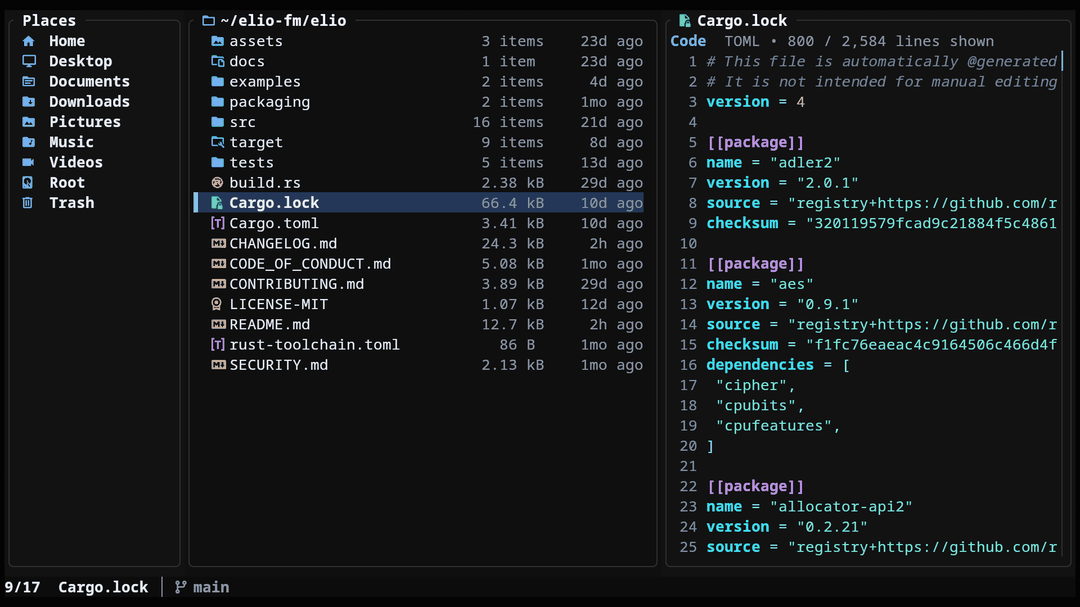
Elio 是一款开箱即用的终端文件管理器,采用三栏布局,把常用位置、文件列表和预览并排展示,键盘鼠标都能顺手操作。它自带模糊查找、压缩包管理、重复文件清理和丰富预览,还支持在终端里直接看图。适合习惯命令行、又想要图形化浏览体验的 Linux 和 FreeBSD 用户。
核心亮点:
- 三栏布局同屏展示位置、文件与预览
- 键盘鼠标双操作,网格列表视图随意切换
- 内置模糊查找与 zoxide 历史目录跳转
- 支持压缩包解压创建和重复文件清理
当前版本 v1.15.0(2026-11-02 发布),开源协议 MIT,GitHub 914 star。


核心信息
| 软件名称 | Elio(elio-fm/elio) |
| 当前版本 | v1.15.0 |
| 更新日期 | 2026-11-02 |
| 开源协议 | MIT |
| 软件分类 | Linux 桌面 |
| 关键词 | cli、cross-platform、file-browser、file-manager、file-preview、filesystem |
本次更新内容
- 新增跨平台剪贴板支持,文件可在本软件与其他桌面应用间复制粘贴,并支持从系统剪贴板粘贴文件与文本。
- 新增回收站支持与项目详情浮层,删除文件更安全,查看文件信息更便捷。
- 复制快捷键改为复制文件到系统剪贴板,取消与清除选择改为可配置操作,旧配置仍兼容。
- 滚动条支持拖动并统一弹窗样式,聚焦条目可反向高亮,界面操作更顺手。
- 修复应用记忆文件夹被删除后文件选择窗口异常关闭,以及透明指示色显示错误的问题。
查看官方英文更新日志(原文)
### Added

- Added native cross-platform item clipboard support through the Copy to Clipboard overlay (i → Item), allowing files and folders to be copied between elio and other desktop applications.
- Added item pasting from the system clipboard via the terminal's paste shortcut and the configurable `paste_item` action (`Ctrl+v` by default).
- Added clipboard text pasting to text-entry overlays via `paste_item`.
- Added Trash support on Windows through the system drive's Recycle Bin. ([#355])
- Added an item details overlay, opened with `i` or `Alt+Enter` by default.
- Added `[focused_entry] reversed` to render focused file-browser entries with a reversed focus surface based on their effective name color. ([#328])

### Changed

- Changed `Ctrl+c` from cancel/clear selection to the configurable `copy_item` action, which copies items to the system clipboard.
- Made clear selection and cancel configurable through the `clear_selection` and `cancel` actions, both bound to Esc by default.
- Renamed the `copy_path` keybinding to `copy_to_clipboard`; `copy_path` remains accepted for existing configs.
- Made Trash, Delete, and Restore popup scrollbars match the style of the rest of the scrollbars.
- Made scrollbars draggable.

### Fixed

- Fixed the FileChooser portal closing when an app's remembered folder has been deleted. ([#375])
- Fixed transparent file-browser indicator colors rendering as the terminal default color; `none` now hides the indicator while preserving the focused entry surface.
下载地址
以下为官方原包,本站不二次打包;多个文件为不同包型,按需选择其中一个下载即可:
elio-1.15.0-x86_64-unknown-linux-gnu.tar.gz(官方原包 | 7.9 MB)
elio_amd64.deb(官方原包 | 6.0 MB)
✅ 上方 SHA256 与官方发布值一致,可自行核对。
快速上手
- 在终端中运行 elio 命令启动程序,默认打开当前工作目录;也可在命令后跟一个文件或目录路径直接打开它。
- 用方向键或鼠标在左侧 Places、中间 Files、右侧 Preview 三栏间浏览,按 v 在网格视图与列表视图间切换。
- 按 Ctrl++ 或 Ctrl+- 缩放网格视图,用模糊查找快速定位文件夹和文件,用 Go-to 与 Open With 执行常用操作。
- 对文件执行移入回收站、恢复或永久删除,并用重复文件查找功能管理内容相同的文件。
- 在支持内联图片的终端中直接查看图片预览,并可解压或创建常见归档格式。
提示:建议在终端使用 Nerd Font,图标显示更正常。
讨论(0 条)