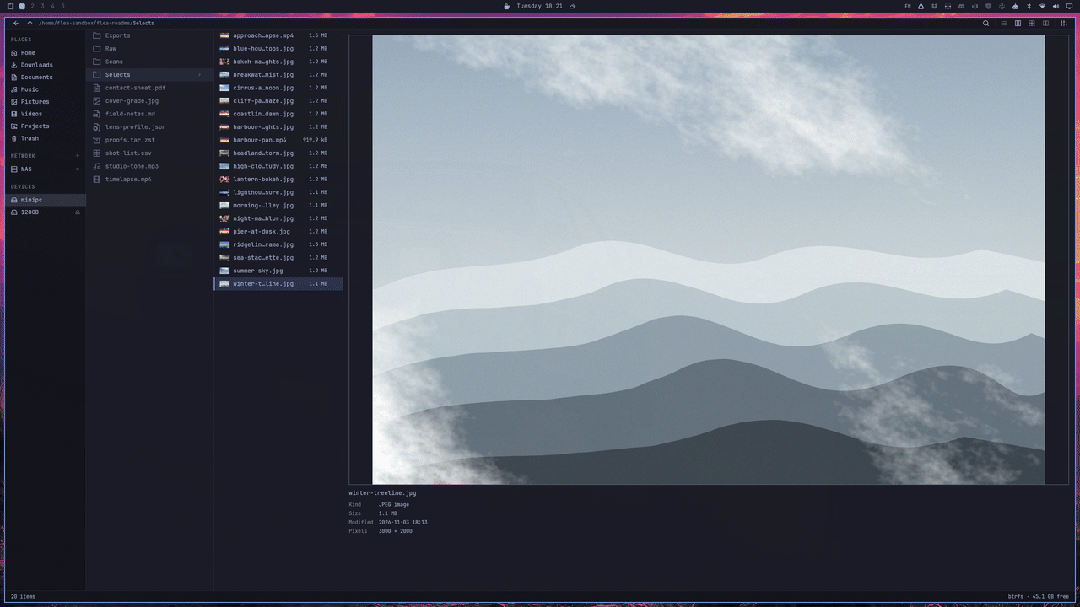
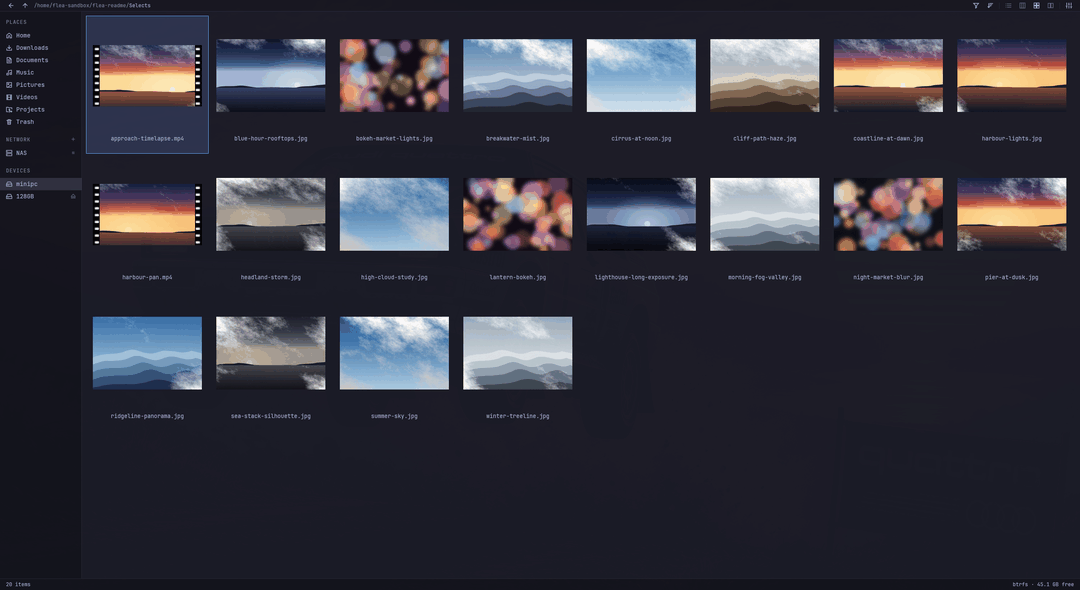
Flea 是专为 Omarchy 打造的极速开源图形文件管理器,基于 Rust 与 QML 构建,运行在 Wayland 桌面。它提供列表、网格、分栏等多种浏览方式,支持快速预览、批量重命名、标签、即时搜索和网络共享,还能把镜像写入 U 盘。适合追求效率、习惯键盘操作、使用 Hyprland 或 Omarchy 桌面的 Linux 用户。
核心亮点:
- 列表、网格、分栏、双窗格四种视图,可按文件夹记忆
- 空格键快速预览图片、PDF、媒体、压缩包和三维模型
- 复制移动重命名压缩解压均支持撤销,可批量改名
- 标签按主题配色,输入即搜并实时排序结果
当前版本 v0.4.2(2026-11-11 发布),开源协议 MIT,GitHub 1,280 star。

核心信息
| 软件名称 | Flea(thisisgm/flea) |
| 当前版本 | v0.4.2 |
| 更新日期 | 2026-11-11 |
| 开源协议 | MIT |
| 软件分类 | Linux 桌面 |
| 关键词 | file-manager、hyprland、linux、omarchy、qml、quickshell |
本次更新内容
- 新版本可在当前文件夹直接发起新搜索,并让超大文件夹正常加载,不再卡住或失败。
- 文件粘贴改为排队执行,每个任务独立显示进度、取消、回执与撤销,操作更清晰可控。
- 跨盘移动与写入可移动存储时先校验数据,失败则保留源文件,避免数据丢失。
- 回收站支持更多文件系统挂载,侧栏清空时保留当前文件夹,减少误操作。
- 多个压缩包可分别解压,压缩、转换等任务在网盘挂载上不再误报失败。
- 预览与播放体验改进:无扩展名文件可识别为文本,视频可点击暂停,旋转视频正常播放。
查看官方英文更新日志(原文)
# Flea 0.4.2

- Start a new search in the current folder (#451, @muellan).
- Open large folders at Tight row density instead of failing to load (#454, @austrasien).
- Queue a second file paste behind a running transfer, with each job keeping its own progress, Cancel, receipt and Undo (#443, #444, @AksharP5).
- Act on the selected file for copy, move, rename, Trash and delete when its name is not valid UTF-8, even beside a file with the same displayed name.
- Keep a cross-drive move's source intact if the new copy cannot be verified or a read-only parent prevents removal.
- Confirm the written data before reporting completion of copies to removable drives, including encrypted USB drives, SD cards and Thunderbolt storage.
- Support Trash on btrfs subvolume and bind mounts that GIO refuses, including listing, restore and Empty Trash (#436, @AkitaOnRails).
- Keep the current folder behind the confirmation card when emptying Trash from the sidebar (#419, @k-kostin).
- Offer Extract for several selected archives, with a separate job for each (#397, @MISTERNEGATIVE21).
- Publish complete outputs from Extract, Compress, Convert and Combine on rclone and WebDAV mounts without reporting a successful copy as failed (#370, @vitonique).
- Preview files with no known extension as text or code when their contents identify them, including executable scripts with a shebang (#377, @mtp13; #393, @filip-spaldon).
- Pause a playing video with a click and resume it with another click in Quick Look and the preview pane (#424, @timothy-ecc).
- Play videos with rotation metadata in the right orientation without crashing the media helper on libmpv 0.41 (#450, @kevinpardo).
- Copy the folder path with a copy button beside the address bar, and open the path editor with a single click on empty address space (#327, @dpan).
- Toggle Dual with F3 and return to the previous view, and remember Dual across relaunch.
- Keep the same remembered sort in both Dual panes when a folder is open in both (#179, @zm14).
- Offer Show tabs as icons in Settings > View, off by default (#308, @jlahijani).
- Use Settings > View to hide Omi in empty folders or stop the empty-folder messages rotating.
- Apply Highlight on hover to sidebar, breadcrumb and share-row highlights too, and keep it off by default (#230, @alextakitani).
- Keep tag colours distinct from one another in listings and menus on the bundled themes.
- Show Columns thumbnails on every visible row at the chosen Row density.
- Mark only the files being shown when dragging a selection band over a filtered listing.
- Move by the rows being drawn with Up and Down in a filtered Grid.
- Keep marked files, the cursor and the scroll position in Search when files in its scope change.
- Load Search results even when row density, text size or window height changes while the search is running.
- Keep Filter and Sort disabled while Search is open, including while its query is being typed.
- Open the highlighted file or enter the highlighted fold
下载地址
以下为官方原包,本站不二次打包;多个文件为不同包型,按需选择其中一个下载即可:
flea-v0.4.2-linux-x86_64.tar.gz(官方原包 | 26.9 MB)
flea-v0.4.2.tar.gz(官方原包 | 45.4 MB)
✅ 上方 SHA256 与官方发布值一致,可自行核对。
快速上手
- 在终端运行 omarchy pkg add flea 完成安装,随后执行 flea –default 将 Flea 设为默认文件管理器与文件选择器。
- 首次启动 Flea 后,用侧边栏浏览磁盘与已挂载设备,按 Ctrl+4 切换到双窗格视图并排查看两个文件夹。
- 选中文件按空格打开快速预览,可翻页查看 PDF、播放媒体、缩放图片或查看压缩包内容。
- 用菜单对文件执行复制、移动、重命名、压缩、解压或移入回收站,按 z 可撤销恢复。
- 按 T 再按数字键给文件打标签,在搜索框输入 tag:red 即可按标签筛选文件。
提示:在会话终端执行 flea –default,文件对话框会立即切换。
讨论(0 条)