GSYVideoPlayer 是安卓平台的多功能视频播放器框架,支持 IJKPlayer、Media3、MediaPlayer 等多种内核自由切换,内置弹幕、投屏、滤镜、小窗播放等能力,兼容 HLS、DASH、RTMP 等协议。适合需要快速搭建视频播放功能的安卓开发者,尤其适合做短视频、直播回放或带弹幕的播放场景。
核心亮点:
- 多内核自由切换,兼容主流播放引擎
- 支持边下边播与多种流媒体协议
- 内置弹幕、投屏、小窗和广告功能
- 提供滤镜、截图、倍速与列表连播
当前版本 v14.1.0(2026-11-11 发布),开源协议 Apache-2.0,GitHub 21,532 star。


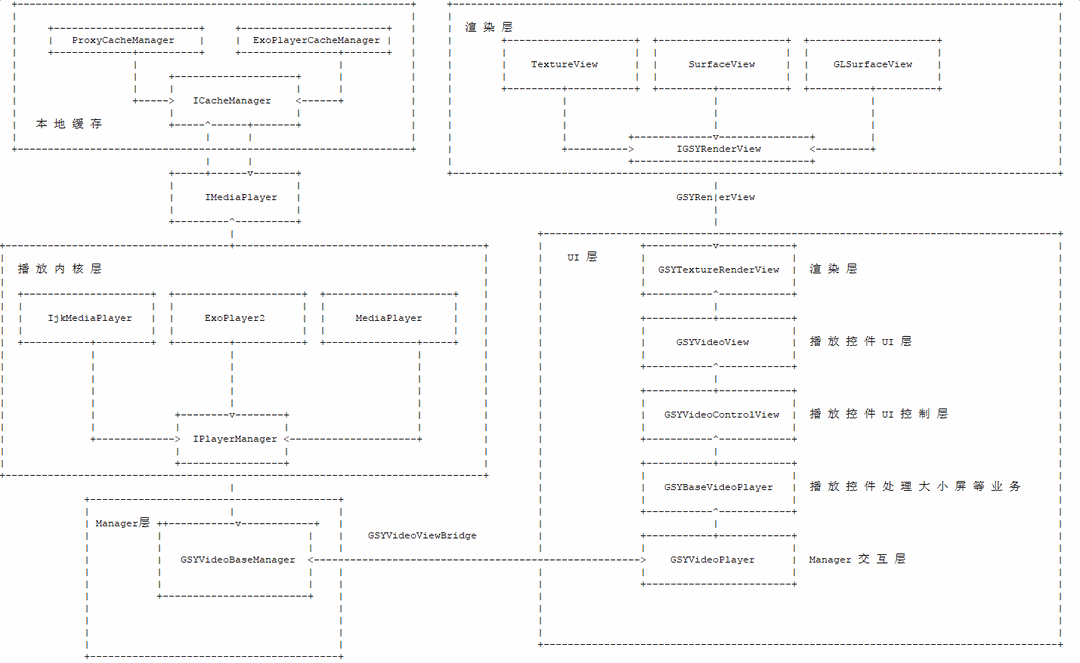
核心信息
| 软件名称 | GSYVideoPlayer(CarGuo/GSYVideoPlayer) |
| 当前版本 | v14.1.0 |
| 更新日期 | 2026-11-11 |
| 开源协议 | Apache-2.0 |
| 软件分类 | Android 开源 APK |
| 关键词 | 16k、android、exoplayer、ffmpeg、gsy、ijkplayer |
本次更新内容
- 新版本修复了暂停与恢复时缓冲提示覆盖用户操作的问题,准备阶段暂停和预加载行为保持不变。
- Compose 集成下倍速等播放状态在初始化后立即同步,界面显示更及时准确。
- 原生解码库成套更新,改善部分视频画面裁剪与尺寸显示异常,并减少解码卡顿。
- 新增可选的画面裁剪重建机制,默认关闭,仅对特定编码格式生效,不影响其他场景。
查看官方英文更新日志(原文)
## 中文

- **Compose #4267**:倍速快照与 Host 配置同源,新 `setUp` 和挂载后立即同步 `snapshot` / `stateFlow`。
- **暂停恢复 #4268**:在 Java 公共核心修复缓冲通知覆盖暂停/恢复意图的问题,保留准备阶段暂停、预加载和 `seek=false` 行为。
- **IJK 三 ABI 成套更新**:ARM64 / ARMv7 / x86_64 的 FFmpeg、player、SDL 库与独立 ABI 模块逐字节匹配,包含以下修复:
  - MediaCodec 输出格式事件中的 H.264 crop-only、单轴可见尺寸传播。
  - 可选 H.264 crop 重建:受限 SPS/PPS+IDR 转换下排空旧解码器代、重建并重放一次。
  - 异步 MediaCodec EOS 等待输入槽位时允许输出继续推进,避免阻塞排空;自动生效,crop 选项关闭时也适用于 AVC/HEVC。

`mediacodec-h264-crop-workaround` **默认 0 关闭**,仅适用于受支持 H.264 输入的异步 MediaCodec 路径,不适用于 HEVC、软件解码或同步输入。FFmpeg n5.1.10 / OpenSSL 3.5.9 基线保持不变。

发布前本地验证通过:Java/cast/Compose Debug 与 Release 共 **52 次单测执行**、**48 项会话回归**、Demo Debug/Release 构建、Release APK 16 KiB 原生库打包对齐,以及 15 模块双渠道坐标本地发布和投屏依赖隔离检查。**本轮未对当前最终原生库重新进行真机播放验证。**

## English

- **Compose #4267**: read speed snapshots from Host configuration and publish `snapshot` / `stateFlow` immediately after setup and attachment.
- **Pause/resume #4268**: repair buffering notifications overwriting pause/resume intent in the shared Java core, preserving preparation-time pause, preloading and `seek=false`.
- **Matched IJK three-ABI update**: ARM64 / ARMv7 / x86_64 FFmpeg/player/SDL tuples match their standalone ABI modules byte-for-byte and include:
  - H.264 crop-only and single-axis visible-size propagation on MediaCodec output-format events.
  - Opt-in H.264 crop rebuild: drain the old decoder generation, recreate and replay once for supported SPS/PPS+IDR transitions.
  - Asynchronous MediaCodec EOS progress: allow output while waiting for an input slot instead of blocking drain. This applies automatically, including AVC/HEVC with the crop option disabled.

`mediacodec-h264-crop-workaround` is **disabled by default (0)** and limited to supported H.264 on asynchronous MediaCodec input; HEVC, software decoding and synchronous input are excluded. The FFmpeg n5.1.10 / OpenSSL 3.5.9 baseline is unchanged.

Local pre-release checks passed: **52 Debug/Release unit-test executions**, **48 session regressions**, Debug/Release demo builds, Release APK 16 KiB native-library packaging alignment, and local publication of all 15 modules under both channel coordinates with cast dependency isolation. **Device playback was not revalidated on the final native-library bytes in this release round.**

## Maven Central

```groovy
implementation 'io.github.carguo:gsyvideoplayer:14.1.0'
// Optional Compose integration / 按需添加 Compose 集成
implementation 'io.github.carguo:gsyvideoplayer-compose:14.1.0'
```

[中文完整更新说明](https://github.com/CarGuo/GSYVideoPlayer/blob/v14.1.0/doc/UPDATE_VERSION.md#v1410-2026-11-11) · [Full English changelog](https://github.com/CarGuo/GSYVideoPlayer/blob/v14.1.0/doc/UPDATE_VERSION_EN.md#v1410-2026-11-11) · [原生库选项与范围 / Native-library options and scope](https://github.com/CarGuo/GSYVideoPlayer/blob/v14.1.0/doc/IJK_THREE_ABI_SO_UPDATE.md)

**Full comparison:** [v14.0.0...v14.1.0](https://github.com/CarGuo/GSYVideoPlayer/compare/v14.0.0...v14.1.0)
下载地址
以下为官方原包,本站不二次打包,点击直接下载:
app-release.apk(Android 安装包 | 85.1 MB)
✅ 上方 SHA256 与官方发布值一致,可自行核对。
快速上手
- 在安卓设备上运行下载好的 app-release.apk 完成安装,首次启动后进入示例列表页。
- 在示例列表中选择一个视频条目,进入播放页即可开始播放,体验列表播放与连续播放。
- 播放页点击画面呼出控制层,切换内核(如 IJKPlayer、Media3、MediaPlayer)与显示比例。
- 在播放页使用截图、视频转 GIF、字幕叠加、倍速与旋转等控制项体验对应功能。
- 返回列表尝试小窗播放与多窗口同时播放,观察前后台切换不黑屏效果。
提示:示例页可逐项体验内核切换与滤镜,按需选用。
讨论(0 条)