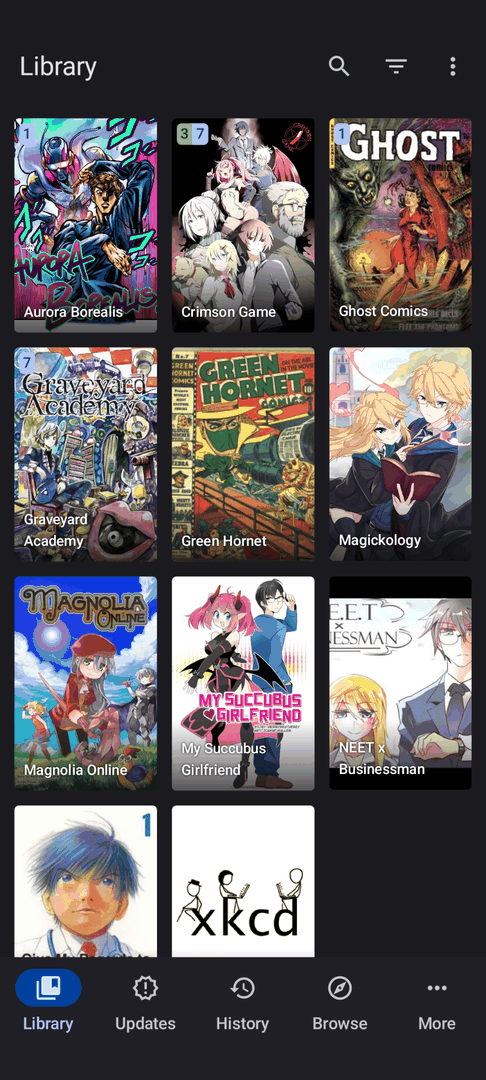
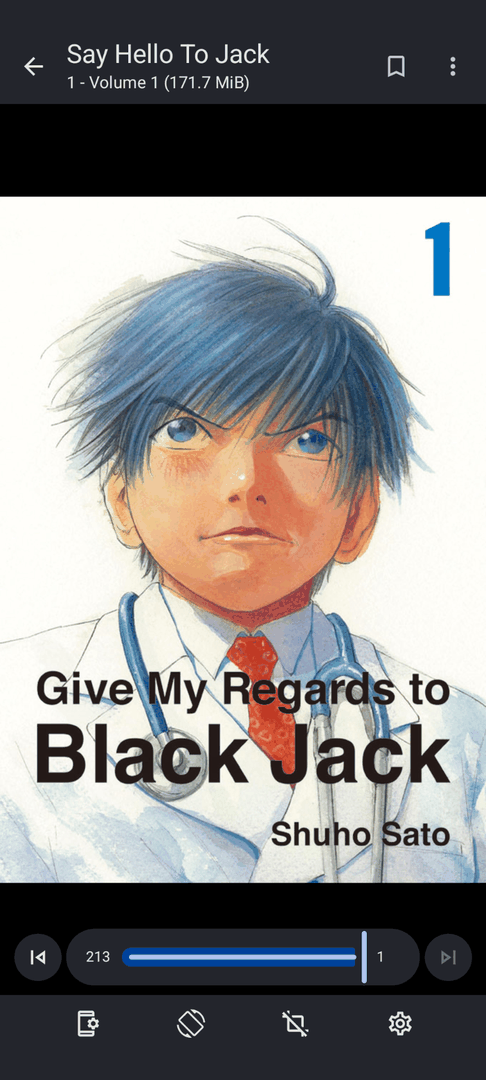
Mihon 是知名漫画阅读器 Tachiyomi 的社区续作,开源免费、无广告,专注在 Android 上发现和阅读漫画、条漫与网络漫画。它本身不托管任何内容,靠用户自行添加来源,阅读器高度可定制,支持追踪同步、分类管理和离线备份,适合喜欢自己掌控漫画库、追求纯净阅读体验的安卓用户。
核心亮点:
- 可配置阅读器,多种翻页模式与阅读方向
- 支持多家漫画追踪站点,自动同步进度
- 分类整理书架,可定时检查新章节
- 本地备份与离线阅读,支持云端存放
当前版本 v0.21.3(2026-10-25 发布),开源协议 Apache-2.0,GitHub 24,954 star。

核心信息
| 软件名称 | Mihon(mihonapp/mihon) |
| 当前版本 | v0.21.3 |
| 更新日期 | 2026-10-25 |
| 开源协议 | Apache-2.0 |
| 软件分类 | Android 开源 APK |
| 关键词 | android、kotlin、manga、manga-downloader、manga-reader、mangadownloader |
本次更新内容
- 新版本可设置时间显示为十二或二十四小时制,也能跟随系统或语言习惯;同时默认隐藏日志中的登录凭证,方便安全分享。
- 备份的创建与恢复更快更省内存,大书库不再因内存不足失败;书库更新会优先处理条目最多的来源。
- 修复了网页视图崩溃、请求头泄露到其他站点、下载不显示、封面重载等多项问题,并解决了若干崩溃与登录失败。
- 下载设置中的长图分割选项被移除,改由阅读器直接处理;下载队列界面已重建。
- 此前版本还修复了阅读进度显示异常、旧数据库升级卡住、返回手势崩溃及部分来源筛选崩溃等问题。
查看官方英文更新日志(原文)
Consider supporting the development on [Patreon](https://www.patreon.com/mihon/membership) or [OpenCollective](https://opencollective.com/mihon/contribute) to keep Mihon improving!

Check out the [past release notes](https://github.com/mihonapp/mihon/releases) if you're upgrading from an earlier version.

<!-->

> [!NOTE]
>
> ### This is the last major version to support Tachiyomi's backup format (.tachibk) and extensions made for it.
>
> After this version, Mihon won't be able to restore backups in Tachiyomi's backup format (.tachibk). The next version will also drop compatibility with extensions made for Tachiyomi (1.4 extensions). This is being done to reduce maintenance burden and simplify things for upcoming features.
>
> From the next update, the only way to restore a .tachibk backup will be to restore it on this version and then update to the latest version.

### ✨ New Features
- Added a Time Format setting to show times in 12 or 24 hour format, or to follow your language or system (Settings → Appearance) (@MajorTanya)
- Added a "Redact sensitive headers" setting (on by default) that hides login tokens from logs, so they are safe to share (Settings → Advanced) (@MajorTanya)

### ⚙️ Changes
- Library updates now start with the sources that have the most entries in your library (@AntsyLich)

### 🚀 Improvements
- Creating and restoring backups is faster and uses much less memory, so big libraries no longer run out of memory (@NGB-Was-Taken, @AntsyLich)

### 🧩 Fixes
- Fixed WebView crashing for sources that set an Origin header (@AntsyLich)
- Fixed WebView sending a source's headers to other sites (@AntsyLich)
- Fixed downloads not showing for entries of a source that shares its name with another source (@AntsyLich)
- Fixed covers reloading when removing an entry from your library (@AntsyLich)
- Fixed the More tab icon pausing and then bouncing back when leaving the tab (@AntsyLich)
- Fixed the Shizuku extension installer not being available with Sui (@AntsyLich)
- Fixed the extension update count being hidden when tab names are long, like in German (@Sahil-669, @AntsyLich)

### 🧹 Removals
- Removed the "Split tall images" download setting with it being handled in the reader directly (@AntsyLich)

### 🔧 Under the hood
- The download queue screen was rebuilt (@AntsyLich)
- Updated OkHttp, which now blocks the compromised eMudhra certificates on devices without Google Play Services (@renovate)

<!-->

## And in [v0.21.2](https://github.com/mihonapp/mihon/releases/tag/v0.21.2)

### 🧩 Fixes
- Fixed Comick showing reading progress with long decimal numbers (@MajorTanya)
- Fixed updating from v0.20.x failing on some older databases, which left the app on the updating screen or crashing on launch (@AntsyLich)
- Fixed a crash when using the back gesture while the reader or a dialog was closing (@AntsyLich)
- Fixed Kitsu login failing with "Failed to bypass Cloudflare" (@AntsyLich)
- Fixed the tracker st
下载地址
以下为官方原包,本站不二次打包;多个文件为不同包型,按需选择其中一个下载即可:
mihon-arm64-v8a-v0.21.3.apk(Android 安装包 | 26.5 MB)
mihon-armeabi-v7a-v0.21.3.apk(Android 安装包 | 23.5 MB)
mihon-v0.21.3-foss.apk(Android 安装包 | 64.2 MB)
mihon-v0.21.3.apk(Android 安装包 | 65.0 MB)
mihon-x86-v0.21.3.apk(Android 安装包 | 27.9 MB)
mihon-x86_64-v0.21.3.apk(Android 安装包 | 28.9 MB)
✅ 上方 SHA256 与官方发布值一致,可自行核对。
快速上手
- 在 Android 设备上运行下载好的安装包完成安装,若系统提示未知来源权限,按提示允许后继续安装。
- 首次启动后进入书架界面,可先浏览界面熟悉底部导航与阅读器入口。
- 在书架中通过分类功能整理内容,创建分类并把条目归入其中便于管理。
- 打开阅读器设置,按需调整阅读方向、查看器类型等阅读选项。
- 在设置中开启书库更新计划,并创建本地备份以便离线阅读或保存到云服务。
提示:安装包按设备架构选择,不确定时选通用版本即可。
讨论(0 条)