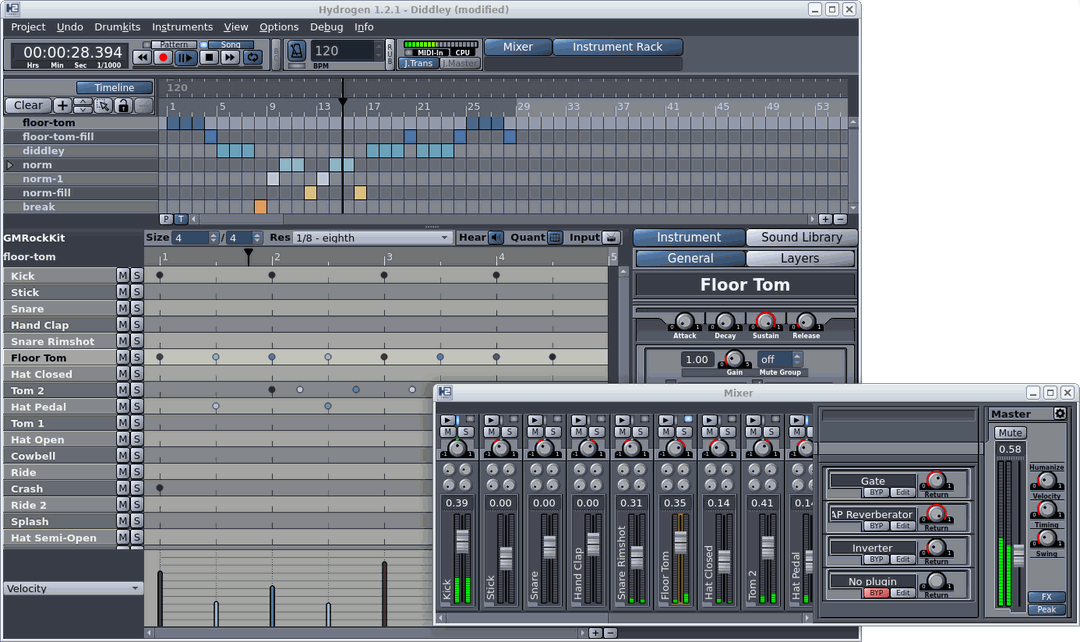
Hydrogen 是一款跨平台开源鼓机,既能按模式编程节奏,也能当鼓合成器用。它支持 MIDI、可加载大量鼓组,并对音色与音符属性做细致调节,还带高质量变速变调。适合在家练习、录音室编曲或现场演出需要稳定节奏引擎的音乐人。
核心亮点:
- 模式化鼓音序编程,兼顾鼓合成器角色
- MIDI 支持完善,可用 MIDI 或 OSC 自动化控制
- 内置丰富鼓组,音色与音符属性可深度调节
- 高质量时间伸缩与变调,适配练习与现场演出
当前版本 v1.2.7(2026-10-02 发布),开源协议 GPL-2.0,GitHub 1,354 star。

核心信息
| 软件名称 | Hydrogen(hydrogen-music/hydrogen) |
| 当前版本 | v1.2.7 |
| 更新日期 | 2026-10-02 |
| 开源协议 | GPL-2.0 |
| 软件分类 | Linux 桌面 |
| 关键词 | audio、drum-machine、jack、midi、music、qt |
本次更新内容
- 新版本修复了若干问题,并更新了翻译,同时为即将到来的大版本升级做好了兼容准备。
- 新增对旧版本歌曲和鼓组的支持,并添加了命令行工具的手册页,方便用户查阅。
- 当时间线激活或速度同步时,速度修改操作会被忽略,避免冲突和弹窗干扰。
- 修复了偏好设置保存、虚拟键盘遮挡、模式加载删除等问题,并提升了字体和音频性能的稳定性。
查看官方英文更新日志(原文)
This patch release contains minor bug fixes, updated translations, and improved forward compatibility for the upcoming 2.0 release.

### Added

- Support for songs and drumkits created with version `0.9.3` (#2193).
- Linux man pages for the `h2cli` and `h2player` applications have been added.
- Forward compatibility to version 2.0:
  - `hydrogen.conf` regarding MIDI input channel values.
  - `.h2pattern`, in which the `<pitch>` and `<category>` node will be dropped     and `<tags>` introduced.
  - `.h2song`, in which the playback track will be stored as a full-blown     instrument and the `<tags>` node introduced.
  - drumkits, in the `<tags>` node will be introduced.
- Swedish translation updated by @yeager.

### Changed

- When timeline is activated or tempo is synced to an external application,   tempo changes via keyboard shortcuts, MIDI, or OSC commands as well as   Beat Counter and Tap Tempo are now discarded.
- Big update of the `hydrogen` man page.
- Instead of using the raw font family names of the config file, they are   validated first and might trigger a fallback to a safer font. This was done to   prevent crashes of `libfontconfig` on Linux (#2343).
- Default font was changed to "Sans Serif" (#2343).

### Fixed

- OSC endpoint `/Hydrogen/SAVE_PREFERENCES` does now actually save the   preferences (instead of the song).
- Keyboard events for settings values on rotaries and faders are not shadowed by   the virtual keyboard anymore.
- Using bpm, beat counter, and tap tempo MIDI actions or OSC commands while   timeline is activate does no longer result in countless popups.
- Pattern loading and deleting via the Sound Library has been fixed.
- Online drumkit download from SourceForge when compiled with Qt6 (none of our   release artifacts).
- Segfault on Port-MIDI host error by @rrrapha.
- Fixed linker error on OpenBSD by @rrrapha.
- Fixed performance issue when using JACK audio with rubberband.
- Parameter loss in the MIDI table within the preferences (#2328).
- Fixed XDG app ID by @City-busz.
- Rubberband support compiled into Hydrogen is no longer deactivated in case the   rubberband CLI is not installed on the system.
下载地址
以下为官方原包,本站不二次打包,点击直接下载:
Hydrogen-1.2.7-x86_64.AppImage(官方原包 | 82.0 MB)
✅ 上方 SHA256 与官方发布值一致,可自行核对。
快速上手
- 运行下载好的安装包,按向导完成安装并启动 Hydrogen。
- 首次启动后进入主窗口,在鼓组列表中选择一个鼓组开始使用。
- 在模式编辑区点击网格添加音符,编排节奏型。
- 按播放键试听节奏,可调整速度与音量。
- 需要更多帮助时,打开手册查阅详细说明。
提示:先用内置鼓组练习编排,熟悉后再导入自定义鼓组。
讨论(0 条)