LCU 把 Codex 的计算机操作能力从 Codex 应用里拆出来,让任意 Agent 框架都能调用,无需 Codex 认证,但需本地装好官方 ChatGPT 桌面应用提供运行时。它支持桌面应用读写点击、Chrome 标签控制,并适配多种 Agent 工具,适合想让 Agent 直接操作 Linux 桌面的开发者。
核心亮点:
- 读取窗口、点击输入并截图操作桌面应用
- 通过官方扩展读取控制 Chrome 标签页
- 适配多种 Agent 框架与命令行工具
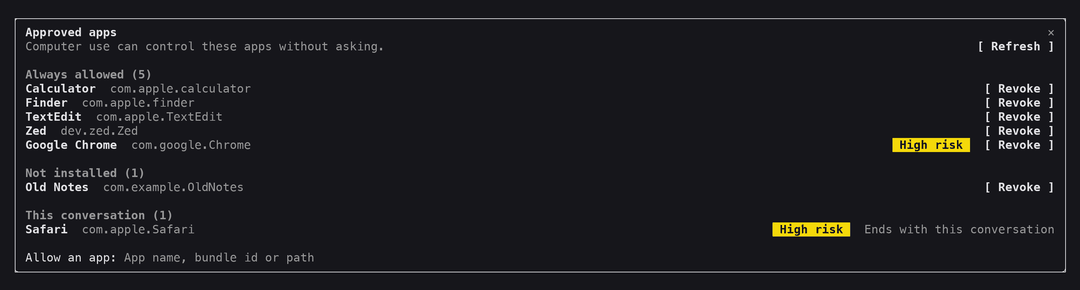
- 原生审批面板管理应用授权与撤销
当前版本 v0.15.0(2026-11-21 发布),开源协议 MIT,GitHub 2,451 star。

核心信息
| 软件名称 | Lcu(amontlabs/lcu) |
| 当前版本 | v0.15.0 |
| 更新日期 | 2026-11-21 |
| 开源协议 | MIT |
| 软件分类 | Linux 桌面 |
| 关键词 | accessibility、agent-skills、browser-automation、claude-code、codex-cli、computer-use |
本次更新内容
- 新版本新增对 Grok CLI 的实验性支持,macOS 用户可通过安装命令接入并随时卸载。
- 接入后工具调用与发起它的对话绑定,新对话会结束未正常关闭的旧轮次,避免状态混乱。
- 应用授权以终端选项形式呈现,无法显示时可按提示授权,凭系统验证即可对全部代理生效。
- 升级后需重启使用本软件的代理,若想退回可重新安装此前版本。
查看官方英文更新日志(原文)
# LCU 0.15.0

**LCU now works with Grok CLI on macOS (experimental).**

## Changes

- **New experimental adapter: Grok CLI.** Run `lcu setup --agent grok` on macOS. Setup registers a user-scoped LCU plugin through Grok's own plugin manager; remove it with `grok plugin uninstall lcu-computer-use`. LCU's tool calls stay tied to the Grok prompt that started them, and a new prompt ends a turn that Grok closed without reporting it (cancel-and-send, rewind). Native app approvals appear as Grok's terminal form with the same choices as the original runtime. When Grok cannot show the form, the model is told to run `lcu apps allow <App>`; approving it with Touch ID or your password allows that app for every agent until `lcu apps revoke <App>`. Only Grok CLI 1.0.92 on macOS arm64 was tested live; see [Grok CLI](https://github.com/amontlabs/lcu/blob/main/docs/ADAPTERS.md#grok-cli) for the limits. ([#90](https://github.com/amontlabs/lcu/pull/90), thanks @Ivocin, who wrote the adapter)

## Upgrading

Run `lcu update`, then restart the agents that use LCU. To use Grok CLI, run `lcu setup --agent grok` after updating. To go back, reinstall 0.14.0.

## Downloads

| Archive | SHA-256 |
| --- | --- |
| `lcu-0.15.0-darwin-arm64.tar.gz` | `17dcb484106630de0c02adef9cc7a7ce7e3248db3a390460c02448c4e207b18b` |
| `lcu-0.15.0-linux-arm64.tar.gz` | `2fbd2a4d89d92df85461dbbf0b1c29f876a0a2845a96604d44c554c2727e0be4` |
| `lcu-0.15.0-linux-x64.tar.gz` | `edf28fabd2bf2d62486f7e7b6ccfefca200be9e6af000ee6e1e04cdc602ec303` |

Each archive has a matching `.sha256` file; check it with `shasum -a 256 -c`.
下载地址
以下为官方原包,本站不二次打包,点击直接下载:
lcu-0.15.0-linux-x64.tar.gz(官方原包 | 5.7 MB)
✅ 上方 SHA256 与官方发布值一致,可自行核对。
快速上手
- 解压下载好的压缩包,进入解压后的目录,找到并运行其中的可执行文件 lcu 完成首次启动。
- 首次启动后按提示确认本机已安装 ChatGPT 桌面应用,LCU 依赖它提供运行时与指令。
- 在终端执行 lcu setup –agent claude-code,为 Claude Code 安装适配与审批组件。
- 首次让代理控制应用时,在终端弹出的 Computer use approval 面板中选择允许本次会话、始终允许或拒绝。
- 随时执行 lcu apps 查看已始终允许的应用,用 lcu apps allow 或 lcu apps revoke 增删授权。
提示:只有你能在审批面板作答,模型无法代按,高风险应用会显示运行时警告。
讨论(0 条)