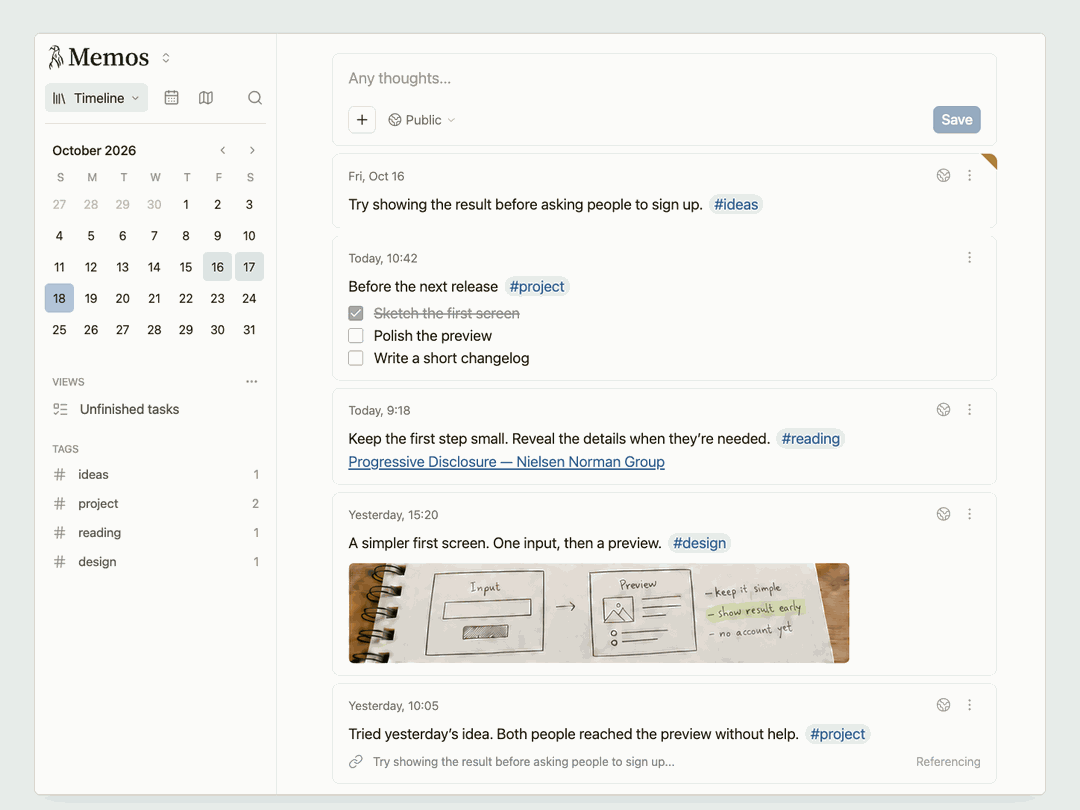
Memos 是一款开源的自托管轻量笔记工具,把日常碎片想法按时间线聚合在一起,支持 Markdown 写作与标签串联。数据完全存放在自己的服务器上,隐私与分享范围由你掌控。适合喜欢随手记录、注重数据自主的极客与自托管爱好者。
核心亮点:
- 时间线式记录,碎片想法按日期归档
- 支持 Markdown 与标签,方便整理回顾
- 自托管部署,数据完全归自己所有
- 可精细控制私密、分享或公开范围
当前版本 v26.11.2(2026-11-22 发布),开源协议 MIT,GitHub 64,640 star。

核心信息
| 软件名称 | Memos(usememos/memos) |
| 当前版本 | v26.11.2 |
| 更新日期 | 2026-11-22 |
| 开源协议 | MIT |
| 软件分类 | 自托管服务 |
| 关键词 | docker、foss、go、markdown、memo、microblog |
本次更新内容
- 新版本可在列表中把评论和笔记一起显示,评论卡片上方会标明所属笔记,方便查看讨论。
- 时间线新增全宽显示选项,笔记可占满整个时间线宽度,不再局限于居中窄栏。
- 保存的视图支持上下移动调整顺序,常用视图可以按自己的习惯排列。
- 编辑器改进:可见范围选择器用通俗文字说明谁能查看笔记,保存、更新和评论时会显示进度。
- 日历和界面细节优化:月份选择器会标出有笔记的月份并支持方向键切换,侧边栏样式更统一。
- 附件缩略图、分享链接、标签计数和导出等多项问题得到修复,长笔记处理速度也有所提升。
查看官方英文更新日志(原文)
Memos 26.11.2 shows comments alongside memos in lists, lets you reorder saved Views, and adds a full-width timeline. Calendar navigation, MariaDB compatibility, and editor reliability also improve.

## Highlights

* **Comments in lists:** Turn on Include comments in Settings > Preferences > This device to show comments beside memos in every memo list. A comment in a list names its parent memo on a strip above its card. ([comments as memos](https://github.com/usememos/memos/commit/8b61d2e9d626eae7483731513beac5ed383fc39d))
* **Timeline width:** A Full width option in the timeline display menu lets memos use the whole timeline instead of a centered column. ([#6557](https://github.com/usememos/memos/pull/6557))
* **Views:** Reorder saved Views with Move up and Move down in each row's menu. ([reorder Views](https://github.com/usememos/memos/commit/40185270f0328565b974fd8986e1a01c3fd00fbd))

## Fixes and polish

* **Editor:** The audience picker says who can read a memo: only you, Space members, signed-in users, or everyone. A space typed after a Korean IME commit stays after the word in Markdown mode. Link memo search finds text containing quotes or backslashes. Save, Update, and Comment show progress while a request is running. ([audience picker](https://github.com/usememos/memos/commit/f4c95effd686395cb4f6f3230a816ad5a1b40475), [Korean IME](https://github.com/usememos/memos/commit/5e4bfcd008c06942569a1a56fb49f02ed8698562), [#6583](https://github.com/usememos/memos/pull/6583), [button states](https://github.com/usememos/memos/commit/ec132044edea7213da74496cbca38c13bcd539b8))
* **Attachments and sharing:** Thumbnails of externally linked attachments, such as those created by an import, no longer render blank. Copying a share link works on instances served over plain HTTP. ([#6574](https://github.com/usememos/memos/pull/6574), [#6576](https://github.com/usememos/memos/pull/6576))
* **Tags:** Settings > Tags counts memos for rules written as patterns instead of showing 0. ([#6591](https://github.com/usememos/memos/pull/6591))
* **Calendar:** The month picker marks the months that hold memos and lists the years they span, and arrow keys move across months and years. Titles, weekday labels, and dates share one text axis, the month fits the viewport on medium screens, excerpt text keeps its contrast on busy days, and a month that fails to load says so instead of looking empty. ([calendar fixes](https://github.com/usememos/memos/commit/bbc168e845725636ba51df473b9c2e94fb647774))
* **Interface:** The sidebar uses one text size with aligned trailing controls, today is outlined in the sidebar calendar, action menus use a horizontal ellipsis, and sign-in buttons show progress. ([sidebar](https://github.com/usememos/memos/commit/00fcd170281a75fc0e95ec4f2f54f43d32fe81bd), [action menus](https://github.com/usememos/memos/commit/1825ae440fdfd7201ce0ff96a4414933402311ef), [#6590](https://github.com/usememos/memos/pull/6590), [button states](https://github.com/usemem
下载地址
以下为官方原包,本站不二次打包,点击直接下载:
memos_26.11.2_linux_amd64.tar.gz(官方原包 | 20.4 MB)
✅ 上方 SHA256 与官方发布值一致,可自行核对。
快速上手
- 在已安装 Docker 的电脑上打开终端,运行 README 中的 docker run 命令启动 Memos 容器,并把数据目录挂载到本地文件夹。
- 容器启动后,在浏览器访问 http://localhost:5230,进入 Memos 的首次使用页面。
- 在页面上创建第一个账号,设置用户名和密码,完成后即可进入个人时间线。
- 在时间线顶部的输入框写一条 memo,可用 Markdown 排版,并添加标签归类,内容会按日期留在时间线上。
提示:所有数据都保存在挂载的本地文件夹里,记得定期备份该文件夹。
讨论(0 条)