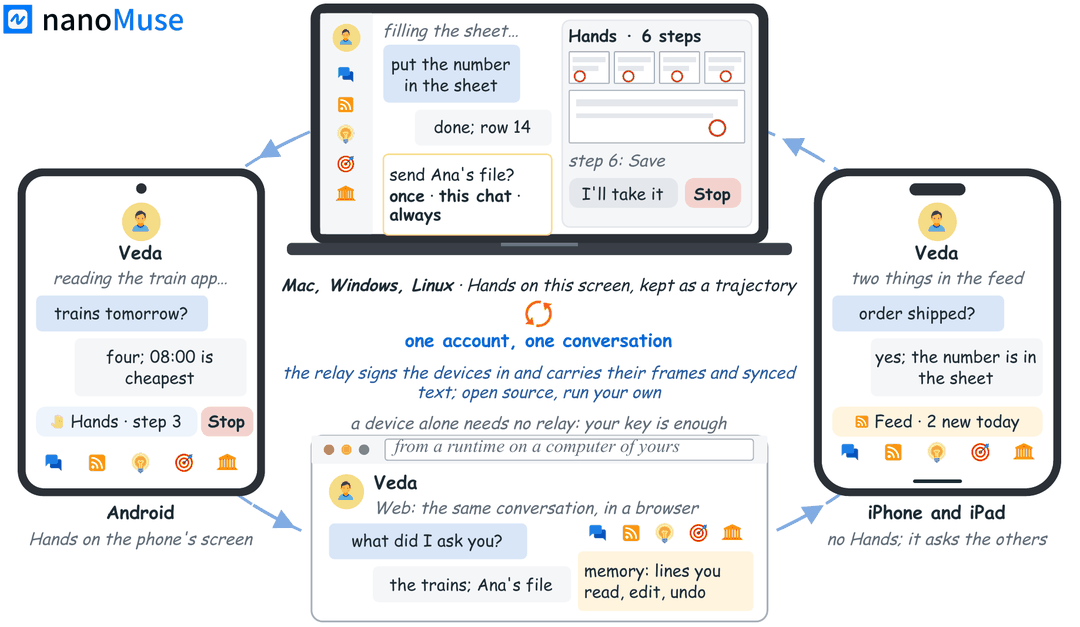
NanoMuse 是一套开源的个人智能助理,覆盖手机、桌面与网页端,通过中继服务把设备串起来,随时唤起就能替你动手做事。它有自己的名字和形象,能记住你的偏好,应用关掉也继续干活,遇到不可逆操作会先停下来问你。适合想自托管、重视隐私又想要跨设备 AI 助手的用户。
核心亮点:
- 手机、桌面、网页多端联动,随身唤起
- 关掉应用仍持续执行任务,不中断
- 记住用户偏好,越用越懂你
- 不可逆操作前主动暂停确认
当前版本 v1.0.10(2026-11-25 发布),开源协议 GPL-3.0,GitHub 3,707 star。


核心信息
| 软件名称 | NanoMuse(nano-muse/nanoMuse) |
| 当前版本 | v1.0.10 |
| 更新日期 | 2026-11-25 |
| 开源协议 | GPL-3.0 |
| 软件分类 | Linux 桌面 |
| 关键词 | agent-skills、ai-agent、android、computer-use、cross-device、desktop-app |
本次更新内容
- 支持将应用任务移至副屏运行,主屏专注交互,兼顾隐私与操作便捷性。
- 实现设备自动配对,无需手动输入代码,连接更顺畅且密钥存储更安全。
- 智能跟进待办事项与外部更新,自动整理摘要或清单,助你不错过重要信息。
- 各设备对话独立保持上下文,断连重连后无缝恢复,跨端协作体验更连贯。
- 强化敏感操作确认机制,严格隔离账户数据,保障本地隐私与数据安全。
查看官方英文更新日志(原文)
# nanoMuse 1.0.10 · Bridge

🐉 **nanoMuse `1.0.10` “Bridge”** lets an Android phone keep a screen task away from the display you are using, and helps every client return to commitments and sources that changed while you were away.

On Android 14 and newer, a compatible app can run on a separate display while your keyboard, chat and Stop control stay on the main screen. The six-step setup watches Android's switches, reads the one-time wireless debugging code through the accessibility service when allowed, and connects by itself. During a run, a secure floating preview shows the last safe frame until the next one is ready, while the originating chat shows the phase and step without exposing screen text or model reasoning. This work was inspired by [Mika](https://github.com/wangzan101/Mika); the wireless pairing and floating-window code adapted from Mika is included under Apache-2.0 with its notice in the APK.

The other thread is follow-through. The runtime, desktop and phones can notice a due commitment, an expected reply, a changed connected source or an update from a public project or researcher, then bring one relevant item back to the main chat. These checks are bounded, observe quiet hours and remain under the controls in Feed settings.

## Highlights

- **Android can operate a compatible app on a background screen.** Turn on *Settings → Hands → Background screen*, complete the guided wireless debugging setup, then name the app in a screen task. A draggable read-only window keeps Stop, pause and phone handover available. The chat that started the task shows safe live progress and stops only its own screen run.
- **Pairing is automatic when Android exposes the pairing window.** With accessibility enabled, nanoMuse reads the six-digit code and port from Android Settings and completes the local pairing without logging the code. An inline notification reply and a collapsed manual form remain as fallbacks. The private key stays in Android Keystore, and later runs try the saved port, the system property, mDNS and loopback discovery before asking for a port.
- **Feed and the main chat follow through on more of what you said.** Due commitments, expected replies, calendar conflicts and selected connected sources can produce a grounded draft, brief, checklist or short check-in. Android and iPhone can also follow public GitHub, publication and feed sources while the computer is off.
- **Device conversations and coding work keep their own context.** Android, iPhone and desktop can start a chat bound to a selected computer, recover results after reconnecting, show streamed steps and stop the exact remote call. Coding projects, sessions, tool details and file diffs use the same hub actions across the clients.
- **Long turns retain the request and sensitive outcomes.** The current request and the latest work stay in context after many tool calls. Completed sensitive actions remain visible after compaction, and an identical sensitive action asks again instead
下载地址
以下为官方原包,本站不二次打包;多个文件为不同包型,按需选择其中一个下载即可:
nanoMuse-Desktop-1.0.10-linux-x64.AppImage(官方原包 | 309.5 MB)
nanoMuse-Desktop-1.0.10-linux-x64.deb(官方原包 | 240.9 MB)
nanoMuse-Desktop-1.0.10-linux-x64.tar.gz(官方原包 | 289.4 MB)
✅ 上方 SHA256 与官方发布值一致,可自行核对。
快速上手
- 运行下载好的安装包,按提示完成安装后从应用菜单启动 NanoMuse 桌面端。
- 首次启动后按引导登录账号,即可使用社区中继提供的免费模型额度。
- 在设置中按需填入自己的模型密钥,额度用完后继续使用。
- 在对话中给智能体下达任务,它会实际执行操作,并在不可撤销的动作前先询问你。
提示:关闭应用后任务仍会继续运行,重新打开即可查看进度。
讨论(0 条)