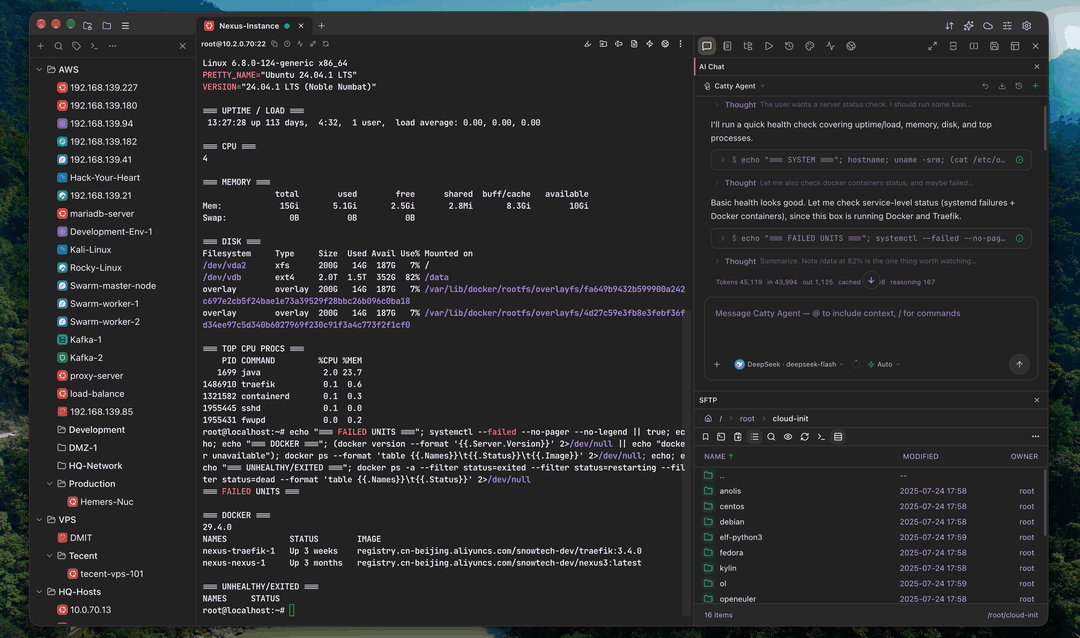
Netcatty 是一款跨平台的 SSH 工作台,把终端、SFTP 文件浏览和会话管理整合到一起,还内置了能理解服务器环境的 AI 助手,用自然语言就能完成诊断、部署和多主机协同操作。适合经常管理多台远程服务器的开发者、运维和 DevOps 人员。
核心亮点:
- 内置 AI 助手,用自然语言执行命令与多主机协同任务
- 分屏终端加标签页,多会话并行管理更顺手
- 双窗格 SFTP 浏览器,远程文件拖拽传输直观
- 支持 SSH、本地终端、Telnet、Mosh 与串口连接
当前版本 v1.1.92(2026-11-26 发布),开源协议 GPL-3.0,GitHub 7,594 star。


核心信息
| 软件名称 | Netcatty(binaricat/Netcatty) |
| 当前版本 | v1.1.92 |
| 更新日期 | 2026-11-26 |
| 开源协议 | GPL-3.0 |
| 软件分类 | Linux 桌面 |
| 关键词 | electron、electron-app、radix-ui、react、sftp-client、ssh |
本次更新内容
- 内置VNC与RDP远程桌面,支持多屏、剪贴板同步及音频播放,提升远程办公体验
- AI智能助手迭代上限提升,远程桌面操作生成结构化卡片,便于直观查看与控制
- 支持批量后台终端任务处理,系统管理器新增一键端口转发功能,简化运维操作
- 终端目录选择器支持Git Bash,SFTP文件夹双击行为可配置,优化文件管理流程
- 修复SSH跳转链显示、标签页名称保持及Vault多项问题,提升连接稳定性与安全性
查看官方英文更新日志(原文)
## ✨ Release Highlights

Netcatty **v1.1.92** introduces built-in **VNC & RDP** remote desktop sessions with **Catty Computer Use**, raises the default AI iteration limit to 200 with redesigned Computer Use tool cards, adds bulk background terminal jobs and one-click port forwarding from System Manager, and ships a major round of plugin-platform primitives and terminal/Vault fixes.

### 🖥️ Built-in VNC & RDP Remote Desktop

- **Native VNC & RDP workspaces**: connect to Windows RDP and VNC desktops (including JumpServer RDP) directly inside Netcatty with responsive toolbar overflow, HiDPI scaling, macOS Cmd-to-Ctrl mapping, protocol-aware special keys, VNC manual refresh, and automatic TLS 1.2 kRSA fallback for Windows RDP certificates (#4463).
- **Multi-monitor, shared drives, and telemetry**: switch RDP monitors, mount local folders via RDPDR, sync clipboard text/files, play remote RDP audio, monitor live network quality telemetry, and create RDP/VNC/local-shell hosts from the refreshed **New Host** dropdown menu (#4463, #4465).

### 🤖 Catty Computer Use & AI Improvements

- **Catty Computer Use for VNC & RDP**: inspect connected remote desktops read-only with `remote_desktop_read_screen` (supporting full-screen, coordinate grid, and zoomed region captures) and run mouse/keyboard actions via `remote_desktop_act` with privacy-lock controls, high-risk OS shortcut approvals, user preemption, and an action audit log (#4463).
- **Structured Computer Use cards & higher default step limit**: remote desktop tool calls now render as rich artifact cards with action-specific icons, human-readable summaries, secret-redacted hover details, and clickable cached screenshot thumbnails. Built-in AI `maxIterations` now defaults to **200** (configurable up to **1000**) (#4465).
- **Bulk background jobs & MCP polish**: launch, poll, and stop background jobs across 2–20 sessions at once with `terminal_start_bulk`, `terminal_poll_bulk`, and `terminal_stop_bulk`, alongside tighter `terminal_execute_bulk` output budgets, dismissible model-catalog warnings, and better idle-prompt recognition when decorative glyphs precede prompts (#4423, #4425, #4431, #4420).

### 🛠️ Terminal, SFTP, System Manager, and Vault

- **One-click port forwarding from System Manager**: create local port forwards directly from the **Ports** tab with IPv6 wildcard listener preservation (#4459).
- **Directory Picker & SFTP**: added **Git Bash** support in the terminal Directory Picker, a configurable setting for **SFTP tree view folder double-click behavior**, and persistent compose-bar `cwd` labels across command submissions (#4407, #4460, #4422).
- **SSH, tabs, and Vault fixes**: clearer jump-chain connection progress showing each hop's address and target label, respected configured SSH tab names and dynamic title modes, restored Host Details inheritance and safe group-path normalization, consistent MCP host/group proxy updates, always-visible per-pane close buttons at narrow widths, polished ma
下载地址
以下为官方原包,本站不二次打包;多个文件为不同包型,按需选择其中一个下载即可:
Netcatty-1.1.92-linux-amd64.deb(官方原包 | 180.6 MB)
Netcatty-1.1.92-linux-x86_64.AppImage(官方原包 | 183.2 MB)
Netcatty-1.1.92-linux-x86_64.rpm(官方原包 | 180.6 MB)
✅ 上方 SHA256 与官方发布值一致,可自行核对。
快速上手
- 运行下载好的安装包,按向导完成安装后启动 Netcatty,进入主工作区界面。
- 在连接管理区域新建 SSH 连接,填写主机地址、端口与登录凭据,保存后双击即可打开终端会话。
- 在终端标签中执行命令;需要同时操作多台主机时,使用分屏终端并排查看多个会话。
- 打开 SFTP 面板浏览远程目录,进行上传、下载与文件管理,无需额外工具。
- 在 Catty Agent 对话区用自然语言描述需求,让它执行命令并汇总服务器状态。
提示:首次连接前确认远程主机已开启 SSH 服务并放行对应端口。
讨论(0 条)