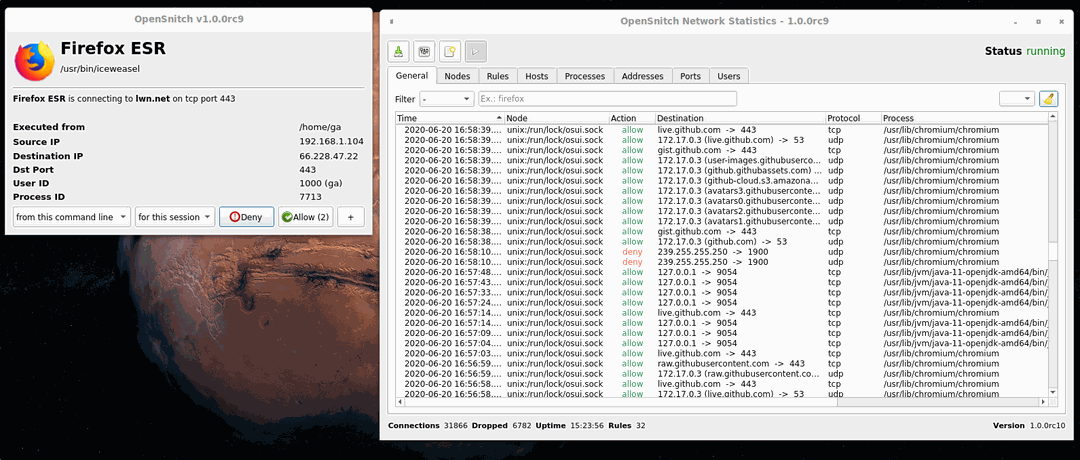
OpenSnitch 是 Linux 桌面上的应用级防火墙,思路类似 macOS 的 Little Snitch:每个程序想往外连网时都会弹窗询问,由你决定放行还是拦截。它还能用屏蔽列表系统级拦截广告、追踪器和恶意域名,并通过图形界面配置 nftables 系统规则。适合在意隐私、想看清后台程序偷偷联网的 Linux 用户。
核心亮点:
- 逐应用弹窗放行或拦截出站连接
- 系统级屏蔽广告、追踪器与恶意域名
- 图形界面直接配置 nftables 系统规则
- 集中管理多个节点并支持 SIEM 集成
当前版本 v1.8.0(2025-12-15 发布),开源协议 GPL-3.0,GitHub 14,319 star。


核心信息
| 软件名称 | OpenSnitch(evilsocket/opensnitch) |
| 当前版本 | v1.8.0 |
| 更新日期 | 2025-12-15 |
| 开源协议 | GPL-3.0 |
| 软件分类 | Linux 桌面 |
| 关键词 | application-firewall、data-breach、firewall、linux、networking、security |
本次更新内容
- 图形界面改用新版开发框架,部分旧系统需手动安装依赖或等待后续通用包,守护进程仍兼容旧界面。
- 防火墙规则统一归入单张表管理,系统升级时可能提示更新规则,部分发行版需手动处理。
- 新增任务加载与扫描、下载等后台任务功能,并改进多节点、性能与任务监控体验。
- 界面优化桌面通知、窗口状态恢复与多节点操作,整体使用更顺畅。
查看官方英文更新日志(原文)
## Important changes of this release
### GUI migrated to PyQt6 #1222
 - We've migrated the GUI to PyQt6 because PyQt5 has been deprecated, and many distros have started to remove it.
   :warning: This means that starting with v1.8.0, **the GUI is no longer compatible** by default with the following distros:
   - LinuxMint 21.2 or earlier.
   - Ubuntu 22.04 or earlier.
   - OpenSuse 15.5 or earlier (it works on 15.6, but you'll have to install some packages manually).

   The GUI still works if you install the packages manually with `pip`, and there will be a flatpak version soon.
   On the other hand, the daemon v1.8.0 should work fine with GUI v1.7.2.

### Firewall rules grouped into one table, by @alice945 https://github.com/evilsocket/opensnitch/pull/1423
 * Now all our firewall rules (netfilter rules) are grouped under one table called `opensnitch`.
   Previously we added several tables like `mangle`, `output`, `input`, `prerouting`, etc.
 * If you have added system firewall rules, or if you have changed the firewall policies, `apt` will prompt you to update it.
   For `rpm` based distros you'll have to update it manually if needed.

## What has changed

15/06/2026: opensnitch-ui-1.8.0-1.noarch.rpm updated because of #1576

### Daemon
 * Use application specific nft table by @alice945 in https://github.com/evilsocket/opensnitch/pull/1423
 * daemon/audit: allow configuring audispd_events socket path by @LordGrimmauld in https://github.com/evilsocket/opensnitch/pull/1418
 * mount tracefs path if it's not mounted: #1450 , fbc72bb96acc807f23fca15d7f94a5d956d6cce0.
 * Tasks (WIP):
   - Allow to load tasks from disk: 66ee50bf7d9658cb5cc1be8731227a5324bb32cc
   New task IOCScanner: 16738560379a8163f41b38c670df9e26d12fc669 [README](https://github.com/evilsocket/opensnitch/blob/master/daemon/tasks/iocscanner/README.md)
   New downloader task: 149e0f61b8614af211790ca846100c1001d4f656

 * Generic improvements: 2c3120b936b978a683dc5928123b4b368a01d316, c719c34de3f31d1fde4a1842223ec75e1362bd82, 906ad17b12026aef231776aad0adac083b0f298d,
 * Multi-node improvements: 9b33f7bdc8f9247112a7ea3b2bc059d730f84ca8,
 * Performance improvements:  481dc1cd53ce88aca4d08142c958ce44765e1907, 7a0c96c17eba4ca47fa10d6e8a5b2655d911fd34
 * Better tasks monitoring (process dialog, netstat, node monitoring): 85635051aa6e0e265e59965aef0e3574e50e7000

### GUI (server)
 * Ported to PyQt6: #1009 e5d1702bd36dd06c552c95ad3a3dcd023c3eb231
 * Update generate_i18n.sh - find lrelease by @munix9 in https://github.com/evilsocket/opensnitch/pull/1411
 * ui: switch to python-slugify by @LordGrimmauld in https://github.com/evilsocket/opensnitch/pull/1413
 * fix: restore maximized window state correctly when loading dialog geometry by @ryan-steed-usa in https://github.com/evilsocket/opensnitch/pull/1458
 * Better desktop notifications: ad0df38e8c490bc4d177ef86990cf3930f5d5b58
 * Multi-node improvements: 90dfba1380247c4df652f184cf11419a069b639a, 321c152
下载地址
以下为官方原包,本站不二次打包;多个文件为不同包型,按需选择其中一个下载即可:
opensnitch-1.8.0-1.x86_64.rpm(官方原包 | 6.3 MB)
opensnitch-ui-1.8.0-1.noarch.rpm(官方原包 | 1.5 MB)
opensnitch_1.8.0-1_amd64.deb(官方原包 | 4.5 MB)
opensnitch_1.8.0-1_armhf.deb(官方原包 | 4.1 MB)
packages-builds-and-signatures.tar.gz(官方原包 | 37.7 MB)
python3-opensnitch-ui_1.8.0-1_all.deb(官方原包 | 465.1 KB)
✅ 上方 SHA256 与官方发布值一致,可自行核对。
快速上手
- 运行下载好的安装包,用包管理器安装 OpenSnitch 主程序与界面组件
- 安装完成后,在终端执行 opensnitch-ui 命令启动图形界面
- 也可从应用程序菜单中找到并打开 OpenSnitch 界面
- 首次启动后,界面会弹出连接请求,按需选择允许或拒绝
- 在界面中查看出站连接记录,并配置拦截规则
提示:留意首次启动时的连接弹窗,及时处理以免误拦常用程序。
讨论(0 条)