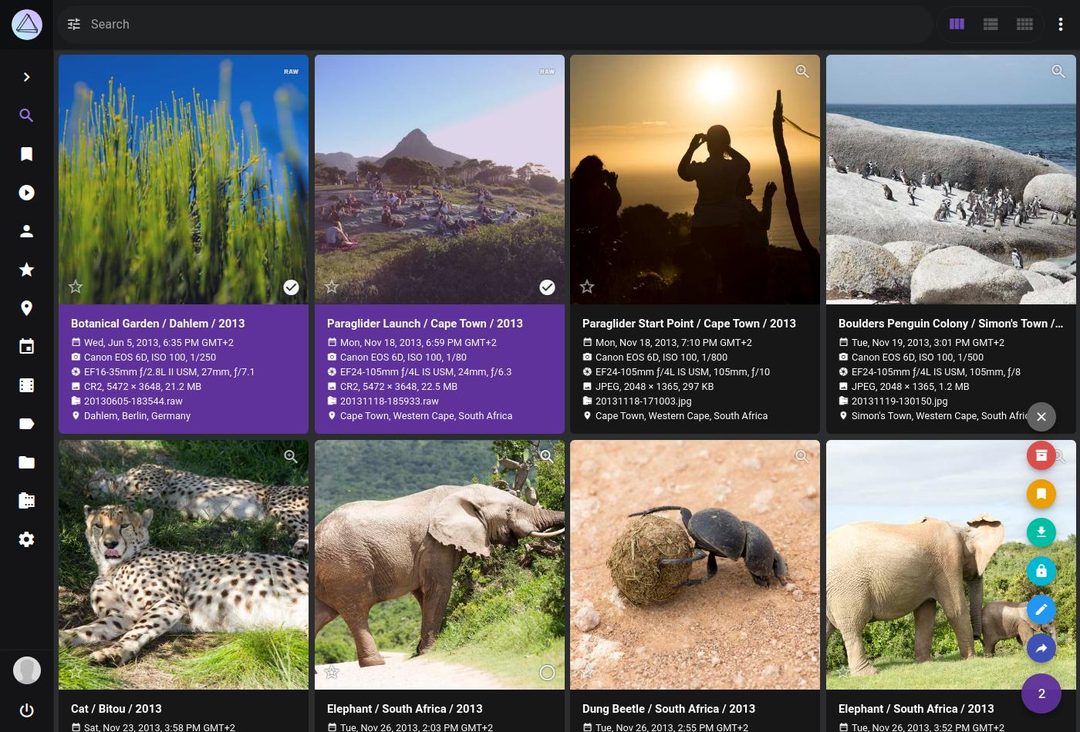
PhotoPrism 是一款自托管的 AI 相册工具,能自动识别人脸、地标和内容标签,让你用关键词秒搜照片。它支持 RAW 和视频,提供地图浏览和隐私保护,适合注重数据隐私、想摆脱云服务依赖的摄影爱好者和家庭用户。
核心亮点:
- AI 自动标记人脸、地标和内容,搜索秒出结果
- 支持 RAW 和视频格式,浏览无压力
- 内置世界地图和隐私地理编码,回忆旅行足迹
- PWA 应用手机桌面安装,体验接近原生
当前版本 v261029-963b58c50(2026-10-29 发布),开源协议 AGPL-3.0,GitHub 40,459 star。

核心信息
| 软件名称 | Photoprism(photoprism/photoprism) |
| 当前版本 | v261029-963b58c50 |
| 更新日期 | 2026-10-29 |
| 开源协议 | AGPL-3.0 |
| 软件分类 | 自托管服务 |
| 关键词 | ai、golang、google-photos、machine-learning、photography、private-cloud |
本次更新内容
- 新增实验性数据库支持,首次启动可能变慢,升级前建议先备份数据库。
- AI 助手等外部应用可通过授权连接,按账户权限搜索和浏览照片库。
- 照片查看器新增导出选项,可按不同分辨率下载图片。
- 地点功能更新标准地图并增强三维地球视图,浏览位置更直观。
- 含特殊字符的文件和文件夹不再被索引或导入,已有文件需重命名后才能恢复收录。
查看官方英文更新日志(原文)
This [release](https://docs.photoprism.app/release-notes/#october-29-2026) upgrades PhotoPrism's [database layer](https://github.com/photoprism/photoprism/pull/4831) and introduces experimental [🐘 PostgreSQL](https://docs.photoprism.app/getting-started/advanced/migrations/postgres/) support, thanks to @keif888's hard work and numerous contributions.

AI assistants and other applications can now connect via [🔐 OAuth](https://github.com/photoprism/photoprism/issues/4368) and use new [🤖 MCP](https://docs.photoprism.app/developer-guide/api/mcp/#library-tools) tools to search and browse your library. Other improvements include a new [⬇️ Export](https://github.com/photoprism/photoprism/issues/655) dialog in the photo viewer for downloading images at selected resolutions and [updated standard maps](https://github.com/photoprism/photoprism/issues/5926) in [Places](https://demo.photoprism.app/library/places), along with an enhanced [🌎 3D Earth](https://docs.photoprism.app/user-guide/organize/places/#3d-earth-view) view. This release also includes fixes for several [metadata handling](https://docs.photoprism.app/user-guide/library/metadata/) issues, as well as updates to [libheif](https://github.com/photoprism/photoprism/issues/5928), [Go](https://github.com/golang/go/issues?q=milestone%3AGo1.27.3), and [ONNX Runtime](https://github.com/photoprism/photoprism/issues/5922).

Thank you to all our [contributors](https://docs.photoprism.app/developer-guide/), [members](https://www.photoprism.app/editions/#compare), and [sponsors](https://docs.photoprism.app/developer-guide/#thank-you-to-all-current-and-past-sponsors), whose generous support has been and continues to be essential to the success of the project! 💎✨

#### Upgrade Notes

- [MCP is enabled by default for eligible users.](https://docs.photoprism.app/developer-guide/api/mcp/#authorization) Admins can disable it in the [account settings](https://docs.photoprism.app/user-guide/users/), or globally for all users by setting [`PHOTOPRISM_DISABLE_MCP` to "true"](https://docs.photoprism.app/getting-started/config-options/#feature-flags). To prevent external apps from connecting via [OAuth Authorization Code Flow](https://docs.photoprism.app/developer-guide/api/oauth2/#authorization-code-flow), set `PHOTOPRISM_OAUTH_APPS` to "none".
- [Files and folders with names containing unsupported characters, such as `|"?*%<>{}:~$`, are no longer indexed, imported, or synced.](https://github.com/photoprism/photoprism/issues/5904) Files that are already in your library will be skipped during indexing until you rename them.
- [We recommend creating a database backup before upgrading.](https://docs.photoprism.app/user-guide/backups/) Due to schema migrations, the first start with an existing database may take longer than usual. These migrations may also temporarily require additional disk space.

#### What's new?

- AI: [Added MCP search and browsing tools that respect account permissions](https://docs.photopr
下载地址
以下为官方原包,本站不二次打包,点击直接下载:
photoprism_261029-963b58c50-linux-amd64.tar.gz(官方原包 | 406.2 MB)
✅ 上方 SHA256 与官方发布值一致,可自行核对。
快速上手
- 解压下载好的压缩包到本地目录,进入解压后的文件夹,找到可执行文件与配置示例。
- 在终端或命令行中运行启动命令启动服务,等待日志提示服务已就绪。
- 用浏览器访问本机服务地址,首次进入时按页面提示创建管理员账户并登录。
- 登录后在设置中指定照片目录,让应用扫描并索引已有图片与视频。
- 在浏览页用搜索框和筛选条件查找照片,按标签、地点或画质快速定位。
提示:首次索引较慢,可先只导入部分照片试运行。
讨论(0 条)