Rectangle 是一款开源 macOS 窗口管理工具,基于 Spectacle 开发,用快捷键或拖拽贴边就能把窗口分成左右半屏、四分之一、三分之一等布局,还支持行/列平铺。适合经常多窗口并排办公、想摆脱手动拖拽调整大小的 Mac 用户。
核心亮点:
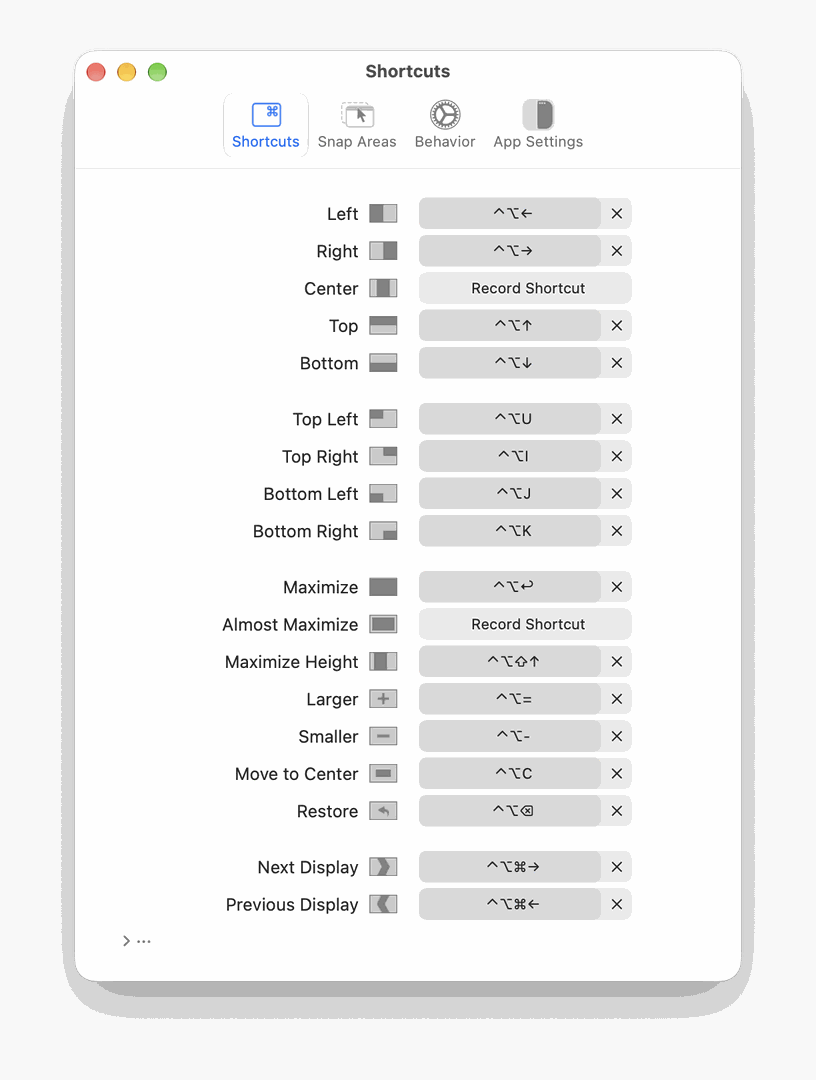
- 快捷键一键贴边分屏,左右半屏、四角四分之一随心排
- 拖拽窗口到屏幕边缘出现提示,松手自动吸附到位
- 支持按行或按列平铺当前屏幕所有窗口,快速整理桌面
- 可开启窗口动画与模糊吸附预览,操作反馈更顺滑
当前版本 v2.0.5(2026-11-20 发布),开源协议 MIT,GitHub 30,308 star。
许可说明:仓库 LICENSE 原文核实为 MIT(audit 自动判定)

核心信息
| 软件名称 | Rectangle(rxhanson/Rectangle) |
| 当前版本 | v2.0.5 |
| 更新日期 | 2026-11-20 |
| 开源协议 | MIT |
| 软件分类 | macOS 软件 |
| 关键词 | macOS 软件 |
本次更新内容
- 新版本完善了多语言支持,中文、西班牙语、意大利语等界面翻译更完整,普通用户使用更顺手。
- 窗口管理更智能:重复操作分屏动作可跨显示器切换,全屏时其他屏幕仍可拖拽吸附,窗口能跟随鼠标所在屏幕移动。
- 新增终端相关选项,可让终端窗口使用全屏高度或自动应用到每个新窗口,并减少不必要的窗口尺寸警告。
- 设置界面关闭后及时释放资源,任务控制激活时忽略快捷键,被忽略的应用不再响应标题栏双击操作。
- 修复了分屏计算精度、待办窗口在屏幕外的显示问题,以及显示器配置变化时的布局错乱。
查看官方英文更新日志(原文)
## What's Changed
* Free the Settings window when it closes by @zolferfigueiredo in https://github.com/rxhanson/Rectangle/pull/1930
* Add a Terminal option to use the full screen height when the menu bar is hidden by @AkiyamaKunka in https://github.com/rxhanson/Rectangle/pull/1934
* Keep the stacked-window list highlight on the window at the front by @MyronKoch in https://github.com/rxhanson/Rectangle/pull/1938
* Localize the remaining Settings labels for zh-Hans by @AkiyamaKunka in https://github.com/rxhanson/Rectangle/pull/1939
* Add a Snap Areas setting for restoring windows resized with Larger or Smaller by @SamuelAdigos in https://github.com/rxhanson/Rectangle/pull/1940
* Skip the title bar double-click action for ignored apps by @SamuelAdigos in https://github.com/rxhanson/Rectangle/pull/1941
* Complete the Spanish (es, es-419) localization by @SamuelAdigos in https://github.com/rxhanson/Rectangle/pull/1942
* Ignore keyboard shortcuts while Mission Control is active by @AkiyamaKunka in https://github.com/rxhanson/Rectangle/pull/1935
* Add Hindi (hi) localization by @samanyudas in https://github.com/rxhanson/Rectangle/pull/1944
* Complete the Traditional Chinese (zh-Hant) localization by @AkiyamaKunka in https://github.com/rxhanson/Rectangle/pull/1946
* Move thirds and fourths to the adjacent display on repeat by @tlq5l in https://github.com/rxhanson/Rectangle/pull/1937
* Add a Terminal option to apply an action to every new window by @AkiyamaKunka in https://github.com/rxhanson/Rectangle/pull/1945
* Reflow Todo mode when the display configuration changes by @AkiyamaKunka in https://github.com/rxhanson/Rectangle/pull/1947
* Fix RectangleTests failing to compile on main by @yannickgloster in https://github.com/rxhanson/Rectangle/pull/1954
* Keep drag-to-snap on the other displays while a window is fullscreen by @AkiyamaKunka in https://github.com/rxhanson/Rectangle/pull/1949
* Keep the Todo window on screen when its app enforces a wider minimum width by @AkiyamaKunka in https://github.com/rxhanson/Rectangle/pull/1950
* Support vertical display traversal on repeated half actions by @yannickgloster in https://github.com/rxhanson/Rectangle/pull/1952
* Add a download and update section for mainland China users to README.zh-Hans.md by @AkiyamaKunka in https://github.com/rxhanson/Rectangle/pull/1963
* The `WindowManager` needs to be adjusted so that it can accommodate future changes by @rxhanson in https://github.com/rxhanson/Rectangle/pull/1967
* Move window to the display under the cursor  by @Kiizon in https://github.com/rxhanson/Rectangle/pull/1913
* Make the default display ordering deterministic by @AkiyamaKunka in https://github.com/rxhanson/Rectangle/pull/1960
* Floor the center third calculations to whole pixels by @AkiyamaKunka in https://github.com/rxhanson/Rectangle/pull/1961
* Keep zh-Hans up to date: README sync and translation fixes by @AkiyamaKunka in https://github.com/rxhanson/Rectangle/pull/1964
* Give the
下载地址
以下为官方原包,本站不二次打包,点击直接下载:
Rectangle2.0.5.dmg(官方原包 | 4.7 MB)
✅ 上方 SHA256 与官方发布值一致,可自行核对。
快速上手
- 首次启动后按提示授予辅助功能权限,否则窗口无法被移动和调整
- 拖动任意窗口到屏幕左或右边缘,出现脚印预览后松开即可占半屏
- 把窗口拖到屏幕顶部可最大化,拖到四角则占对应四分之一屏
- 在设置中打开行为里的附加选项,可启用窗口动画和吸附区域模糊预览
- 在快捷键设置中展开附加项,可为按行平铺和按列平铺分别指定按键
提示:吸附预览默认关闭,可在行为设置的吸附区域中开启模糊效果。
讨论(0 条)