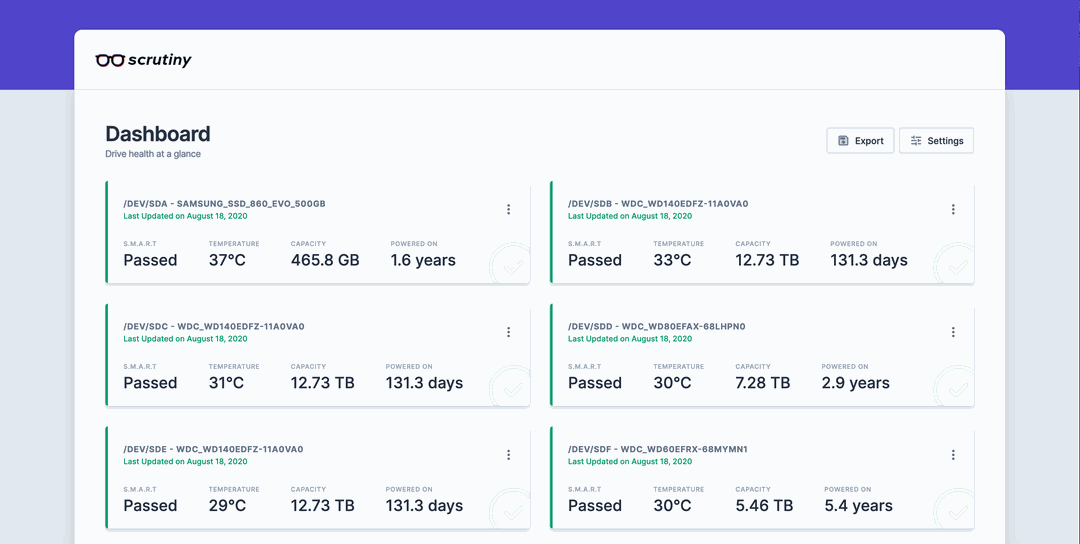
Scrutiny 是一款自托管的硬盘健康监控面板,把 smartd 采集的 S.M.A.R.T 指标汇总成网页仪表盘,结合真实故障率设置更靠谱的预警阈值,还能记录历史趋势和温度变化。适合跑多盘 NAS、家庭服务器或小型机房的用户,用 Docker 就能快速部署,支持 Webhook 告警通知。
核心亮点:
- 网页仪表盘聚焦关键指标,一眼看清硬盘状态
- 自动扫描并识别所有接入硬盘,省去手动配置
- 记录 S.M.A.R.T 历史趋势,判断是否缓慢劣化
- 按真实故障率定制阈值,比厂商默认更灵敏
当前版本 v0.10.0(2026-11-01 发布),开源协议 MIT,GitHub 8,466 star。


核心信息
| 软件名称 | Scrutiny(AnalogJ/scrutiny) |
| 当前版本 | v0.10.0 |
| 更新日期 | 2026-11-01 |
| 开源协议 | MIT |
| 软件分类 | 自托管服务 |
| 关键词 | 自托管服务 |
本次更新内容
- 新版本支持为设备设置自定义名称,通知和界面中会显示更易识别的名称,方便区分多块硬盘。
- 设备名称改为保存在数据库中,可直接在设备设置里修改,不再依赖配置文件。
- 新增全局通知设置,可为未单独配置的设备统一设定上传提醒和上传周期。
- 采集错误提醒可按设备单独开关,并支持全局默认设置,减少不必要的打扰。
- 上传状态稳定期间会保留预计上传周期,避免通知中的时间估计频繁跳动。
查看官方英文更新日志(原文)
Timestamp |  SHA | Message | Author
------------- | ------------- | ------------- | -------------
2026-11-01T05:35Z | 3ae9db20 | (v0.10.0) Automated packaging of release by Packagr | packagrio-bot
2026-10-31T15:56Z | 87682de5 | test(notify): expect GetDeviceDetails in irregular upload test (#1137)<li>add GetDeviceDetails mock expectation to TestMissedUploadTracker_IrregularUploadKeepsEstimate Claude-Session: https://claude.ai/code/session_01GRHbNYzX3T1jbmuDUhuJJe Co-authored-by: Claude Opus 5.5 <noreply@anthropic.com> | Aram Akhavan
2026-10-24T22:51Z | 5e71f6a5 | feat(notify): name devices by friendly_name in notifications (#1136) Claude-Session: https://claude.ai/code/session_012Z7GCmjBAZyr57e2q2Yeg7 Co-authored-by: Claude Opus 5.5 <noreply@anthropic.com> | Aram Akhavan
2026-10-24T22:50Z | fa47b444 | fix(notify): keep the estimated upload period while uploads settle (#1135) Claude-Session: https://claude.ai/code/session_012Z7GCmjBAZyr57e2q2Yeg7 Co-authored-by: Claude Opus 5.5 <noreply@anthropic.com> | Aram Akhavan
2026-10-24T02:54Z | cc48b73b | feat(webapp): store friendly_name in the database and edit it from device settings (#1131)<li>remove devices[].friendly_name from config<li>persist Device.FriendlyName, add m20261021150000 migration<li>add UpdateDeviceFriendlyName to DeviceRepo and regenerate mock<li>add POST /api/device/:scrutiny_uuid/friendly_name<li>drop config lookups in device details and summary handlers<li>implement DetailSettingsComponent with a full-width Friendly Name input, prefilled from the device details<li>open device settings dialog at 600px<li>add setFriendlyName to DetailService<li>replace device object after save so the detail title updates<li>add server test and update config and component specs Claude-Session: https://claude.ai/code/session_016mJ4NiUfTGspusCoqYHATc Co-authored-by: Claude Opus 5.5 <noreply@anthropic.com> | Aram Akhavan
2026-10-23T18:50Z | a253daed | feat(config): add global notify.on_missed_upload and notify.upload_period (#1133)<li>add both keys to scrutiny.yaml `notify`, defaulting to true and 0<li>fall back to them for devices without their own setting, or not in `devices`<li>make `devices[].notifications.upload_period` a pointer so 0 can override<li>validate `notify.upload_period`<li>add `GetDuration` to the config interface<li>update examples, README and tests Co-authored-by: Claude Opus 5.5 <noreply@anthropic.com> Claude-Session: https://claude.ai/code/session_01Xn7iu3egYCo31BcvY9m1Ux | Aram Akhavan
2026-10-23T18:39Z | b10e260d | feat(config): move per-device on_smartctl_error to scrutiny.yaml (#1128)<li>add `devices[].notifications.on_smartctl_error` to scrutiny.yaml<li>skip collector error notifications for devices that disable it<li>add `notify.on_smartctl_error` to scrutiny.yaml, defaulting to true<li>drop `devices[].notify.on_smartctl_error` from collector.yaml<li>update examples, README and tests Co-authored-by: Claude Opus 5.5 <noreply@anthropic.com> | Aram Akhavan
2026-10-23T17:34Z | f51e
下载地址
以下为官方原包,本站不二次打包;多个文件为不同包型,按需选择其中一个下载即可:
scrutiny-collector-metrics-linux-amd64(官方原包 | 16.3 MB)
scrutiny-collector-metrics-linux-arm-5(官方原包 | 15.5 MB)
scrutiny-collector-metrics-linux-arm-6(官方原包 | 15.4 MB)
scrutiny-collector-metrics-linux-arm-7(官方原包 | 15.4 MB)
scrutiny-web-frontend.tar.gz(官方原包 | 8.3 MB)
scrutiny-web-linux-amd64(官方原包 | 44.4 MB)
scrutiny-web-linux-arm-5(官方原包 | 42.3 MB)
scrutiny-web-linux-arm-6(官方原包 | 42.1 MB)
scrutiny-web-linux-arm-7(官方原包 | 42.1 MB)
✅ 上方 SHA256 与官方发布值一致,可自行核对。
快速上手
- 首次启动后打开浏览器访问 Web 界面,在仪表盘查看已自动检测到的硬盘及关键 S.M.A.R.T 指标。
- 在配置文件中按需调整采集器参数,如覆盖 smartctl 扫描到的设备类型,以适配 RAID 或虚拟磁盘。
- 启动采集器采集各硬盘的 S.M.A.R.T 数据,仪表盘会展示温度与指标的历史趋势。
- 在 Web 界面配置 Webhook 告警通知,硬盘指标异常时自动推送提醒。
提示:RAID 或虚拟磁盘需通过 –device 传入容器,否则可能采集不到数据。
讨论(0 条)