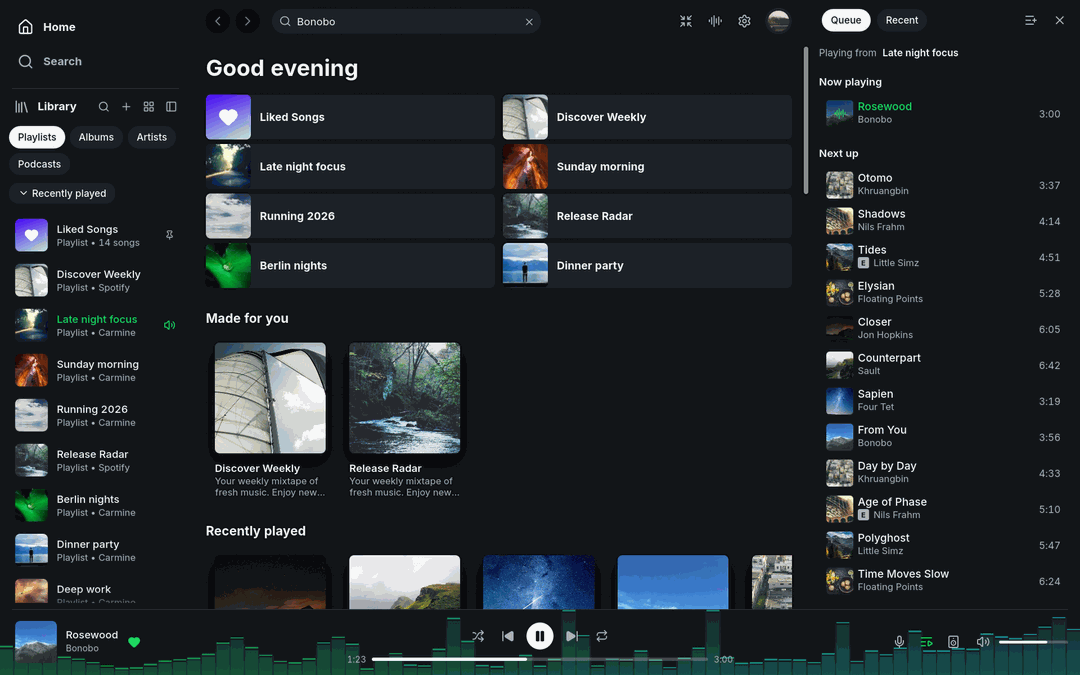
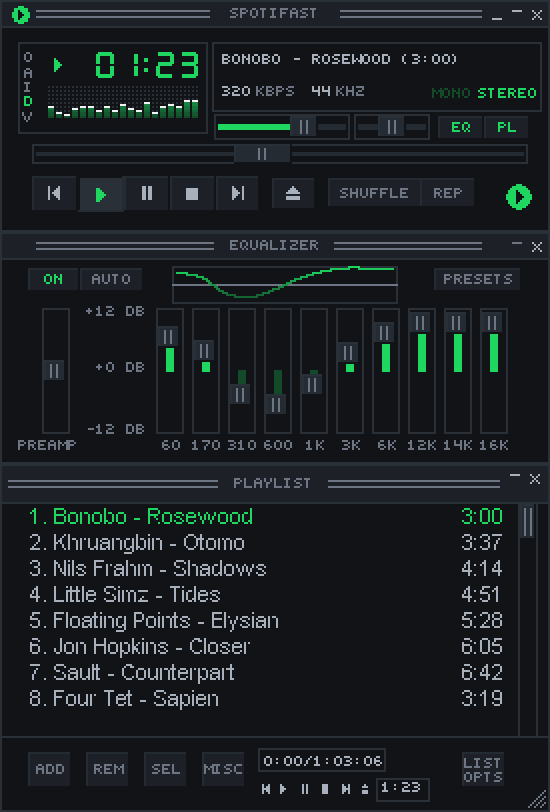
Spotifast 是一款用 Rust 编写的原生 Spotify 桌面客户端,界面基于 egui,不依赖浏览器引擎,启动和操作都很轻快。它支持播放、搜索、浏览歌单与专辑,还带均衡器、可视化效果和小型播放器模式,适合想要更流畅桌面听歌体验的 Linux、macOS 和 Windows 用户。注意播放需要 Spotify Premium 账号。
核心亮点:
- Rust 编写,原生界面,无浏览器引擎,运行轻快
- 支持歌单、喜欢歌曲、专辑与艺人浏览搜索
- 内置均衡器与可视化效果,含 MilkDrop 风格
- 提供迷你播放器模式,可切换两种播放后端
当前版本 v0.17.2(2026-11-17 发布),开源协议 MIT,GitHub 10,420 star。

核心信息
| 软件名称 | Spotifast(crmne/spotifast) |
| 当前版本 | v0.17.2 |
| 更新日期 | 2026-11-17 |
| 开源协议 | MIT |
| 软件分类 | Linux 桌面 |
| 关键词 | audio、cross-platform、desktop-app、egui、gui、librespot |
本次更新内容
- 新版本可自动下载并在下次启动时安装更新,设置中新增自动更新开关,包管理器安装的版本会显示更新命令。
- 修复了在手机上选歌、自动播放接管后以及点击队列深处歌曲时无法正常播放的问题。
- Windows 上 Soloist 恢复可用,若新构建持续崩溃会自动回退到此前可用的版本。
- 点击心形图标可打开播放列表清单,集中勾选或取消喜欢歌曲和各播放列表。
- 主题配色更贴合主题定义,面板、选中项和弱化文字使用主题自带颜色。
查看官方英文更新日志(原文)
Spotifast 0.17.2 gets Soloist playing again on Windows, where Spotify's newest build of it crashes on start, and fixes songs that wouldn't start: a song picked on your phone, a song after autoplay took over, and a song far down the queue. Updates now install themselves at the next start, and the heart opens a checklist of your playlists. If you missed 0.17, it brought Windows Media Player skins that really run, two skins of our own and MilkDrop inside them: see the [0.17.0 notes](https://github.com/crmne/spotifast/releases/tag/v0.17.0) and the film.

**Download Spotifast:** [Mac](https://github.com/crmne/spotifast/releases/download/v0.17.2/spotifast-v0.17.2-macos-universal.dmg) · [Windows](https://github.com/crmne/spotifast/releases/download/v0.17.2/spotifast-v0.17.2-x86_64-pc-windows-msvc.msi) · [Windows ARM](https://github.com/crmne/spotifast/releases/download/v0.17.2/spotifast-v0.17.2-aarch64-pc-windows-msvc.msi) · [Linux](https://github.com/crmne/spotifast/releases/download/v0.17.2/spotifast-v0.17.2-x86_64-unknown-linux-gnu.tar.gz) · [Linux ARM](https://github.com/crmne/spotifast/releases/download/v0.17.2/spotifast-v0.17.2-aarch64-unknown-linux-gnu.tar.gz) · [Flatpak](https://github.com/crmne/spotifast/releases/download/v0.17.2/spotifast-v0.17.2-x86_64.flatpak) · [AppImage](https://github.com/crmne/spotifast/releases/download/v0.17.2/spotifast-0.17.2-x86_64.AppImage) · [AppImage ARM](https://github.com/crmne/spotifast/releases/download/v0.17.2/spotifast-0.17.2-aarch64.AppImage)

## New

- **Updates install themselves.** A copy that updates itself downloads the new version and installs it the next time Spotifast starts, or right away if you restart. Updates have their own section in Settings, with an **Update automatically** switch. A copy installed by a package manager shows the command that updates it, ready to copy. By @crmne.
- **The heart opens a checklist of your playlists,** with their covers, as on Spotify's phone app: tick or untick Liked Songs and any playlist in one place. By @Espaye in [#1151](https://github.com/crmne/spotifast/pull/1151).
- **Omarchy themes bring their own shades.** Panels, selections and muted text take the colours the theme defines, instead of blends of its background and foreground. By @diverseau in [#1308](https://github.com/crmne/spotifast/pull/1308).

## Fixed

- **Soloist plays again on Windows.** Spotify's newest Soloist build crashes as it starts on Windows, so Spotifast said "Soloist didn't start". A new build that keeps crashing now sends Spotifast back to the last build that worked, until Spotify publishes a better one. Reported in [#1220](https://github.com/crmne/spotifast/issues/1220). By @crmne.
- **A song picked on your phone plays, not the playlist's first.** The Spotify app names the song in a way librespot misread. The fix is librespot's, by @briandet in [librespot#1795](https://github.com/librespot-org/librespot/pull/1795). Reported in [#1303](https://github.com/crmne/spotifast/issues/1303).
-
下载地址
以下为官方原包,本站不二次打包;多个文件为不同包型,按需选择其中一个下载即可:
spotifast-0.17.2-x86_64.AppImage(官方原包 | 20.1 MB)
spotifast-v0.17.2-source.tar.gz(官方原包 | 51.8 MB)
spotifast-v0.17.2-x86_64-unknown-linux-gnu.tar.gz(官方原包 | 20.9 MB)
spotifast_0.17.2_amd64.deb(官方原包 | 21.4 MB)
✅ 上方 SHA256 与官方发布值一致,可自行核对。
快速上手
- 运行下载好的安装包,按提示完成安装后从开始菜单启动 Spotifast。
- 首次启动后登录 Spotify 账号,免费账号只能浏览和搜索,播放需要 Premium。
- 登录后按引导选择播放方式:Soloist 播放器或内置播放器,选择会被记住。
- 若选 Soloist,按引导完成密钥设置与一次性配对,再在 Spotify 中选择名为 This computer 的设备。
- 在界面中浏览播放列表、喜欢的歌曲、专辑和艺人,点击即可开始播放。
提示:播放需 Spotify Premium,免费账号仅能浏览和搜索。
讨论(0 条)