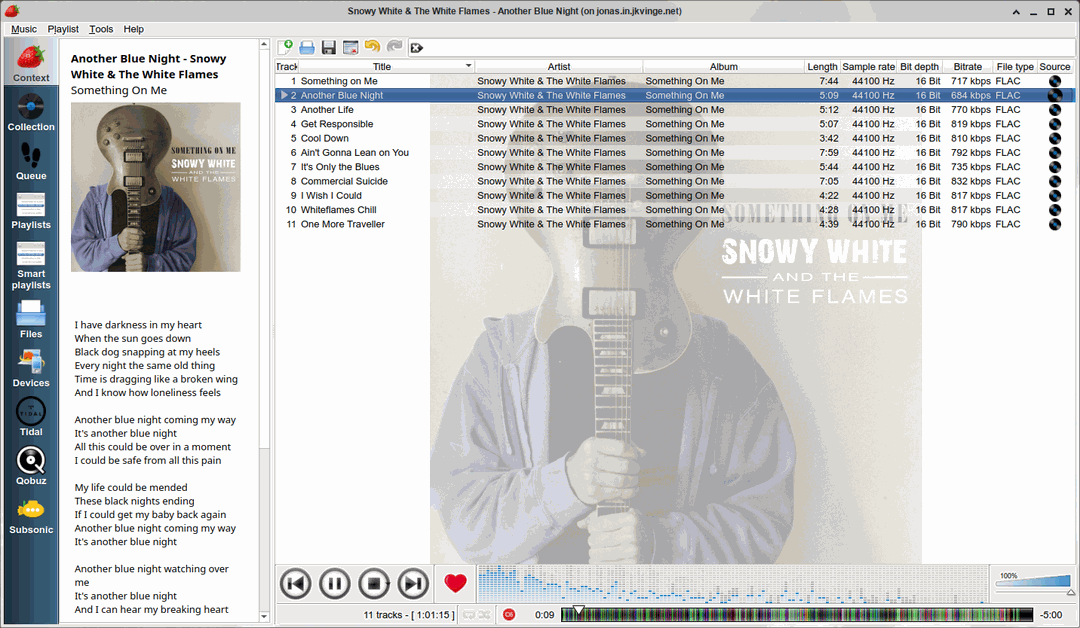
Strawberry 是一款面向发烧友和音乐收藏者的本地音乐库管理与播放器,源自 Clementine 分支,用 C++ 和 Qt 写成。它支持大量无损与常见音频格式,在 Linux 上提供位完美播放,还能整理标签、抓取封面和歌词,适合在意音质、想把本地曲库打理得井井有条的人。
核心亮点:
- 支持 FLAC、DSD、ALAC 等大量音频格式
- Linux 下位完美播放,满足发烧友需求
- 可编辑标签并借声学指纹补全缺失信息
- 智能动态播放列表与均衡器、波形进度条
当前版本 v1.2.31(2026-10-02 发布),开源协议 GPL-3.0,GitHub 4,085 star。

核心信息
| 软件名称 | Strawberry(strawberrymusicplayer/strawberry) |
| 当前版本 | v1.2.31 |
| 更新日期 | 2026-10-02 |
| 开源协议 | GPL-3.0 |
| 软件分类 | Linux 桌面 |
| 关键词 | alsa、audio、audio-player、bitperfect、bitperfect-player、c-plus-plus |
本次更新内容
- 修复随机播放时跳曲、重复播放已播歌曲的问题,并解决切换歌曲或删除当前曲目后随机顺序错乱的情况。
- 修复歌单操作中移动、撤销、复制歌曲时误删或共享曲目导致保存异常的问题。
- 新增静音独立状态、侧边栏快捷键、扫描播放模式,并支持 Plex 和 Jellyfin 音乐服务。
- 改进歌词和封面搜索,新增凭据管理器安全存储密码,并优化深色主题显示。
- Windows 平台修复 ASIO 播放不稳定和设备列表问题,macOS 修复播放列表空白区域颜色绘制。
查看官方英文更新日志(原文)
## Bugfixes:
- Fixed shuffle skipping tracks and repeating tracks already played, when adding tracks, removing the current track, choosing a track, turning on shuffle while playing or repeating the playlist
- Fixed going back to the previous track changing the shuffle order
- Fixed album and grouping shuffle skipping albums or groupings when choosing a track
- Fixed inside album shuffle and album repeat not finding the next track on the same album after removing the current track
- Fixed track repeat playing the wrong track after removing the current track
- Fixed moving several tracks that are not next to each other to another playlist removing the wrong tracks from the source playlist
- Fixed undo right after startup removing the restored playlist
- Fixed undo after repopulating a dynamic playlist acting on the wrong tracks
- Fixed "play now" playing the wrong track when inserting tracks into an automatically sorted playlist
- Fixed tracks copied to another playlist, or added to the same playlist again, being shared between the playlists, which broke updating and saving the remaining tracks when one of them was removed
- Fixed OpenTidal cover provider search (API changed)
- Fixed songlyrics.com and letras.mus.br lyrics being blocked
- (Windows) Fixed unstable ASIO playback
- (Windows|MinGW-W64) Fixed ASIO device listing

## Enhancements:
- Volume mute is now a separate state instead of setting the volume to zero, and is shown in the volume slider and on-screen display
- Use uchardet to detect the text encoding of CUE sheets and M3U and PLS playlists (#2336)
- Use existing src/apicredentials.h when building from source
- Improved detecting a dark palette and calculating the playlist alternating row color
- Added Ctrl+B shortcut for showing the sidebar
- Added a "Scan tracks" repeat mode which only plays a part of each track
- Added a credentials manager which stores the Subsonic password in the system keyring (libsecret, KWallet, GNOME Keyring, macOS Keychain or Windows Credential Manager)
- Added an option to disable notifications when the title of a radio stream changes
- Added options to show the album edition and audio quality in Qobuz search results, and the audio quality in Tidal search results
- Added Plex support
- Added Jellyfin support
- Added a bitrate setting for Spotify (96, 160 or 320 kbit/s)
- Show a warning in the Spotify settings when the GStreamer Spotify plugin is too old to play tracks (older than 0.14.4), and explain the possible causes when a Spotify track can't be played
- (macOS) Fixed alternating row colors being painted in the empty area below the playlist
- (Windows) Disabled fading when ASIO output is selected

## Contributors
- @jonaski
- @SanteriK123
- @ramiropo
- @vista747
- @nixietab
- @mzilinski
- @Vinzzzze

**Full Changelog**: https://github.com/strawberrymusicplayer/strawberry/compare/1.2.30...1.2.31

Linux AppImage, macOS and Windows release is available on Patreon:
下载地址
以下为官方原包,本站不二次打包;多个文件为不同包型,按需选择其中一个下载即可:
strawberry-dbgsym_1.2.31-bookworm_amd64.deb(官方原包 | 128.1 MB)
strawberry-dbgsym_1.2.31-forky_amd64.deb(官方原包 | 147.6 MB)
strawberry-dbgsym_1.2.31-trixie_amd64.deb(官方原包 | 139.0 MB)
strawberry_1.2.31-bookworm_amd64.deb(官方原包 | 7.0 MB)
strawberry_1.2.31-forky_amd64.deb(官方原包 | 7.4 MB)
strawberry_1.2.31-noble_amd64.deb(官方原包 | 7.2 MB)
strawberry_1.2.31-resolute_amd64.deb(官方原包 | 7.2 MB)
strawberry_1.2.31-stonking_amd64.deb(官方原包 | 7.3 MB)
strawberry_1.2.31-trixie_amd64.deb(官方原包 | 7.1 MB)
✅ 上方 SHA256 与官方发布值一致,可自行核对。
快速上手
- 首次启动后,在设置中指定音乐文件夹,让 Strawberry 扫描并整理你的音乐收藏。
- 在音乐库中浏览歌曲,双击即可播放,也可将曲目拖入播放列表管理队列。
- 使用智能播放列表按条件自动归类歌曲,或编辑标签补全缺失的曲目信息。
- 在均衡器与音量标准化选项中调整音效,获得适合自己设备的听感。
提示:播放前可在设置里开启音量标准化,避免不同歌曲音量忽大忽小。
讨论(0 条)