Ytmdesktop 是把 YouTube Music 装进桌面的开源客户端,基于 Electron 打造,支持后台播放不打断,还能接入 Discord 展示正在听的歌。它适合习惯在电脑上听歌、又不想一直开着浏览器标签页的用户,Windows、Linux、Mac 都有对应安装方式。
核心亮点:
- 桌面端畅听 YouTube Music,无需常开浏览器
- 后台播放不中断,切窗口也不影响听歌
- 支持 Discord 状态展示,分享正在听的曲目
- 跨平台可用,提供多种包管理器安装渠道
当前版本 v2.1.0(2026-10-29 发布),开源协议 GPL-3.0,GitHub 6,752 star。

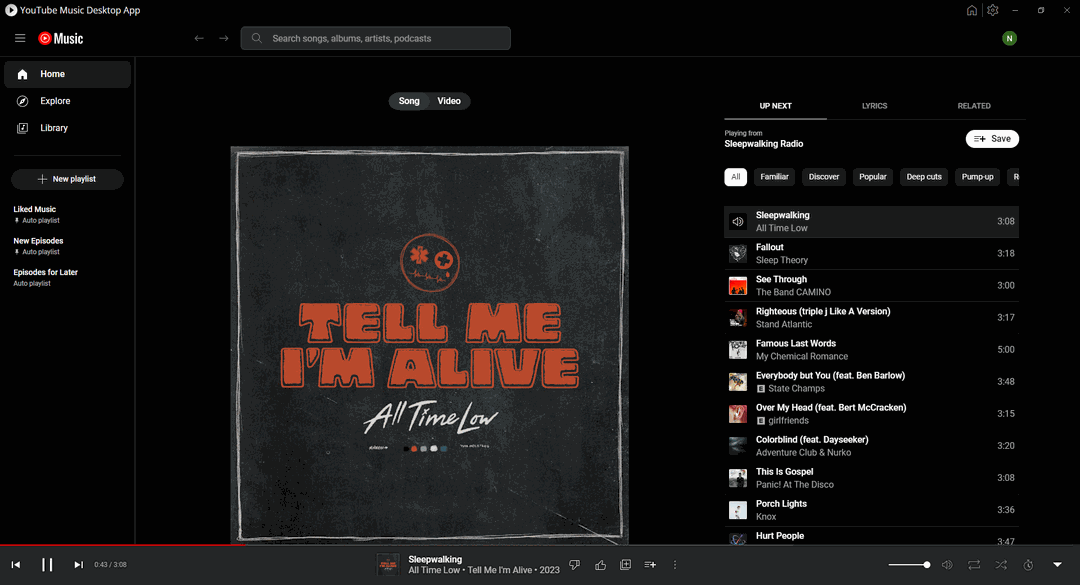
核心信息
| 软件名称 | Ytmdesktop(ytmdesktop/ytmdesktop) |
| 当前版本 | v2.1.0 |
| 更新日期 | 2026-10-29 |
| 开源协议 | GPL-3.0 |
| 软件分类 | Linux 桌面 |
| 关键词 | app、desktop、discord、electron、electron-application、javascript |
本次更新内容
- 新增定时歌词功能,歌词随播放同步滚动,提升跟唱体验。
- 引入增强媒体服务,支持系统媒体控制和迷你播放器,方便快捷操作。
- 增加更多快捷键和右键菜单选项,操作更高效。
- 修复了因网站更新导致应用无法加载的问题,并增强容错性。
查看官方英文更新日志(原文)
## What's Changed
This is a big one and a lot of things have changed but most will not be user facing. This release changes a lot of the internals of the application which will help us maintain things better, faster, and hopefully provide more features quicker over time. Many features have been rewritten because of this change and may provide a better user experience.

With that said this release does contain a lot of new features and other changes.

### Features
- Timed lyrics when available for the current video. We source this from YTM directly and replace the lyrics tab
  - <details>
	<summary>Known potential issues</summary>
	This is non-exclusive to timed lyrics but there are cases where the lyrics do not align with the currently playing video and our timed lyrics system reflects this as well. This is an issue with YTM as it occurs even without our timed lyrics system.
	</details>
- Experimental enhanced media service (default enabled with this release) powered by [Xosms](https://github.com/NovusTheory/xosms). If you encounter issues you can disable it under Integrations -> Enhanced media service
  - On Windows this allows us to provide more information and functionality if you use a third party flyout program such as Fluent Flyouts.
  - On Linux this allows us to provide our own MPRIS based service (org.mpris.MediaPlayer2.ytmdesktop). Enhanced functionality is provided such as scroll to adjust player volume, shuffle, and repeat actions.
  - macOS support exists but is far more experimental and not as thoroughly tested.
- Miniplayer that can be opened from the top when you don't want a large YTM window taking up your space and something you can pin on top to control the player.
  - *Note: If you are on linux using wayland you will need to use your native window manager to pin the miniplayer always on top.*
- More shortcuts for managing the player.
  - *Note: If you are on linux using wayland this feature will not likely work correctly for now.*
- More context menu actions for ease of use
  - Opening the context menu on an image allows opening it in your browser
  - Opening the context menu on a text box will provide undo, redo, copy, cut, paste, and select all actions.

### Developer Features
- Companion Server
  - `shuffleEnabled` state is now provided.
  - Queue modification commands are now provided allowing you to arbitrarily add videos or playlists via id to the queue in any position. You can also remove or move videos around in the queue.
  - When the user is offline (no internet) thumbnails for the current song may be provided as a base64 data url containing the image instead of a link to the thumbnail.
  - mDNS broadcasting provided for the companion server under the name `_ytmdesktop._tcp`. If you are making a third party application such as a mobile app to control YTMDesktop you can use mDNS to find the player instead of scanning IPs or asking the user for an IP.
- Read-only IPC server that allows rece
下载地址
以下为官方原包,本站不二次打包,点击直接下载:
youtube-music-desktop-app_2.1.0_amd64.deb(官方原包 | 94.3 MB)
✅ 上方 SHA256 与官方发布值一致,可自行核对。
快速上手
- 运行下载好的安装包,按提示完成安装并启动程序
- 首次启动后等待应用加载 YouTube Music 界面,按需登录账号
- 在界面中浏览并播放音乐,使用播放控制按钮管理播放
- 在设置中调整应用选项,如主题、托盘等偏好
提示:登录后可同步歌单与播放记录,体验更完整
讨论(0 条)