Ad-silence 是一款轻量级安卓静音工具,能精准屏蔽 Accuradio、Spotify 等应用的广告通知。支持自定义关键词与延迟恢复,体积小巧且无广告。适合追求纯净听歌体验、希望手动管理通知音量的用户,开源免费,配置灵活。
核心亮点:
- 支持主流音乐应用及任意自定义应用的通知静音
- 通过关键词匹配精准识别广告,避免误触静音
- 提供延迟恢复功能,确保广告播放完毕再恢复音量
- 极简界面设计,安装包极小,完全开源无内购
当前版本 v0.8.1(2026-09-29 发布),开源协议 GPL-3.0,GitHub 407 star。

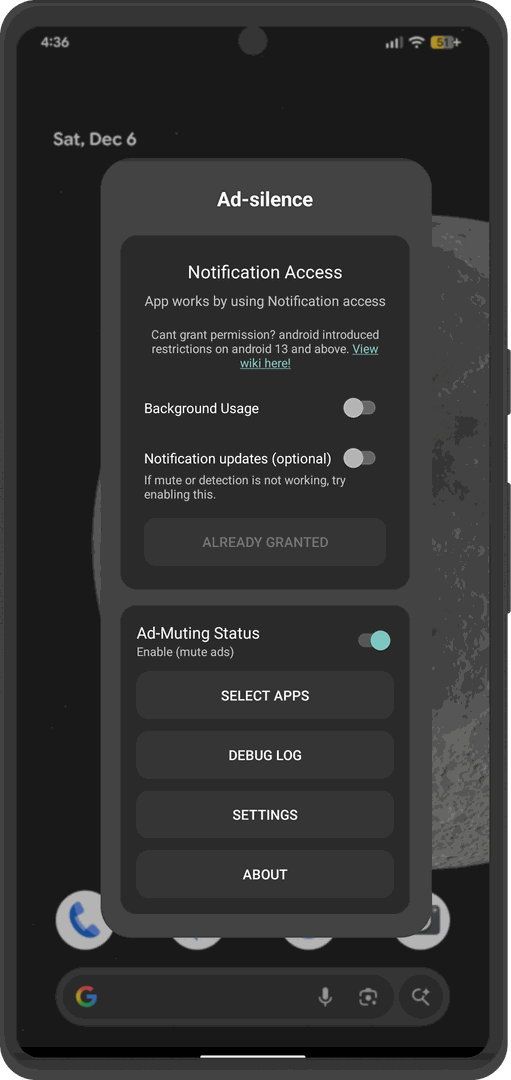
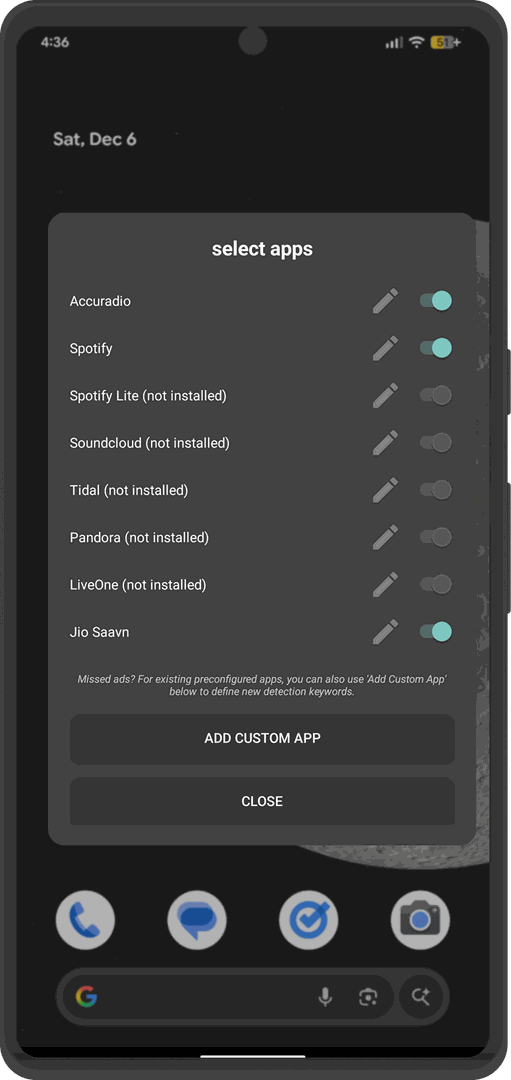
核心信息
| 软件名称 | Ad-silence(aghontpi/ad-silence) |
| 当前版本 | v0.8.1 |
| 更新日期 | 2026-09-29 |
| 开源协议 | GPL-3.0 |
| 软件分类 | Android 开源 APK |
| 关键词 | accuradio、ad-block、adblocker、android、any-app、kotlin |
本次更新内容
- 新增空文本关键词匹配,解决特定应用广告无法拦截的问题
- 优化添加应用界面设计,提升自定义规则时的操作体验
- 修复权限授予后控制选项不显示的问题,确保功能正常启用
- 适配最新安卓系统,提升应用稳定性与资源运行效率
查看官方英文更新日志(原文)
***Stable release — requires Android 5.0 (API 21) or later.***

## Added
- **Empty keyword matching:** Custom app rules can match notifications with empty text, including blank AccuRadio ads ([#326](https://github.com/aghontpi/ad-silence/pull/326); commits [`50dc157`](https://github.com/aghontpi/ad-silence/commit/50dc157c8466a59d88daf2a915151c48779df97d) and [`2af6fe1`](https://github.com/aghontpi/ad-silence/commit/2af6fe11da20389969faf34abdfd30fd7f8f84f1)).
- **Custom app screen:** Updated the add-app screen design ([#326](https://github.com/aghontpi/ad-silence/pull/326); commit [`7d13fc5`](https://github.com/aghontpi/ad-silence/commit/7d13fc54ccaa415ca0f8711ad31c04267e8f053b)).

## Updates
- **Android 16 support:** Targets Android 16 (API 36; commit [`7daccb1`](https://github.com/aghontpi/ad-silence/commit/7daccb12500fc0290730d67f7b741825220e8f02), included in release PR [#327](https://github.com/aghontpi/ad-silence/pull/327)).
- **Build tools:** Upgrades Gradle for Java 25 and updates Gradle 9 DSL usage ([#374](https://github.com/aghontpi/ad-silence/pull/374); commits [`70c904a`](https://github.com/aghontpi/ad-silence/commit/70c904a173a00a9124babe839726bd28777e69e3) and [`746d063`](https://github.com/aghontpi/ad-silence/commit/746d063bd7dd82cf67a9d2915ade67003e3b60c8)).
- **Release builds:** Signed release builds are produced from Android Studio instead of CI ([#374](https://github.com/aghontpi/ad-silence/pull/374); commit [`b85151e`](https://github.com/aghontpi/ad-silence/commit/b85151e65add554f23ecde92e2be316fd24da166)).
- **Resource shrinking:** Uses R8 optimized resource shrinking ([#374](https://github.com/aghontpi/ad-silence/pull/374); commit [`96633e9`](https://github.com/aghontpi/ad-silence/commit/96633e9f774c76b068fb006f6b75ddd8b09b2605)).

## Fixes
- **Permission setup:** App controls appear only after notification access is granted ([#374](https://github.com/aghontpi/ad-silence/pull/374); commit [`c2db242`](https://github.com/aghontpi/ad-silence/commit/c2db2428c543b77ddeb2ce6c60f29b06346c4bfa)).
- **AccuRadio detection:** Adds debug logging for empty notification match decisions ([#326](https://github.com/aghontpi/ad-silence/pull/326), [#374](https://github.com/aghontpi/ad-silence/pull/374); commits [`2af6fe1`](https://github.com/aghontpi/ad-silence/commit/2af6fe11da20389969faf34abdfd30fd7f8f84f1) and [`88961a6`](https://github.com/aghontpi/ad-silence/commit/88961a60956b5af6c0fbec45722a9abaccbf0176)).

## Download
- **Ad-silence-v0.8.1.apk** — Install this signed APK directly. Android updates require the same signing key.

**You can also get Ad-silence on Google Play and F-Droid.**

<p align="left">
<a href="https://play.google.com/store/apps/details?id=bluepie.ad_silence&pcampaignid=pcampaignidMKT-Other-global-all-co-prtnr-py-PartBadge-Mar2515-1"><img alt="Get it on Google Play" height="72px" src="https://play.google.com/intl/en_us/badges/static/images/badges/en_badge_web_generic.png"/></a>
<a href="https://f-droid.org/packages/blu
下载地址
以下为官方原包,本站不二次打包,点击直接下载:
Ad-silence-v0.8.1.apk(Android 安装包 | 167.5 KB)
✅ 上方 SHA256 与官方发布值一致,可自行核对。
快速上手
- 运行下载好的 APK 安装包,按照系统提示完成应用的安装流程。
- 首次启动 Ad-silence,在弹窗请求中授予通知使用权,以便软件读取通知内容。
- 点击主界面 “Select Apps” 按钮,浏览列表并勾选需要静音屏蔽广告的应用。
- 如需屏蔽其他应用,点击 “Add Custom App” 添加自定义应用并保存配置。
提示:自定义应用时,Package Name 必填,Keywords 用于精准匹配广告通知内容。
讨论(0 条)