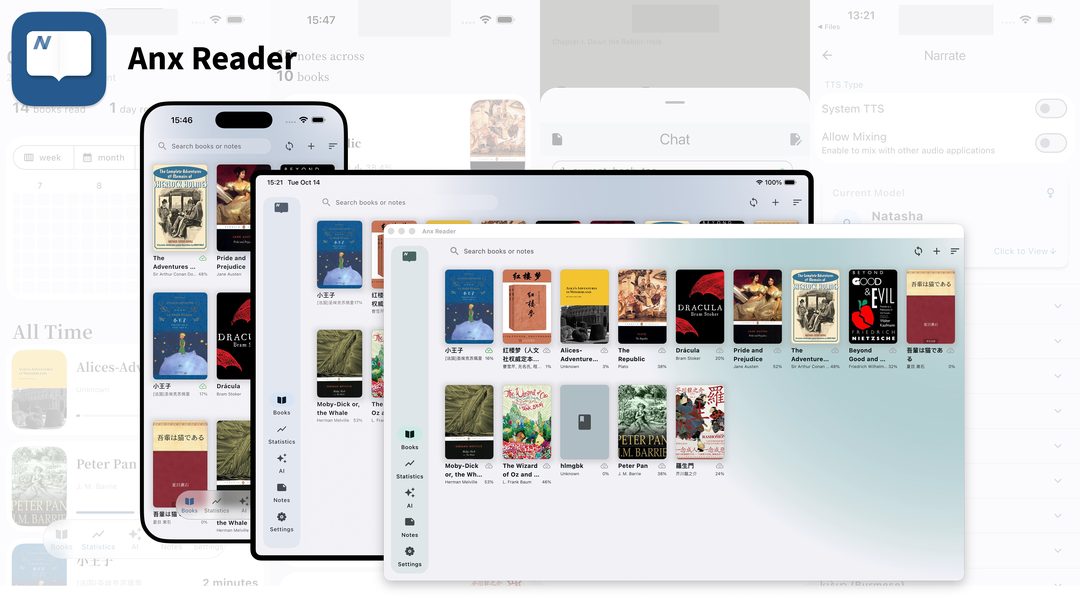
Anx Reader 是一款用 Flutter 打造的开源电子书阅读器,支持多种主流电子书格式,内置 AI 伴读能生成思维导图、词典翻译和观点分析。界面现代、排版可调,还带笔记工作区和阅读统计。适合爱读书、想用 AI 辅助理解、又看重跨平台同步的 Android 用户。
核心亮点:
- 支持多种电子书格式,阅读排版可自由调节
- AI 伴读生成思维导图、词典翻译与观点分析
- 笔记工作区支持多色标记与导出分享
- WebDAV 同步书籍、笔记和阅读进度
当前版本 v1.14.0(2026-03-19 发布),开源协议 MIT,GitHub 9,264 star。


核心信息
| 软件名称 | Anx-reader(Anxcye/anx-reader) |
| 当前版本 | v1.14.0 |
| 更新日期 | 2026-03-19 |
| 开源协议 | MIT |
| 软件分类 | Android 开源 APK |
| 关键词 | dart、ebook-reader、flutter |
本次更新内容
- 新版本优化了翻译服务,改用更稳定的接口,并迁移了已保存的全文翻译偏好。
- AI 功能大幅增强:支持独立推理内容展示、多服务商配置、多密钥轮换、速率限制和聊天界面自定义。
- 阅读器新增背景图片适配模式、模糊与透明度调节,并修复了主题颜色异常导致的崩溃问题。
- 文本转语音功能改进:可从选中文本开始朗读、点击暂停/继续、新增悬浮控制按钮,并修复了相关异常。
- 修复了桌面端资源清理、滚动卡顿、图片保存权限等问题,提升了整体稳定性。
查看官方英文更新日志(原文)
## 1.14.0
- Fix(translate): Remove legacy Microsoft reverse-engineered translation service and migrate saved full-text translation preference to Microsoft Azure API
- Fix(l10n): Remove legacy Microsoft translation localization entries
- Feat(ai): Support separate AI reasoning content with lightweight collapsible thinking UI in chat and stream views (#787)
- Feat(reader): Add background image fit mode setting with cover and stretch options
- Feat(appearance): Add setting to toggle action button labels visibility in selection context menu
- Feat(reader): Add background image blur and opacity controls in reading settings (#753)
- Feat(tts): Add Narrator option to text selection toolbar to start TTS from selected text (#794) Thanks @deskangel
- Feat(tts): Add click to pause/resume TTS playback on currently reading text (#794) Thanks @deskangel
- Feat(tts): Add floating action button in reader for quick TTS controls (previous, pause/resume, next, stop) (#723)
- Feat(reader): Add Ctrl+[ and Ctrl+] page turning shortcuts on macOS, support Logitech Options+ mouse button mapping (#794) Thanks @deskangel
- Feat(ai): Add global AI RPM rate limiting in AI service layer
- Feat(ai): Add AI Provider Configuration Center with support for OpenAI-compatible, Claude, and Gemini protocols
- Feat(ai): Support multiple API keys per provider with round-robin rotation
- Feat(ai): Add provider-level reasoning_effort configuration with auto mode and advanced settings entry
- Feat(ai): Add provider test connection with streaming preview
- Feat(ai): Add AI chat display mode settings with adaptive, split, and popup options
- Feat(ai): Add resizable AI panel with drag to resize, sizes persisted
- Feat(ai): Add AI panel position settings (bottom/right) for non-popup modes
- Feat(ai): Add font size setting for AI chat via three-dot menu
- Feat(ai): Add quick model switcher in AI chat input bar (tune icon button)
- Feat(ai): Add model picker in provider detail page with showMenu dropdown after fetching
- Fix(ui): Fix context menu action buttons layout and icon color issues when labels are hidden
- Fix(reader): Fix background image effects not applying and switch reader background fill mode to cover (#753)
- Fix(reader): Fix RangeError crash when read theme color is null/invalid (#759)
- Fix(tts): Fix TTS type selection having no effect when changed in reading interface (#794) Thanks @deskangel
- Fix(tts): Fix incorrect reading position after modifying pitch or rate (#794) Thanks @deskangel
- Fix(tts): Fix crash when SystemTts speak() receives null text from WebView
- Fix(ai): Fix unable to use AI for full-text translation
- Fix(ai): Fix test connection using default provider instead of current provider
- Fix(ai): Fix AI crash prevention by adding guards for null webViewEnvironment on Windows
- Fix(ai): Fix type cast error when using Gemini AI with tools (#747)
- Fix(reader): Desktop resource lifecycle, WebView stability, and scroll UX optimization (#790) Thanks @yi124773651
- Fi
下载地址
以下为官方原包,本站不二次打包;多个文件为不同包型,按需选择其中一个下载即可:
Anx-Reader-android-1.14.0-arm64-v8a.apk(Android 安装包 | 26.2 MB)
Anx-Reader-android-1.14.0-armeabi-v7a.apk(Android 安装包 | 26.5 MB)
Anx-Reader-android-1.14.0-universal.apk(Android 安装包 | 51.8 MB)
Anx-Reader-android-1.14.0-x86_64.apk(Android 安装包 | 26.4 MB)
✅ 上方 SHA256 与官方发布值一致,可自行核对。
快速上手
- 在 Android 设备上运行下载好的 APK 安装包,按系统提示完成安装并打开应用
- 首次启动后进入书架界面,点击添加或导入按钮,把本地电子书文件加入书架
- 在书架点开一本书开始阅读,阅读中可调整字体大小、行距、边距和主题背景
- 阅读时使用笔记功能记录想法,可按时间或章节排序并导出为文本文件
- 在设置中配置 WebDAV 同步,同步书籍、笔记与阅读进度
提示:按设备架构选择安装包,不确定时用通用版更稳妥。
讨论(0 条)