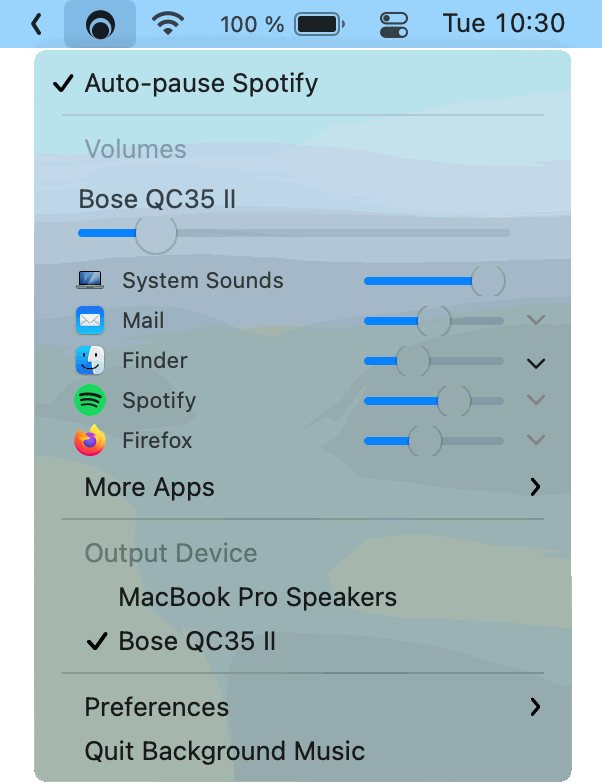
BackgroundMusic 是一款 macOS 音频管理工具,能在其他应用发声时自动暂停背景音乐,播放结束后再恢复,同时支持为每个应用单独调节音量。它适合习惯边听歌边工作、开会或看视频的用户,让音频切换不再手忙脚乱。
核心亮点:
- 其他应用发声时自动暂停背景音乐
- 支持为每个应用单独调节音量
- 系统级音频路由,兼容常见播放器
- 开源实现,可自行编译与定制
当前版本 v0.5.0(2026-06-10 发布),开源协议 GPL-2.0,GitHub 19,388 star。

核心信息
| 软件名称 | BackgroundMusic(kyleneideck/BackgroundMusic) |
| 当前版本 | v0.5.0 |
| 更新日期 | 2026-06-10 |
| 开源协议 | GPL-2.0 |
| 软件分类 | macOS 软件 |
| 关键词 | audio、audio-utility、cpp、macos、objective-c |
本次更新内容
- 新版本新增按应用单独静音按钮,并改进多个浏览器的独立音量控制,调节更灵活。
- 自动暂停延迟可自行设置,改善与视频网站的兼容性,播放体验更顺畅。
- 无音频播放时不再占用麦克风,系统麦克风提示只在真正播放时出现。
- 安装不再依赖特定转译环境,同时修复多处崩溃和菜单栏图标显示问题。
查看官方英文更新日志(原文)
If you don't know which file to download, you want `BackgroundMusic-0.5.0.pkg` and you can ignore the others.

## Changes since v0.4.3

### New
* Per-app mute button by @TwelfthFace in #843
* Configurable auto-pause delays, for better YouTube compatibility, by @jackdrowlands in #818
* Improved per-app volume support for Safari, Google Chrome, Microsoft Edge, Brave, Arc Browser, NAVER Whale and Discord. Thanks to @manzick (#741), @abdulkadiryugruk (#839) and @GloryWord (#852).
* Background Music now stops processing audio when nothing is playing, so macOS won't show the microphone indicator. It still shows while audio is playing. We're working on that. (2171d9f)
* Installs without needing Rosetta 2 installed (48bdcd1)
* Turning on debug logging now also enables it in Background Music's virtual audio driver (BGMDriver) (0f808cf)

### Fixes
* Fix a crash when an app's volume is set with no bundle ID by @abdulkadiryugruk and @kyleneideck in #839
* Fix the volume icon not being centred in the menu bar by @7Backwards in #767
* Fix multiple crashes in Background Music.app by @johzzy in #777 and #778
* Fix a theoretical crash (use-after-free) in audio playthrough (5158af0)
* Fix the "device is running" listener doing nothing (c235bc9)
* Fix BGMXPCHelper showing as "Kyle Neideck" in System Settings (86ca21c)

### Under the hood
* Code cleanup and refactoring to support C++11 by @johzzy in #779 and #781, and a log-message fix in #776
* Update Homebrew installation instructions by @khipp in #785
* Fix BGMDriver and BGMXPCHelper debug builds not loading on recent macOS (8769ff7)
* Fix warnings on Xcode 26.5 (f5435da)
* Remove `BGM_WrappedAudioEngine` and other dead code (035e4de)

## New Contributors
* @manzick made their first contribution in #741
* @7Backwards made their first contribution in #767
* @johzzy made their first contribution in #776
* @khipp made their first contribution in #785
* @jackdrowlands made their first contribution in #818
* @abdulkadiryugruk made their first contribution in #839
* @TwelfthFace made their first contribution in #843
* @GloryWord made their first contribution in #852 (partially merged so far)

**Full Changelog**: https://github.com/kyleneideck/BackgroundMusic/compare/v0.4.3...v0.5.0
下载地址
以下为官方原包,本站不二次打包;多个文件为不同包型,按需选择其中一个下载即可:
BackgroundMusic-0.5.0.pkg(官方原包 | 787.9 KB)
build-artifacts-v0.5.0.zip(便携版·解压即用 | 8.8 MB)
✅ 上方 SHA256 与官方发布值一致,可自行核对。
快速上手
- 双击运行下载好的安装包,按提示完成安装,安装后无需重启电脑。
- 打开「应用程序」文件夹,启动 Background Music,它会自动设为默认输出设备。
- 在菜单栏打开 Background Music,为各应用拖动音量滑块,可把安静的应用调到超过最大音量。
- 需要录音时,打开 QuickTime Player 选择「文件 > 新建音频录制」,点录制按钮旁的下拉菜单,把输入设备选为 Background Music。
- 退出 Background Music 时,它会自动把默认输出设备恢复原状。
提示:若想开机自动运行,可在其偏好设置中勾选登录时启动。
讨论(0 条)