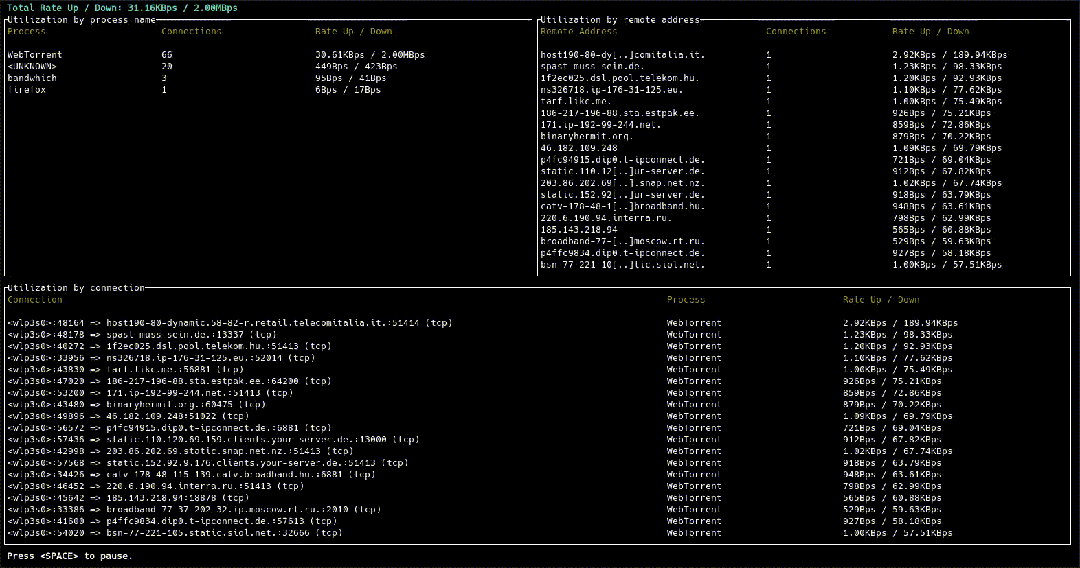
Bandwhich 是一款命令行网络流量监控工具,能实时显示每个进程、连接和远端地址占用的带宽,让偷跑流量的程序无处藏身。它按终端窗口大小自适应排版,后台尽力反查主机名,适合开发者和运维排查网络异常时使用。
核心亮点:
- 按进程、连接、远端地址实时展示带宽占用
- 终端界面自适应窗口大小,空间不足自动精简
- 后台尽力反查 IP 主机名,识别远端来源
- 跨平台支持,提供预编译二进制方便安装
当前版本 v0.23.1(2024-10-08 发布),开源协议 MIT,GitHub 12,071 star。

核心信息
| 软件名称 | Bandwhich(imsnif/bandwhich) |
| 当前版本 | v0.23.1 |
| 更新日期 | 2024-10-08 |
| 开源协议 | MIT |
| 软件分类 | Windows 效率工具 |
| 关键词 | bandwidth、cli、dashboard、networking |
本次更新内容
- 新版本修复了管道中断时的异常退出问题,程序现在能更平稳地结束运行。
- 更新了多项底层依赖组件,提升整体稳定性与兼容性。
- 改进了构建流程,使发布包生成更可靠。
查看官方英文更新日志(原文)
## The middle east is on fire, yet again.

This is a maintainance release with a bug fix and dependency bumps:
- Exit gracefully when there is a broken pipe error #429 - @sigmaSd

## What's Changed
* CI: Use Powershell Compress-Archive to create Windows binary zip by @cyqsimon in https://github.com/imsnif/bandwhich/pull/424
* chore(deps): bump mozilla-actions/sccache-action from 0.0.5 to 0.0.6 in the github-actions group by @dependabot in https://github.com/imsnif/bandwhich/pull/428
* Exit gracefully when there is a broken pipe error by @sigmaSd in https://github.com/imsnif/bandwhich/pull/429
* chore(deps): bump the dependencies group across 1 directory with 21 updates by @dependabot in https://github.com/imsnif/bandwhich/pull/430
* Fix breaking changes of `sysinfo` crate by @cyqsimon in https://github.com/imsnif/bandwhich/pull/431
* Fix `clippy::needless_lifetimes` warnings on nightly by @cyqsimon in https://github.com/imsnif/bandwhich/pull/432
* chore: `cargo update` by @cyqsimon in https://github.com/imsnif/bandwhich/pull/433


**Full Changelog**: https://github.com/imsnif/bandwhich/compare/v0.23.0...v0.23.1
下载地址
以下为官方原包,本站不二次打包,点击直接下载:
bandwhich-v0.23.1-x86_64-pc-windows-msvc.zip(便携版·解压即用 | 1.4 MB)
✅ 上方 SHA256 与官方发布值一致,可自行核对。
快速上手
- 解压下载好的压缩包,得到可执行文件,将其放到自己方便调用的目录中
- 以管理员身份打开命令提示符或终端,进入可执行文件所在目录
- 运行 bandwhich 命令启动程序,即可看到按进程、连接和远程地址统计的网络流量
- 在程序运行中调整终端窗口大小,界面会自动减少显示信息以适应窗口
提示:需以管理员权限运行,否则可能无法捕获网络流量。
讨论(0 条)