这是一款开源的 Windows 批量卸载工具,主打一次性清理大量程序、扫描卸载残留和识别孤儿应用,还能兼容商店应用、Steam 游戏和系统功能。界面信息密度高,适合想快速给电脑减负的普通用户,也照顾到 IT 运维的批量处理需求。
核心亮点:
- 批量勾选卸载,减少重复点击
- 自动清理注册表与文件残留
- 识别孤儿应用和无效卸载项
- 兼容商店应用与 Steam 游戏
当前版本 v6.3(2026-09-07 发布),开源协议 Apache-2.0,GitHub 22,204 star。

核心信息
| 软件名称 | Bulk Crap Uninstaller(Klocman/Bulk-Crap-Uninstaller) |
| 当前版本 | v6.3 |
| 更新日期 | 2026-09-07 |
| 开源协议 | Apache-2.0 |
| 软件分类 | Windows 效率工具 |
| 关键词 | application-manager、application-uninstaller、bloatware、bulk-actions、bulk-uninstall、cleaner |
本次更新内容
- 新版本可为卸载项添加自定义备注,方便用户标记和识别软件。
- 命令行工具新增结构化数据导出与模拟卸载模式,操作更安全灵活。
- 便携版启动器支持新款 ARM 架构电脑,扩大可用设备范围。
- 安装程序会按所选语言正确安装,并优化了错误提示与卸载流程。
- 新增多种语言界面支持,中文翻译同步更新,使用更友好。
查看官方英文更新日志(原文)
## What's Changed
### Features
* Add Custom Notes feature for uninstaller entries by @ronimuliawan in https://github.com/BCUninstaller/Bulk-Crap-Uninstaller/pull/939
* Add JSON output format to BCU-console list and export by @hazeliscoding in https://github.com/BCUninstaller/Bulk-Crap-Uninstaller/pull/967
* Add dry-run mode to BCU-console uninstall command by @hazeliscoding in https://github.com/BCUninstaller/Bulk-Crap-Uninstaller/pull/968
* (Portable ver) Add Windows ARM64 support to launcher and publish script by @NihilDigit in https://github.com/BCUninstaller/Bulk-Crap-Uninstaller/pull/990

### Fixes
* Clarify uninstall progress - leftover scan next step by @One-Simon in https://github.com/BCUninstaller/Bulk-Crap-Uninstaller/pull/930
* Fix BCU-console hanging on Console.ReadKey() after showing help by @hazeliscoding in https://github.com/BCUninstaller/Bulk-Crap-Uninstaller/pull/966
* Uninstall: Execute the Confirmed Directory Entry by @zbalkan in https://github.com/BCUninstaller/Bulk-Crap-Uninstaller/pull/987
* Do not offer to send access denied error during junk backup creation by @Klocman in ebeaf7a86928024f88460c5da853eca121a67dcb
* Show a better error message for missing or blocked BCU files and do not offer to send by @Klocman in 693765fb211745ad0587f7383f75954019f05b08
* Catch OverflowException in HandleDestroy by @Klocman in 47078f9eb52bce1f3de3e2ea20b82f89391408ca
* Add additional error checking to NSIS quiet uninstall by @Klocman in e17302ccf5fe8c61126ede061beadd5ea9caf285

### Translations
* Arabic language translation file update by @HomamLazaref in https://github.com/BCUninstaller/Bulk-Crap-Uninstaller/pull/957
* Updated Simplified Chinese translations by @Starkxim in https://github.com/BCUninstaller/Bulk-Crap-Uninstaller/pull/964
* Add Ukrainian language support by @serhiihoroshko in https://github.com/BCUninstaller/Bulk-Crap-Uninstaller/pull/965
* Update Ukrainian localization by @serhiihoroshko in https://github.com/BCUninstaller/Bulk-Crap-Uninstaller/pull/997
* Add Korean translation by @ptrsk in badd28c07b481d221f2586ca0bbeb476478046ef
* Add Greek translation by @buglocker in f249e9250f32cba0b28d1c52752c737cf226e1e5
* Merge French translation update by Thierry in d42f42df5191efd9572ebd00c3ad0123d4cfb11a

### Other
* Install the setup-selected language even when Extra Languages is deselected by @hazeliscoding in https://github.com/BCUninstaller/Bulk-Crap-Uninstaller/pull/969
* Installer: verify current .NET runtime bootstrap by @zbalkan in https://github.com/BCUninstaller/Bulk-Crap-Uninstaller/pull/986
* Fixed and cleaned up tests by @zbalkan in https://github.com/BCUninstaller/Bulk-Crap-Uninstaller/pull/985
* Updated MSTest dependencies by @zbalkan in https://github.com/BCUninstaller/Bulk-Crap-Uninstaller/pull/1003
* CI: Pin Actions and Publish Windows Test Results by @zbalkan in https://github.com/BCUninstaller/Bulk-Crap-Uninstaller/pull/988
* ci.yaml - force windows-2022 by @Klocman in e92a8d2c
下载地址
以下为官方原包,本站不二次打包;多个文件为不同包型,按需选择其中一个下载即可:
BCUninstaller_6.3.0_net8.0-windows10.0.18362.0.zip(安装版 | 11.8 MB)
BCUninstaller_6.3.0_setup.exe(安装版 | 9.0 MB)
✅ 上方 SHA256 与官方发布值一致,可自行核对。
快速上手
- 运行下载好的安装包,按向导完成安装;若系统缺少所需运行库,安装程序会自动处理
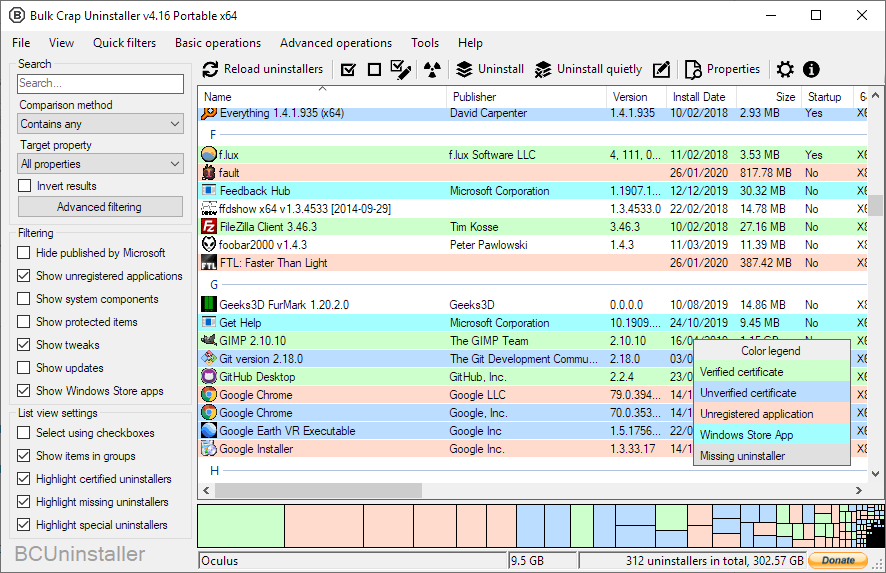
- 首次启动后等待程序扫描已安装应用,列表会显示可卸载的软件
- 在列表中勾选要移除的应用,点击卸载按钮并按提示确认,程序会调用各应用自带的卸载程序
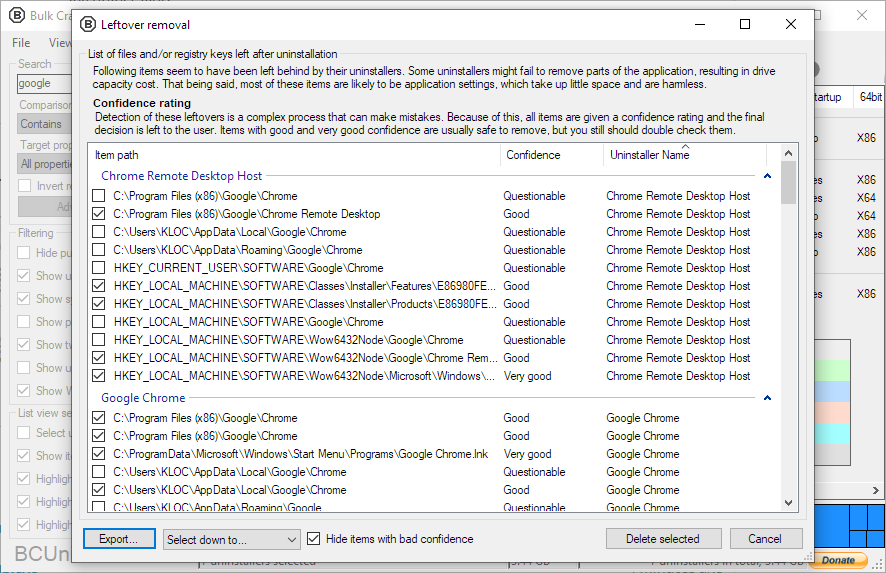
- 卸载完成后可清理残留文件与注册表项,并查看被标记为孤立的应用程序
- 需要批量处理时,可先保存当前选择为列表,之后按该列表一键执行卸载
提示:卸载前确认勾选的应用,避免误删重要软件。
讨论(0 条)