Capso 是 macOS 上的开源截图录屏工具,定位为 CleanShot X 的免费替代品。它把区域截图、窗口截图、滚动长图、录屏、OCR 和标注整合进一个悬浮工具栏,原生 Swift 编写,界面流畅。适合不想为截图功能付费的 Mac 用户、开发者,以及需要频繁做教程或文档配图的人。
核心亮点:
- 截图录屏二合一,一个悬浮工具栏切换全部模式
- 支持滚动长图拼接,网页聊天记录一次截全
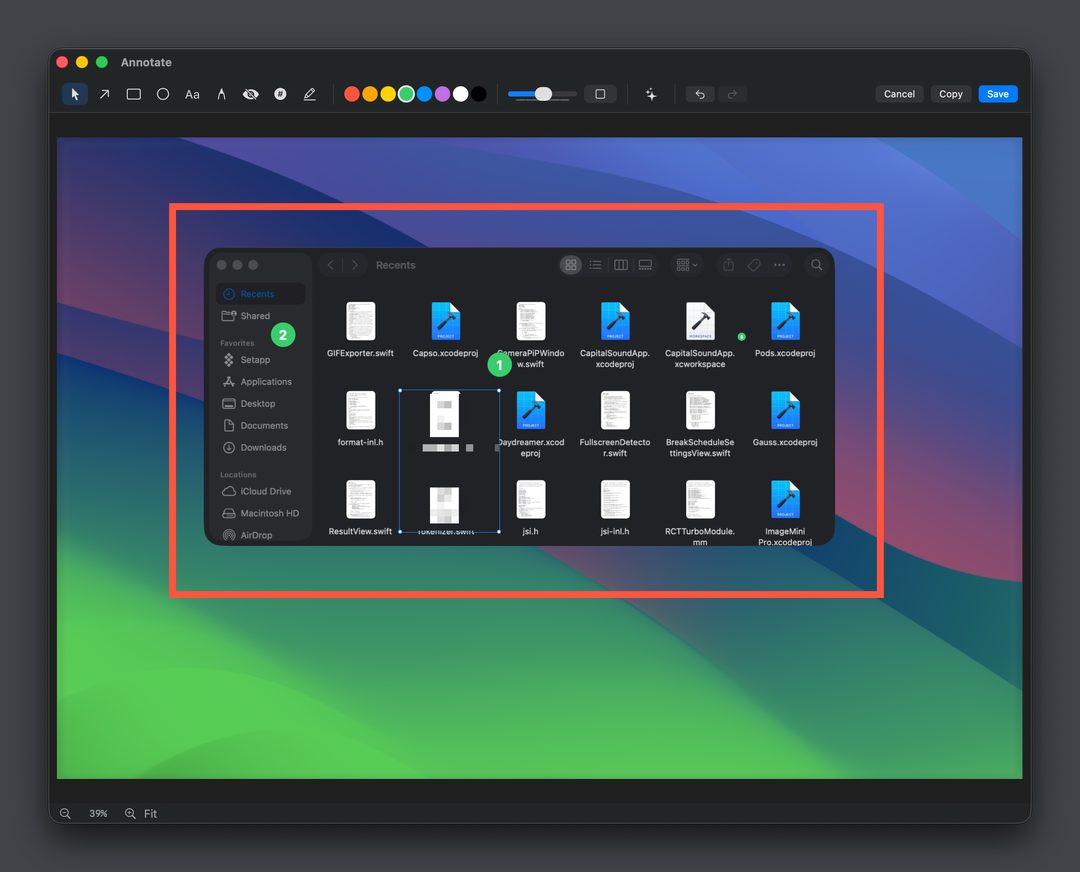
- 内置箭头文字高亮马赛克等标注,截完直接改
- 集成 OCR 文字识别,截图内容可提取复制
当前版本 v1.2.11(2026-11-26 发布),开源协议 MIT,GitHub 1,554 star。

核心信息
| 软件名称 | Capso(lzhgus/Capso) |
| 当前版本 | v1.2.11 |
| 更新日期 | 2026-11-26 |
| 开源协议 | MIT |
| 软件分类 | macOS 软件 |
| 关键词 | annotation、cleanshot-alternative、macos、ocr、open-source、screen-recording |
本次更新内容
- 截图历史新增PDF集合功能,支持导入多页PDF并原位标注,方便统一管理文档素材
- 支持将历史截图批量导出为单个PDF,满足文档整理与分享需求
- 一键截图操作自动保存至历史记录,避免重要截图遗漏
- 文本标注工具提交后保持激活,连续添加文字无需重复点击,提升编辑效率
查看官方英文更新日志(原文)
Import PDFs into Screenshot History as editable collections, keep the Text tool active across placements, and save All-in-One `⌘C` captures to History.

## New

- **PDF Collections in History**: import multi-page PDFs into Screenshot History via the **Import PDF** button, drag-and-drop, or Finder **Open With → Capso**. Pages stay grouped in an ordered collection (`1 → N`) rather than flooding your timeline, can be annotated in place, interleaved with screenshots (picker, context menu, `⌘V` paste, or drag-and-drop), reordered by dragging, and exported back to a single PDF. ([#420](https://github.com/lzhgus/Capso/pull/420))
- **Export selected screenshots to PDF**: select multiple screenshots in History and export them together as a single PDF. ([#420](https://github.com/lzhgus/Capso/pull/420))

## Fixes

- **All-in-One capture history**: copying or saving a capture from the All-in-One overlay (`⌘C`, `⏎`, `⌘⇧C`, or `⌘S`) now saves it to Screenshot History. ([#420](https://github.com/lzhgus/Capso/pull/420))
- **Text annotation tool**: the Text tool stays active after committing a text box so you can place consecutive text annotations without pressing `T` or clicking the Text button again. ([#419](https://github.com/lzhgus/Capso/pull/419))

Thanks to @yangxfDesign for the feature request and bug report!

Full Changelog: https://github.com/lzhgus/Capso/compare/v1.2.10...v1.2.11
下载地址
以下为官方原包,本站不二次打包;多个文件为不同包型,按需选择其中一个下载即可:
Capso-1.2.11.dmg(官方原包 | 10.2 MB)
Capso-1.2.11.zip(便携版·解压即用 | 10.3 MB)
✅ 上方 SHA256 与官方发布值一致,可自行核对。
快速上手
- 首次启动后,按提示允许屏幕录制、摄像头和麦克风权限,否则截图与录制功能无法正常使用。
- 从浮动工具栏选择区域、全屏、窗口、滚动、定时、OCR 或录制等捕获方式。
- 区域截取时拖动选区,可调整大小或移动,按 R 键切换比例与固定尺寸预设。
- 在捕获区域内直接添加箭头、形状、文字、高亮或像素化标注,再保存或复制。
- 使用快速访问浮窗进行复制、保存、标注、OCR、固定,或拖动把手发送到其他应用。
提示:首次使用务必授予屏幕录制权限,否则无法截取画面。
讨论(0 条)