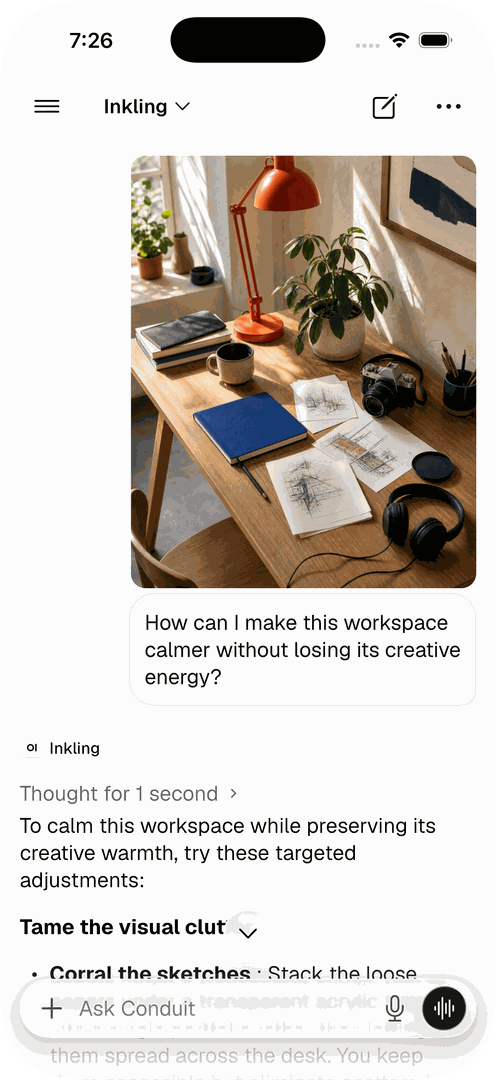
Conduit 是 Open WebUI 的原生手机客户端,用 Flutter 打造,把自托管 AI 对话搬到手机上。它解决了移动端登录、后台断流、截图提问等痛点,聊天数据优先存在本地,不经过第三方后端。适合自建 Open WebUI、LibreChat 或直连模型接口的用户随身使用。
核心亮点:
- 原生移动端体验,补齐桌面版在手机上的短板
- 支持 Open WebUI、LibreChat 及直连模型接口
- 聊天记录优先保存在设备本地,隐私可控
- 可连接自托管智能体,支持工具调用与定时任务
当前版本 v4.3.2(2026-11-22 发布),开源协议 GPL-3.0,GitHub 2,496 star。


核心信息
| 软件名称 | Conduit(cogwheel0/conduit) |
| 当前版本 | v4.3.2 |
| 更新日期 | 2026-11-22 |
| 开源协议 | GPL-3.0 |
| 软件分类 | Android 开源 APK |
| 关键词 | ai-agents、ai-assistant、android、chat、chatbot、cross-platform |
本次更新内容
- 新增推送通知功能:应用关闭时也能收到回复完成、频道消息和定时任务提醒,通知在服务器端加密,保护隐私。
- 推送支持多种安卓分发方式,可自行选择;每个账户可单独测试、关闭或重置推送密钥。
- 浏览器登录支持通行密钥和安全密钥,登录更安全便捷。
- 设置页面统一整合,手机和平板显示一致,平板支持双栏布局。
- 新增日历提醒开关,默认开启,应用关闭时也能本地提醒日程。
查看官方英文更新日志(原文)
## Highlights

- **Push notifications** for Open WebUI and Hermes: finished replies, channel messages and scheduled jobs reach the phone while Conduit is closed. Each notification is encrypted on your own server to the device's key, and passes through an open-source relay that can't read it, or through your own UnifiedPush distributor on Android.
- **Browser sign-in** for Open WebUI single sign-on runs in the system browser, so passkeys and security keys work.
- **Open WebUI 0.13.4** is supported, including Tether, per-model terminals and messages the server holds while another reply runs.
- **Settings** opens every page inside Settings, draws the same pages on iOS and Android, and shows two columns on iPad and Android tablets.

## Push notifications

- Turn push on in **Settings › Notifications › Push Notifications**. One switch covers every Open WebUI account and Hermes connection, and each one shows its status with a fix: **Set Up**, **Ask Your Admin**, **Update**, **Install**, **Copy Command**, **Restart Hermes to finish**, or a prompt to sign in or retry. (#838, #839)
- **Open WebUI 0.11 or later** needs the open-source Conduit Push function, installed once per server. An admin can install or update it from the app after confirming. Anyone else can share an import link with their admin. It sends finished and failed replies, from **Chats Started in Conduit** (the default) or **All My Chats**, and top-level channel messages. ([Admin setup](https://github.com/cogwheel0/conduit/blob/v4.3.2/docs/push/ADMIN_SETUP.md)) (#832, #838)
- **Hermes** needs the open-source Conduit plugin, installed from the Hermes dashboard in one tap or with a command you copy. It pushes replies to runs Conduit starts, and **Notify Me** on a scheduled job pushes its deliveries. (#834, #838, #839)
- **Privacy.** Each device makes its own key pair and keeps the private key in the iOS Keychain or the Android Keystore. Your server encrypts every notification to that key (Web Push, RFC 8291). iOS decrypts it in a Notification Service Extension and Android in a native receiver, so it works with the app closed. The relay is stateless, keeps no logs and only forwards ciphertext to Apple or Google. **How Push Stays Private** in the app explains this in plain words. ([What each party sees](https://github.com/cogwheel0/conduit/blob/v4.3.2/docs/push/THREAT_MODEL.md), [running your own relay](https://github.com/cogwheel0/conduit/blob/v4.3.2/docs/push/SELF_HOSTING.md)) (#829, #831, #833, #835, #837, #840)
- **Android** delivers through **Automatic**, **Google (FCM)** or **UnifiedPush**, with a distributor picker. Firebase starts only after you turn push on. (#837, #839)
- Each account's page has a test notification, a per-device opt-out and diagnostics. **Reset Push Keys** removes this device from every server and sets push up again with new keys. (#839, #1043)
- Every notification belongs to its account. A tap switches to the account or Hermes connection that posted it, and switching
下载地址
以下为官方原包,本站不二次打包;多个文件为不同包型,按需选择其中一个下载即可:
app-arm64-v8a-foss-release.apk(Android 安装包 | 99.9 MB)
app-arm64-v8a-release.apk(Android 安装包 | 100.6 MB)
app-armeabi-v7a-foss-release.apk(Android 安装包 | 89.1 MB)
app-armeabi-v7a-release.apk(Android 安装包 | 89.8 MB)
✅ 上方 SHA256 与官方发布值一致,可自行核对。
快速上手
- 安装完成后首次启动,在连接方式选择页按需选择 Open WebUI、LibreChat、Direct、Hermes 等其中一种连接类型。
- 按所选类型填写服务器地址或接口地址与凭据,保存后即可进入主界面开始对话。
- 在设置中可继续添加其他连接方式,无需登录的连接类型可直接跳过登录。
- 日常使用时在会话列表新建对话,聊天记录优先保存在本机设备上。
提示:连接失败时先核对地址是否含协议前缀与端口,再检查凭据。
讨论(0 条)