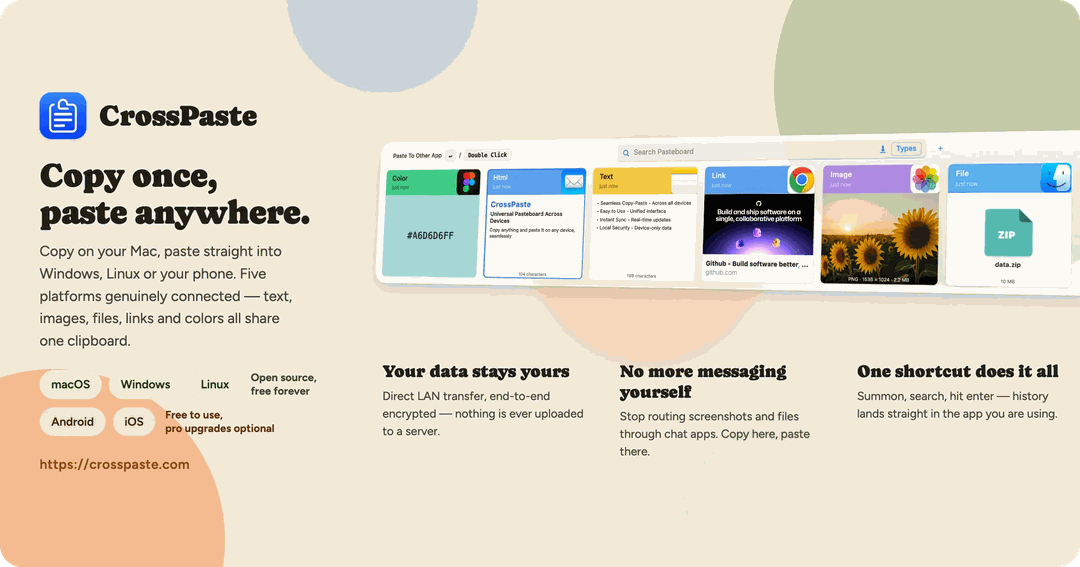
CrossPaste 是款跨设备剪贴板同步工具,主打局域网内无缝共享。它支持文本、图片、文件等多种格式,且采用端到端加密与无服务器架构,数据仅存本地,隐私安全感拉满。适合多设备办公族及注重数据安全的极客用户,让复制粘贴不再受屏幕限制。
核心亮点:
- 支持文本、图片、文件等多格式内容跨设备即时同步
- 采用端到端加密技术,保障数据传输与存储安全
- 基于局域网无服务器架构,数据完全本地化存储
- 内置本地 OCR 功能,无需联网即可提取图片文字
当前版本 v2.3.1.2781(2026-10-30 发布),开源协议 AGPL-3.0,GitHub 2,739 star。

核心信息
| 软件名称 | Crosspaste-desktop(CrossPaste/crosspaste-desktop) |
| 当前版本 | v2.3.1.2781 |
| 更新日期 | 2026-10-30 |
| 开源协议 | AGPL-3.0 |
| 软件分类 | Windows 效率工具 |
| 关键词 | cli、clipboard、clipboard-history、clipboard-manager、clips、compose-desktop |
本次更新内容
- 修复浮动粘贴按钮的交互问题,在Wayland下粘贴可直达原生应用,不再依赖窗口焦点。
- Windows安装包声明防火墙规则,系统更新后不再反复弹窗询问网络权限。
- 搜索窗口支持双击粘贴并遵循系统双击间隔,顶栏可用键盘导航操作。
- 粘贴面板正确高亮选中行,macOS面板保持显示并粘贴到当前应用。
- 标签芯片按颜色着色,强调标签边框更明显,提升视觉辨识度。
查看官方英文更新日志(原文)
# Highlights 🌟

- 📋 **Floating paste button fixes**
  Fixed interaction issues with the floating paste button and its panel;
  on Wayland its pastes now reach native Wayland apps, because clipboard
  writes go straight into the Wayland clipboard instead of an XWayland
  selection that KWin mirrors only while CrossPaste has the focus
  (#5283 #5284 #5285 #5286 #5292 #5293).

- 🪟 **MSIX packages declare their firewall rules**
  Inbound TCP/UDP for `bin\CrossPaste.exe` on domain and private networks
  is declared in the package, so Windows stops re-prompting after every
  versioned-path update and no longer accumulates dead prompt rules. The
  CLI execution aliases moved into the main Application, because the
  Store rejects a hidden second Application as headless; release CI now
  asserts both (#5287 #5288 #5289 #5290).

- 🔍 **Search window double-click paste and keyboard-driven top bar**
  Double-click paste honors the system double-click interval and reads
  Shift from the click itself; every search window shortcut goes through
  one resolver keyed by the focused zone, which adds keyboard navigation
  across the type filter, tags and settings (#5277 #5278 #5279 #5280
  #5281 #5282).

# Bug Fixes 🐛

- :bug: Write the Wayland clipboard natively so background writes reach Wayland apps (#5293)
- :bug: Fold the MSIX CLI aliases into the main Application so the Store accepts it (#5290)
- :bug: Declare MSIX firewall rules so Store updates stop re-prompting (#5288)
- :bug: Highlight the clicked row in the paste panel (#5286)
- :bug: Make the macOS paste panel stay on screen and paste into the focused app (#5284)
- :bug: Read Shift from the click itself in the search window list (#5280)
- :bug: Honor the system double-click interval in the search window (#5278)
- :bug: Keep development.properties and stray .claude folders out of release jars (#5273)

# New Features ✨

- :sparkles: Drive the search window top bar from the keyboard (#5282)
- :sparkles: Tint tag chips with their color and give emphasized chips a heavier edge (#5274)

# Multiplatform · Refactor · Code Style 🔨

- :hammer: Route search window shortcuts through one key resolver keyed by focused zone (#5281)

# Build & CI 👷

- :construction_worker: Assert the Store MSIX keeps its firewall rules (#5289)
下载地址
以下为官方原包,本站不二次打包;多个文件为不同包型,按需选择其中一个下载即可:
crosspaste-2.3.1-2781-windows-amd64.zip(便携版·解压即用 | 169.6 MB)
crosspaste-chrome-extension-2.3.1.2781.zip(便携版·解压即用 | 465.1 KB)
crosspaste.exe(官方安装程序 | 725.5 KB)
✅ 上方 SHA256 与官方发布值一致,可自行核对。
快速上手
- 解压下载好的压缩包,运行其中的 crosspaste.exe 启动应用
- 首次启动后按界面提示完成初始化设置,即可开始使用粘贴板
- 在局域网内的其他设备上同样启动 CrossPaste,设备间会自动发现并实时共享粘贴板内容
- 如需浏览器互通,安装 Chrome 扩展包,在网页中复制的内容即可跨设备粘贴
- 在设置中可调整自动清理选项,管理粘贴板存储空间
提示:所有数据仅存本地且端到端加密,无需联网服务器即可跨设备同步。
讨论(0 条)