Difftastic 是一款按语法结构而非逐行比对代码差异的工具,基于 tree-sitter 解析多种语言,能精准指出真正改动的语法片段,忽略纯格式调整。它兼容 git 等版本控制,适合经常审阅代码改动、被格式化噪音困扰的开发者。
核心亮点:
- 按语法结构比对,精准定位真正改动的代码片段
- 识别空白与缩进变化,不被纯格式调整干扰
- 非行导向,代码换行重排也能看清实质改动
- 兼容 git 等版本控制,可接入日常审阅流程
当前版本 v0.72.0(2026-10-29 发布),开源协议 MIT,GitHub 26,230 star。


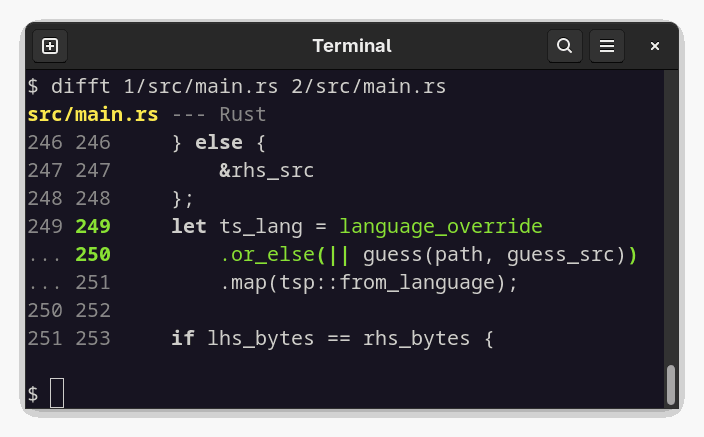
核心信息
| 软件名称 | Difftastic(Wilfred/difftastic) |
| 当前版本 | v0.72.0 |
| 更新日期 | 2026-10-29 |
| 开源协议 | MIT |
| 软件分类 | Windows 效率工具 |
| 关键词 | diff、tree-sitter |
本次更新内容
- 新版本优化了预处理逻辑,对比速度更快,更少退化成纯文本对比,结果更准确。
- 改进了多种语言的语法解析,减少崩溃和标点处理错误,对比更稳定。
- 移除了部分语言支持,以减小程序体积,未来有望通过动态加载恢复。
- 修复了内联显示中相邻改动间未变行不显示的问题,查看差异更完整。
- 修复了输出全部重定向时终端宽度检测失效的问题,与相关工具配合更顺畅。
查看官方英文更新日志(原文)
Difftastic is a structural diff tool that understands syntax. See [the manual](https://difftastic.wilfred.me.uk/introduction.html) to get started, and [the changelog](https://github.com/Wilfred/difftastic/blob/master/CHANGELOG.md) for historical changes.

### Diffing

Improved preprocessing heuristics, so difftastic should be faster and fall back to text diffing less often.

### Parsing

Updated Haskell (the previous version was prone to crashing) and Kotlin parsers.

Improved delimiter and trailing punctuation handling in: C, C++, C#, Elixir, Erlang, Gleam, Go, Java, JavaScript, Kotlin, Haskell, Nix, OCaml, Python, TypeScript and YAML.

Removed Smali support (upstream parser is no longer maintained).

Removed support for Verilog and F# due to the very large parser size making the difft binary big. Adding support for dynamically loading parsers in a future release should allow users to parse these languages again.

### Display

Fixed an issue with inline display where unchanged lines between two nearby changes were not shown.

Fixed an issue (introduced in 0.71) where the terminal width wasn't detected when stdin, stdout and stderr were all redirected. This was most noticeable when using difft with jj.
下载地址
以下为官方原包,本站不二次打包;多个文件为不同包型,按需选择其中一个下载即可:
difft-0.72.0-aarch64-pc-windows-msvc.zip(便携版·解压即用 | 8.3 MB)
difft-0.72.0-x86_64-pc-windows-msvc.zip(便携版·解压即用 | 8.5 MB)
✅ 上方 SHA256 与官方发布值一致,可自行核对。
快速上手
- 解压下载好的压缩包,把其中的 difft 可执行文件放到自己方便调用的目录,并确认该目录已加入系统环境变量。
- 打开命令提示符或 PowerShell,输入 difft 加两个待比较文件的路径,按语法结构查看差异。
- 若文件扩展名不被识别,difftastic 会自动改用按行比较并高亮单词差异,无需额外设置。
- 需要与 git 配合时,按手册中的 git 配置说明把 difft 设为外部 diff 工具,之后查看提交差异即可。
提示:比较大改动文件时较耗内存,可先缩小比较范围。
讨论(0 条)