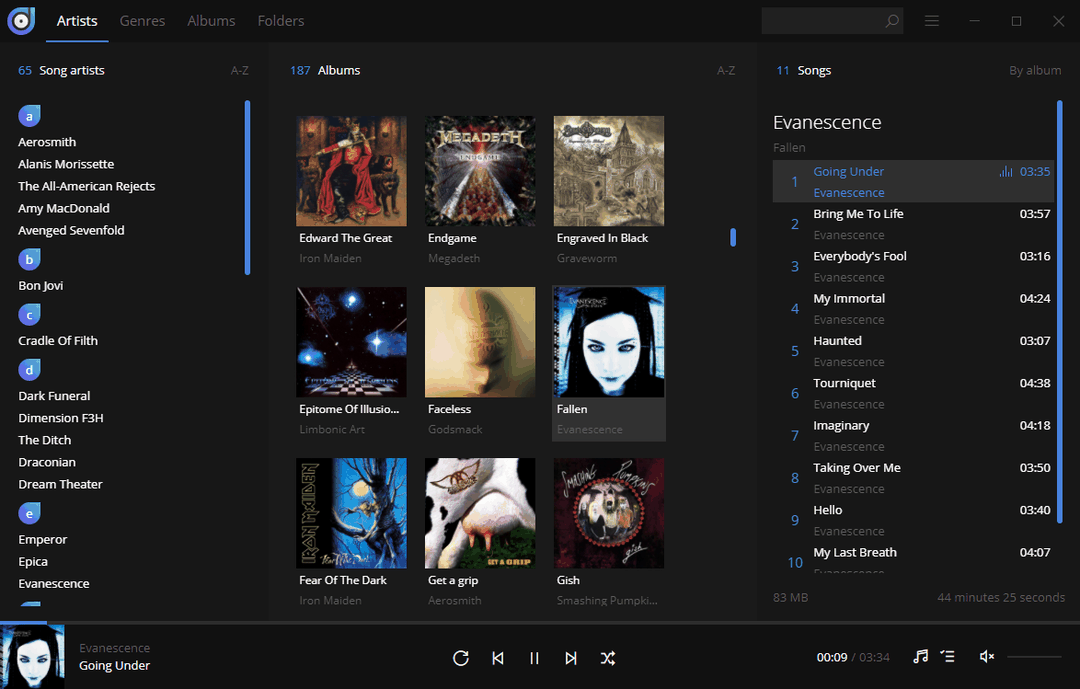
Dopamine 是一款极简本地音乐播放器,主打优雅界面与流畅体验。它基于 Electron 开发,完美支持 Windows、Linux 和 Mac 系统。软件界面干净不花哨,操作直观,特别适合追求视觉清爽、希望专注听歌的桌面用户。
核心亮点:
- 界面优雅简洁,专注音乐播放体验
- 跨平台支持 Windows、Linux 和 Mac
- 支持自定义翻译文件,灵活适配多语言
- 开源项目,社区活跃且持续维护
当前版本 v3.0.12(2026-11-07 发布),开源协议 GPL-3.0,GitHub 2,453 star。


核心信息
| 软件名称 | Dopamine(digimezzo/dopamine) |
| 当前版本 | v3.0.12 |
| 更新日期 | 2026-11-07 |
| 开源协议 | GPL-3.0 |
| 软件分类 | Windows 效率工具 |
| 关键词 | electron、linux、mac、music、music-player、windows |
本次更新内容
- 新增自定义翻译功能及多语言支持,优化土耳其语等翻译体验
- 修复音频播放器内存泄漏及后台进程残留问题,提升长期运行稳定性
- 解决专辑封面显示异常、元数据缺失及进度条闪烁等显示故障
- 新增音频输出设置及可配置的艺术家前缀跳过,增强播放控制灵活性
- 支持WebP格式封面及同步歌词,改善视觉呈现与Last.fm状态同步
查看官方英文更新日志(原文)
## [3.0.12] - 2026-11-07

### Added

- Slider to resize album covers in the list of albums
- Support for WebP album covers
- Synced lyrics support for Windhawk's Desktop Audio Visualizer Plus
- Support for the Turkish alphabet in the list of artists
- Audio device output settings
- Skipping of prefixes in the artists screen has been re-added, but this time it's configurable.
- It is now possible to create and use your own translations
- Flatpak installation via FlatPark (Thank you @jing2uo)

### Changed

- Updated the German translation (Thank you @mgfirewater)
- Updated the Portuguese (Brazil) translation (Thank you @henrique-coder)
- Updated the Turkish translation (Thank you @mertssmnoglu)

### Fixed

- Wave progress bar glitches
- Album cover shown even though a file does not have any
- Artists tab doesn't filter the albums when artist splitting is disabled
- Metadata (Album, Year, Cover) is sometimes not displayed in the showcase view
- Last.fm "Now Playing" expires prematurely (Thank you @jonson-zero)
- Memory leak in the audio player, causing glitches that worsen over long playback sessions. (Thank you @ThatOnePersonCalledAnon)
- Accented lyrics lookups (Thank you @dbqp01)
- Star ratings of loved songs are not backed up or restored correctly
- Memory leak on Linux causing a rogue Dopamine process to remain alive even after closing
- Drop shadows on now playing pictures have banding and look ugly

P.S.: If you enjoy Dopamine, please consider donating via [PayPal](https://www.paypal.com/donate/?hosted_button_id=N9Z4D62P24KRU) or buying me a [coffee](https://ko-fi.com/S6S11K63U). Your support keeps the music going!
下载地址
以下为官方原包,本站不二次打包,点击直接下载:
Dopamine-3.0.12.exe(官方安装程序 | 128.1 MB)
✅ 上方 SHA256 与官方发布值一致,可自行核对。
快速上手
- 运行下载好的安装包,按向导完成安装后从开始菜单启动 Dopamine。
- 首次启动进入欢迎界面,按提示选择界面语言并完成初始设置。
- 在设置中指定音乐文件夹,让 Dopamine 扫描并整理本地曲库。
- 在资料库中浏览歌曲、专辑与播放列表,双击曲目即可开始播放。
- 打开外观或语言菜单可调整界面语言,自定义翻译文件放入应用数据目录的 Translations 文件夹。
提示:修改翻译后切换语言再切回,即可重新加载生效。
讨论(0 条)