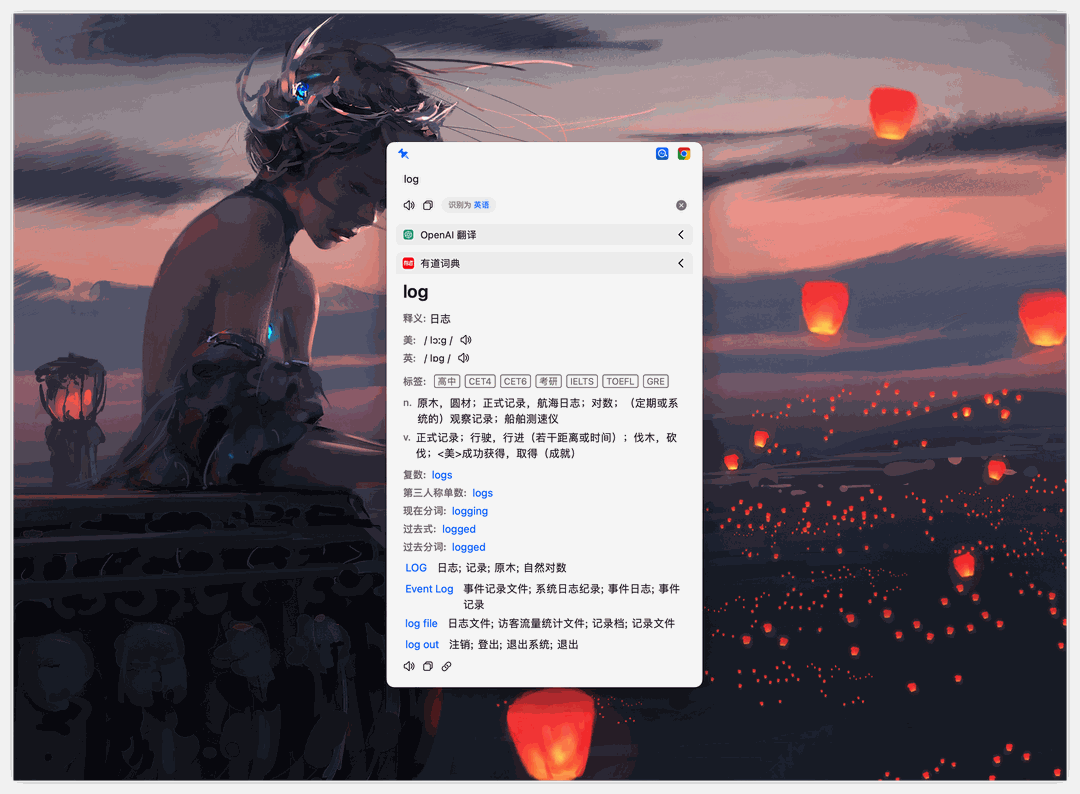
Easydict 是一款 macOS 上的划词翻译与词典工具,选中文字或截图就能即时查词、翻译,开箱即用并自动识别语言。它聚合了苹果词典、多家翻译引擎与 AI 模型,还支持离线 OCR 识别,适合经常阅读外文资料、需要快速查词的用户。
核心亮点:
- 划词即翻即查,快捷键与鼠标选中都能触发
- 截图 OCR 翻译,支持静默识别省去手动操作
- 聚合苹果词典、翻译引擎与 AI 模型等多种服务
- 自动识别输入语言,多服务结果可同时对照查看
当前版本 v2.26.0(2026-10-27 发布),开源协议 GPL-3.0,GitHub 15,367 star。
核心信息
| 软件名称 | Easydict(tisfeng/Easydict) |
| 当前版本 | v2.26.0 |
| 更新日期 | 2026-10-27 |
| 开源协议 | GPL-3.0 |
| 软件分类 | macOS 软件 |
| 关键词 | app、baidu、bing、deepl、dictionary、gemini |
本次更新内容
- 修复反复翻译和混合语言检测时的崩溃问题,并优化多个翻译服务的请求稳定性,提升使用流畅度。
- 新增乌尔都语界面并支持从右到左排版,方便相关语言用户使用。
- 更新内置智能模型列表,修复新模型翻译出错的问题,并简化模型温度设置。
- 恢复词典结果中的本地图片、音频和样式,改进结果文本的复制与朗读体验。
- 剪贴板文本翻译改为立即查询,图片翻译则按自动识别设置处理,并移除已停用的翻译服务。
查看官方英文更新日志(原文)
# 🐞 fix: prevent crashes during repeated translations

## What's Changed
* Prevent crashes during repeated queries and mixed-language detection, and improve overlapping Bing and DeepL requests by @MoonMao42 in [#1368](https://github.com/tisfeng/Easydict/pull/1368)
* Add an Urdu interface with right-to-left layout support by @AlleyNawaz in [#1374](https://github.com/tisfeng/Easydict/pull/1374)
* Refresh built-in AI model lists and fix translation errors with newer Claude models by @xxxxxthhh in [#1371](https://github.com/tisfeng/Easydict/pull/1371)
* Use provider defaults for AI response temperature and remove the temperature setting by @tisfeng in [commit](https://github.com/tisfeng/Easydict/commit/20875c581abf4489717f6d5a16dc9734cafbd3dc)
* Restore local images, audio and styles in Apple Dictionary results, and improve copying and reading result text by @MoonMao42 in [#1355](https://github.com/tisfeng/Easydict/pull/1355)
* Allow Bing service validation without entering an optional cookie by @tisfeng in [commit](https://github.com/tisfeng/Easydict/commit/8c5e207445da72a6c2c08824c883cc91d82c946e)
* Make Translate Clipboard query text immediately, while clipboard images follow the OCR auto-query setting by @tisfeng in [commit](https://github.com/tisfeng/Easydict/commit/f7dbb50ca863ab4d1be12fc2430db0eff62e30b3) and [commit](https://github.com/tisfeng/Easydict/commit/d0c117898523aefafceaa5c087771eca7528a3c7)
* Remove the retired GitHub Models service by @tisfeng in [#1373](https://github.com/tisfeng/Easydict/pull/1373)
* Remove the retired Tencent Translate service by @Jerry23011 in [#1345](https://github.com/tisfeng/Easydict/pull/1345)

## New Contributors
* @xxxxxthhh made their first contribution in [#1371](https://github.com/tisfeng/Easydict/pull/1371)
* @AlleyNawaz made their first contribution in [#1374](https://github.com/tisfeng/Easydict/pull/1374)

**Full Changelog**: [2.25.0...2.26.0](https://github.com/tisfeng/Easydict/compare/2.25.0...2.26.0)
下载地址
以下为官方原包,本站不二次打包;多个文件为不同包型,按需选择其中一个下载即可:
Easydict.dmg(官方原包 | 34.1 MB)
Easydict.zip(便携版·解压即用 | 34.4 MB)
✅ 上方 SHA256 与官方发布值一致,可自行核对。
快速上手
- 运行下载好的安装包,把 Easydict 拖入「应用程序」文件夹完成安装。
- 首次启动后按提示授予辅助功能等系统权限,以便使用划词翻译与快捷键。
- 在输入框输入文字即可自动识别语言并查询,可同时查看多个翻译服务的结果。
- 选中任意文本后用快捷键触发划词翻译,或使用截图 OCR 翻译识别屏幕文字。
- 在设置中按需启用词典、翻译或 AI 服务,并配置语音朗读等选项。
提示:划词翻译需在系统设置中允许 Easydict 访问辅助功能。
讨论(0 条)