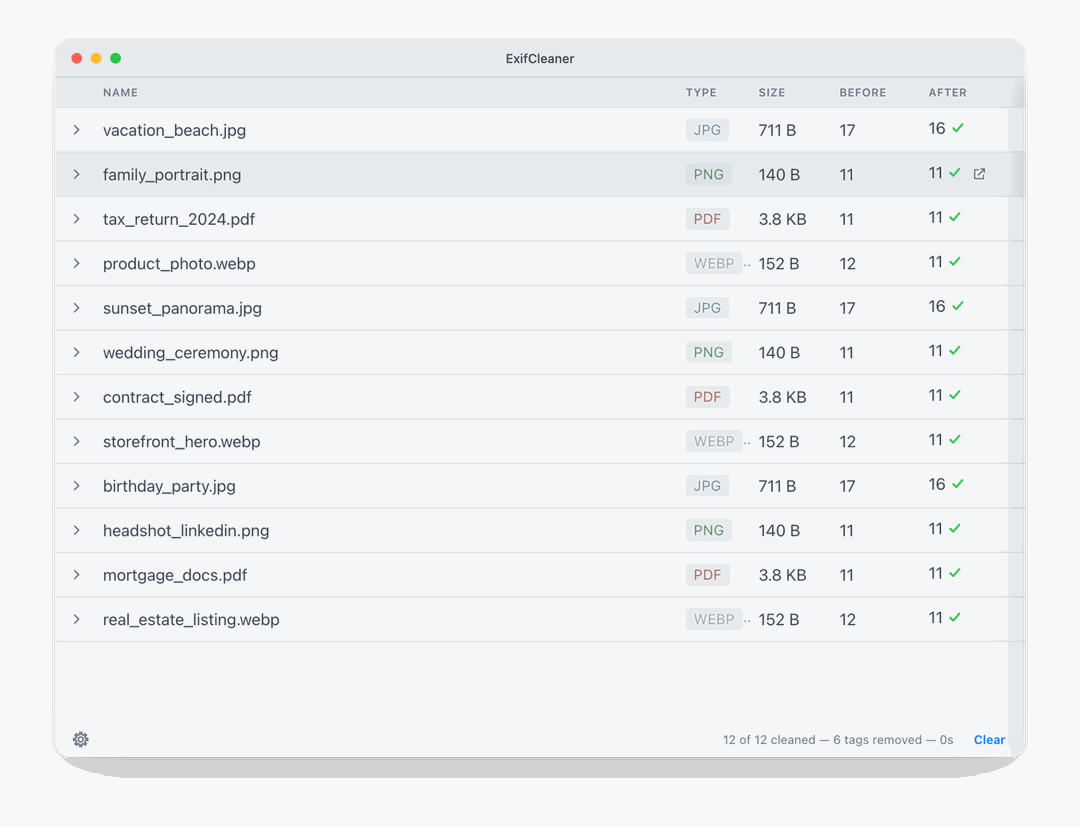
ExifCleaner 是一款跨平台桌面工具,专门清除图片、视频和 PDF 里的元数据,比如拍摄地点、设备型号这些容易泄露隐私的信息。拖拽文件或整个文件夹进去就能批量处理,还能展开查看清理前后的差异。适合经常分享照片、需要保护隐私的普通用户和内容创作者。
核心亮点:
- 拖拽文件或文件夹即可批量清除元数据
- 支持图片、视频和 PDF 等多种格式
- 可展开查看清理前后的元数据差异
- 零遥测零联网,完全离线保护隐私
当前版本 v4.8.0(2026-11-10 发布),开源协议 MIT,GitHub 2,912 star。

核心信息
| 软件名称 | exifcleaner(szTheory/exifcleaner) |
| 当前版本 | v4.8.0 |
| 更新日期 | 2026-11-10 |
| 开源协议 | MIT |
| 软件分类 | Windows 效率工具 |
| 关键词 | concurrency、dark-mode、desktop-app、electron、exif、exiftool |
本次更新内容
- 新版本在覆盖原文件前会先检查清理结果,确认无误才替换,失败则保留原文件,更安全。
- 内置清理器能处理更多格式,WebP 默认由内置清理器处理,保留分辨率并自动丢弃不合格结果。
- 修复彩色 JPEG 另存副本时报错的问题,保留色彩配置时相关描述信息不再误判为残留元数据。
- 检查失败时会显示原因和可疑标签名,方便排查;原文件被其他程序改动时会中止覆盖并保留原文件。
- 覆盖改为替换文件而非原地编辑,权限和属主尽量保留,但硬链接、扩展属性等不会带到新文件。
查看官方英文更新日志(原文)
# ExifCleaner 4.8.0

ExifCleaner 4.8.0 checks a cleaned file before Overwrite replaces your original, cleans WebP files with its built-in cleaner by default, and fixes Save as copy for colour JPEGs.

## What's new

- **Overwrite checks the cleaned file first.** For JPG, JPEG, PNG, WebP, HEIC, HEIF and AVIF, ExifCleaner now writes the cleaned file next to the original, reopens it with ExifTool, runs the leftover-metadata check, syncs it to disk (a full fsync on macOS) and confirms your original did not change. Only then does it replace the original. If any step fails, your original stays as it was. TIFF and media files already worked this way.
- **The built-in cleaner handles Overwrite when it can.** ExifTool writes the file only when the built-in cleaner declines it before writing, for example a HEIC it cannot read. Turning on Preserve timestamps does not send a file to ExifTool.
- **WebP uses the built-in cleaner by default.** With Save as copy on and Preserve resolution on, WebP files were cleaned by ExifTool in earlier versions. The built-in cleaner now keeps the resolution too, so it cleans them. A WebP copy or overwrite that fails the leftover-metadata check is discarded and your original is kept. The check was tried on 23 WebP variants with both cleaners, and none had to be refused.
- **Colour JPEGs now save as copies.** From 4.5.0 to 4.7.0, Save as copy of a colour JPEG could end in "Couldn't verify cleaned output". The check was flagging the JPEG's chroma subsampling, which describes how the picture is encoded, not the photo. It now accepts it. The failed attempts never changed your original.
- **Colour profiles pass the check with Preserve color profile on.** A JPEG, PNG or AVIF with an sRGB, Adobe RGB or Display P3 profile no longer fails on the profile's own descriptive entries. With the setting off, none of the profile's entries are kept. An entry that was not measured still fails the check.
- **A failed check says why.** The file's detail line now shows the check code and the names of the unexpected tags, at most eight, never tag values or file paths. Click the line to copy it. Tag names can come from the file itself, such as PNG text keywords or XMP property names, so a name can be unfamiliar.
- **A changed original stops the overwrite.** If another app, such as a cloud sync client, changes or locks the file while ExifCleaner works, the overwrite stops, reports that your original is unchanged and keeps it.

Thanks to zbruceli for reporting the colour JPEG problem and proposing fixes. We reimplemented them with tests rather than merging them as written.

## Changes to be aware of

- **Overwrite replaces the file.** It swaps in the cleaned file instead of editing yours in place. A file of your own keeps its owner and permissions and, when your system allows it, its group. A symbolic link at the path is replaced by the cleaned file, and the old target is left alone. We have not measured the result for a file owned by a different user.
下载地址
以下为官方原包,本站不二次打包;多个文件为不同包型,按需选择其中一个下载即可:
ExifCleaner.4.8.0.portable.exe(便携版·解压即用 | 129.7 MB)
ExifCleaner.Setup.4.8.0.exe(安装版 | 129.9 MB)
✅ 上方 SHA256 与官方发布值一致,可自行核对。
快速上手
- 运行下载好的安装包或便携版程序,首次启动若出现系统安全提示,点“更多信息”再点“仍要运行”即可打开。
- 把图片、视频或 PDF 文件直接拖进窗口,也可拖入整个文件夹,程序会递归处理其中的全部文件。
- 在设置里按需开启保留方向、另存为副本、保留时间戳等隐私选项,再开始清理元数据。
- 处理完成后展开任意文件,查看清理前后的元数据差异,确认已移除的内容。
提示:处理前建议开启“另存为副本”,保留原始文件以便核对。
讨论(0 条)