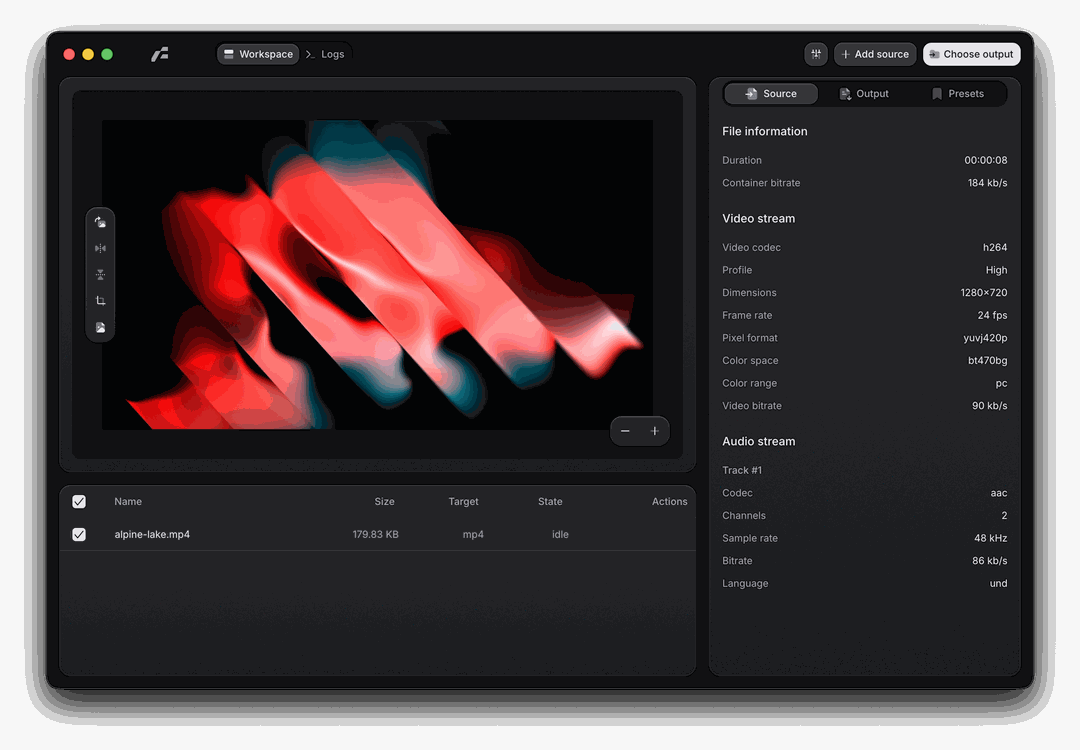
Frame 是一款图形化 FFmpeg 转码工具,用 Rust 编写,提供原生桌面界面,让你点几下就能完成视频、音频、图片的格式转换与压缩。它支持精细控制编码参数、硬件加速和批量任务,适合不想敲命令行的普通用户和需要快速处理媒体的创作者。
核心亮点:
- 支持视频、音频、图片多种格式互转与压缩
- 提供 CRF、目标码率、分辨率、帧率等精细控制
- 集成硬件编码加速,提升转码效率
- 内置任务队列与进度解析,操作直观
当前版本 v0.35.0(2026-11-15 发布),开源协议 GPL-3.0,GitHub 2,408 star。


核心信息
| 软件名称 | Frame(66HEX/frame) |
| 当前版本 | v0.35.0 |
| 更新日期 | 2026-11-15 |
| 开源协议 | GPL-3.0 |
| 软件分类 | Windows 效率工具 |
| 关键词 | ffmpeg、ffmpeg-gui、gpui、gpui-ce、linux、macos |
本次更新内容
- 新增视频防抖功能,有效减少画面抖动,提升观看体验。
- 支持意外关闭后恢复之前的任务队列,避免重复操作。
- 可直接导出当前预览帧为高清图片,方便素材保存。
- 优化文件导入与处理稳定性,防止数据冲突及进程卡顿。
- 升级底层安全组件,修复潜在漏洞,保障软件运行安全。
查看官方英文更新日志(原文)
### Added

- **Video Stabilization:** Adds a single-pass Stabilize video control for playback and export when FFmpeg provides the `deshake` filter. Stabilization reduces camera shake over successive frames; a paused image cannot show its effect. Addresses [#249](https://github.com/66HEX/frame/issues/249).
- **Workspace Recovery:** Native installations can restore prepared queues after restarting Frame, including per-file settings, output names, selection and confirmed results. Restore is explicit; interrupted conversions remain stopped until restarted manually.
- **Source Frame Export:** Saves the frame at the playhead as a full-resolution PNG from the preview toolbar. Preserves source rotation, sample aspect ratio and transparency without applying conversion effects. The result dialog provides Open image and Show in folder actions.
- **Completed Results:** Adds Open and Show in folder actions for each successfully published conversion result.

### Changed

- **Inspector:** Renames the source-information tab from Metadata to Source.
- **Batch Settings:** Adds a selected-files scope alongside Apply to all for output settings and presets, with counts of compatible and skipped files.
- **Dialogs:** Unifies confirmation and update dialogs with animated opening and closing, separated footers and right-aligned primary actions.

### Fixed

- **Safe Output Publication:** Validates native conversion results before publishing them and preserves existing destination files. Cancellation and failed attempts no longer leave misleading completed results or overwrite a previous output.
- **Preset State:** Compares all settings after normalization when determining whether a preset is applied or modified.
- **Import Responsiveness:** Limits concurrent metadata probes, reports stalled sources and cancels probes when files are removed or replaced. Late responses cannot overwrite replacement imports.
- **Preview Startup and Shutdown:** Bounds snapshot and first-frame waits, cleans up canceled media processes and reads ready frame data without repeated polling delays.
- **Deinterlaced Snapshots:** Keeps paused deinterlaced previews on the selected frame, preserving its timestamp and subtitle cues when video dimensions change.
- **Opus Stream Copy:** Rejects trimmed copies with incomplete packet timing before export.

### Security

- **QUIC Dependencies:** Updates `quinn-proto` and `quinn-udp` to patched releases.
下载地址
以下为官方原包,本站不二次打包;多个文件为不同包型,按需选择其中一个下载即可:
Frame-aarch64.app.zip(便携版·解压即用 | 62.8 MB)
Frame-x86_64.app.zip(便携版·解压即用 | 73.8 MB)
Frame-x86_64.exe(官方安装程序 | 95.4 MB)
✅ 上方 SHA256 与官方发布值一致,可自行核对。
快速上手
- 运行下载好的 Frame 安装程序,若出现 SmartScreen 提示,点击「更多信息」再点「仍要运行」完成安装。
- 首次启动 Frame 后,在主界面选择要转换的媒体文件,支持视频、音频和图片等常见格式。
- 在输出设置中选择目标格式与编码器,并按需调整分辨率、帧率、码率等参数。
- 确认设置后开始转换任务,在界面中查看进度,完成后到输出位置取回文件。
提示:转换前先确认输出格式与编码器兼容,避免任务失败。
讨论(0 条)