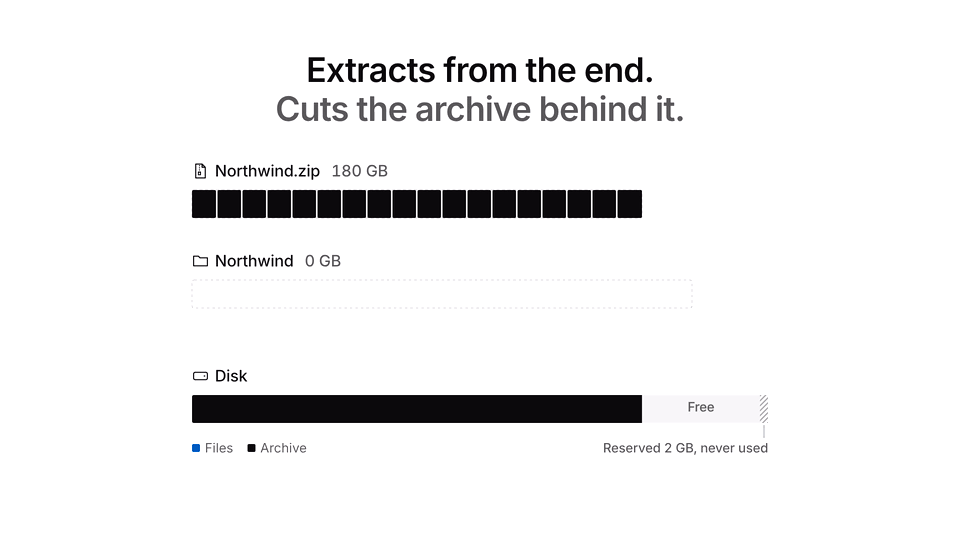
HatchZip 是一款开源解压工具,支持 Windows、macOS 和 Linux,提供桌面应用和命令行两种用法。它最大的特点是边解压边回收压缩包占用的空间,因此解压超大文件时只需预留输出文件的空间,不必同时容纳压缩包和全部解压结果。适合磁盘空间紧张、需要处理大型游戏包或分卷压缩包的用户。
核心亮点:
- 边解压边释放压缩包空间,磁盘占用更省
- 支持 ZIP、7z、RAR、tar 及分卷压缩包
- 解压前先检查空间是否足够,全程保留安全余量
- 可随时中断或崩溃后继续,进度不丢失
当前版本 v0.1.10(2026-11-10 发布),开源协议 Apache-2.0,GitHub 2,905 star。

核心信息
| 软件名称 | Hatchzip(xevrion/hatchzip) |
| 当前版本 | v0.1.10 |
| 更新日期 | 2026-11-10 |
| 开源协议 | Apache-2.0 |
| 软件分类 | Windows 效率工具 |
| 关键词 | 7z、7zip、archive、archive-extractor、cli、crash-safe |
本次更新内容
- 修复安全漏洞:名称相似的文件在解压时可能互相覆盖,现在会按系统规则识别并拒绝此类冲突,建议解压他人压缩包的用户更新。
- 新增支持更多压缩格式,并让解压后的文件夹恢复原有权限和修改时间,界面还增加了西班牙语。
- 遇到无法解码的压缩方法会提前拒绝,避免解压到一半中断;带冒号的文件名在部分系统上可正常解压。
- 窗口缩到最小时按钮仍可操作,下载文件附带校验信息方便验证完整性。
查看官方英文更新日志(原文)
## Security

Update if you extract archives you didn't make yourself.

- **Names a filesystem treats as one file could overwrite each other.** Two entries like `straße.txt` and `STRASSE.txt`, or the two encodings of `é`, are one file on macOS, on Windows and in casefolded Linux folders. HatchZip compared names only by lowercasing, so such a pair could land on one file after the archive was freed. Names are now compared the way filesystems fold them, and such pairs are refused wherever they could meet. A resume also no longer deletes a file whose name on disk is spelled differently from the archive entry. (GHSA-rrfc-2x66-j7xh, thanks @plusky)

## New

- **LZ4 and Brotli in 7z archives** made with 7-Zip ZS. Zstandard already worked. (#75, thanks @011010 and @AbhikRao)
- **Folders get their permissions and modified times back** after extraction, as the archive stored them. Folders that already existed are left alone. (#47, thanks @jayhemnani9910 and @garvrao80)
- **Spanish.** The app's main window now also comes in Spanish. (#87, thanks @011010)

## Fixes

- **A 7z with a method HatchZip can't decode** (LZ5, Lizard) is refused before anything changes. Before, the run stopped at that block with the archive partly freed. (#84, thanks @011010 and @AbhikRao)
- **Names with `:` extract on Linux and macOS,** such as a Wine prefix's `dosdevices/c:` or `meeting 10:30.txt`. A drive letter at the start of a path is still refused everywhere. (#81, thanks @jayhemnani9910)
- **The buttons stay reachable** when the window is at its smallest size. (#54, thanks @garvrao80)

## Downloads

Every file comes with a SHA-256 checksum and signed build provenance. To check a download:

```sh
gh attestation verify HatchZip-x64.msi --repo xevrion/hatchzip
```

Checksums and VirusTotal links for every file: [Verify your download](https://hatchzip.dev/verify.html).

On Windows, `HatchZip-x64-portable.zip` runs without installing anything.

Package managers: `brew install xevrion/tap/hatchzip` (command line), `brew install --cask xevrion/tap/hatchzip` (app), `scoop bucket add xevrion https://github.com/xevrion/scoop-bucket` followed by `scoop install xevrion/hatchzip`, and `cargo binstall hatchzip`.

RAR archives are decoded by UnRAR, under its own [license](https://github.com/xevrion/hatchzip/blob/main/LICENSE-UNRAR), included with every download.

HatchZip is free and open source. If it saved you some disk space, [sponsoring](https://hatchzip.dev/sponsor.html) keeps it going.

**Full Changelog**: https://github.com/xevrion/hatchzip/compare/v0.1.9...v0.1.10
下载地址
以下为官方原包,本站不二次打包;多个文件为不同包型,按需选择其中一个下载即可:
HatchZip-x64-portable.zip(便携版·解压即用 | 11.5 MB)
HatchZip-x64-setup.exe(安装版 | 10.4 MB)
HatchZip-x64.msi(安装版 | 10.2 MB)
hatchzip-x86_64-windows.zip(便携版·解压即用 | 2.5 MB)
✅ 上方 SHA256 与官方发布值一致,可自行核对。
快速上手
- 运行下载好的安装包,若出现“Windows protected your PC”提示,点“More info”后选“Run anyway”完成安装。
- 右键点击要解压的压缩包,选择“HatchZip”,再点“Extract here”就地解压;Windows 11 需先点“Show more options”。
- 若想先指定目标文件夹,右键菜单中改选“Extract files…”,选定位置后再开始解压。
- 也可从开始菜单打开 HatchZip,打开压缩包后点“Extract”执行解压。
- 解压前软件会先检查空间是否够用,过程中可随时停止,之后能接着继续。
提示:解压会边出文件边消耗压缩包,完成后只剩解压出的文件。
讨论(0 条)