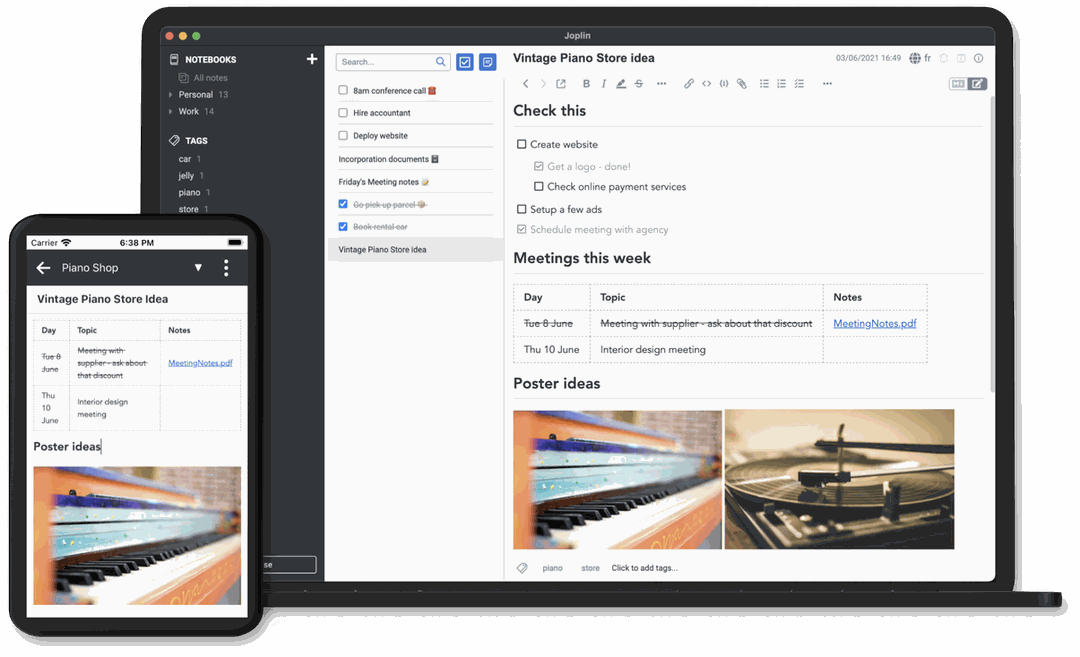
Joplin 是一款开源笔记与待办应用,主打数据完全自有、离线优先,笔记以 Markdown 格式存储,支持端到端加密同步到 Nextcloud、Dropbox 等云盘。它能导入印象笔记内容,跨 Windows、macOS、Linux、安卓和 iOS 使用,适合注重隐私、想摆脱平台锁定的知识管理用户。
核心亮点:
- 笔记以 Markdown 保存,可随时用外部编辑器打开
- 离线优先,所有数据留在本地设备上
- 支持端到端加密同步到多家云服务
- 可导入印象笔记,含附件与完整元数据
当前版本 v3.7.24(2026-11-19 发布),开源协议 AGPL-3.0,GitHub 57,256 star。


核心信息
| 软件名称 | Joplin(laurent22/joplin) |
| 当前版本 | v3.7.24 |
| 更新日期 | 2026-11-19 |
| 开源协议 | AGPL-3.0 |
| 软件分类 | Windows 效率工具 |
| 关键词 | android、dropbox、electron、enex-files、evernote、javascript |
本次更新内容
- 新增内置人工智能服务支持,用户可直接在应用内使用智能功能,无需额外配置。
- 优化同步与加密逻辑,减少分享状态误传,提升多设备同步稳定性。
- 修复笔记导入时特殊字符导致的失败问题,以及特定窗口下的崩溃。
- 加强分享与加密安全:新增公钥指纹验证、关闭加密前确认、检测密钥异常并恢复。
- 默认禁止未加密上传,修复数据接口注入风险,强化导入与同步安全防护。
查看官方英文更新日志(原文)
- Improved: Add a first-class OpenAI provider using the Responses API (#16864) (#16450 by [@Rygaa](https://github.com/Rygaa))
- Improved: Create the application authorisation ID in one place (79d954a)
- Improved: Prioritize local changes to sync info over values with unchanged far-future remote timestamps (2624b35 by Henry Heino)
- Improved: Sync/E2EE: Avoid propagating share/publish status until an item has decrypted (b6692eb by Henry Heino)
- Fixed: Fix ENEX import failing when an unescaped ampersand is directly followed by a tag (e5ed69a)
- Fixed: Fix crash when a semantic search result is open in a secondary window (#17085)
- Security: Add UI to allow validating public key fingerprints when sharing notebooks (3fd2f2f by Henry Heino)
- Security: Ask for confirmation before disabling E2EE (f4447dd by Henry Heino)
- Security: Detect and allow recovering from invalid public-private key pairs (27944cf by Henry Heino)
- Security: Disable unencrypted uploads by default when E2EE is enabled (cfce373 by Henry Heino)
- Security: Fix SQL injection in data API (64522e0 by Henry Heino)
- Security: Harden master key loading, add new encryption method forward compatibility (46c5442 by Henry Heino)
- Security: Harden server share API response handling (64d513a by Henry Heino)
- Security: Prevent OneNote import from reading files outside the import directory (86250d4)
- Security: Sync/E2EE: Do not mark items as published based on the list of shares returned by the server (2d1a179 by Henry Heino)
- Security: Sync/E2EE: Harden marking items as published/shared (3cf1c1a by Henry Heino)
- Security: Sync: Do not allow a remote item to decrypt/deserialize to an item with a different ID (b61ef1e by Henry Heino)
下载地址
该项目由官方站点分发,本站提供版本追踪与中文教程:
✅ 官方原包直发,版本同步更新。
快速上手
- 运行下载好的安装包,按向导完成安装后启动 Joplin,首次进入会看到默认笔记本列表。
- 在左侧笔记本栏新建笔记本,点击新建笔记按钮,用 Markdown 格式记录内容并保存。
- 在顶部搜索框输入关键词,即可全文搜索全部笔记,快速定位需要的内容。
- 打开设置中的同步选项,选择云服务并启用端到端加密,让笔记在多设备间安全同步。
- 从浏览器安装 Web Clipper 扩展,可将网页内容与截图保存为笔记。
提示:笔记为本地优先存储,建议尽早配置同步以防数据丢失。
讨论(0 条)