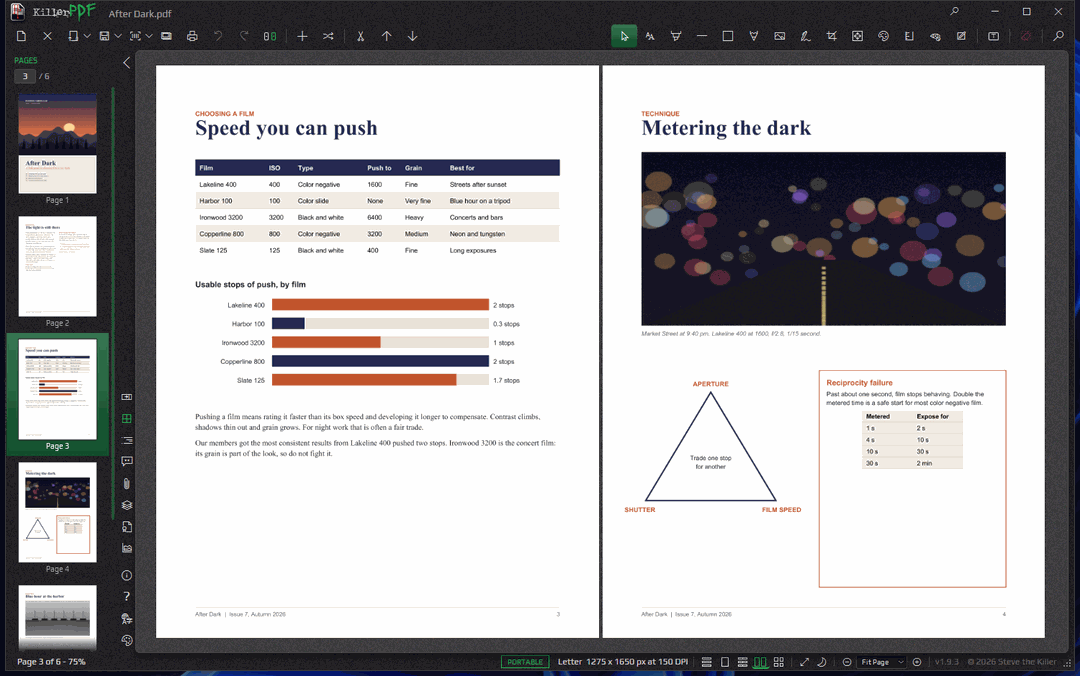
KillerPDF 是一款面向 Windows 的免费开源本地 PDF 编辑器,阅读、注释、编辑、签名、脱敏、格式转换都在一个应用里完成,无需账号也不上传文件。它自带渲染与文本提取引擎,还能直接看 EPUB 和 DjVu 并转成 PDF,适合经常处理合同、扫描件和表单的办公用户。
核心亮点:
- 本地处理文档,无需账号,隐私更可控
- 支持注释、文字图片编辑与手写签名
- 扫描件可 OCR 识别并导出可搜索文本
- 拆分合并、对比、脱敏与表单填写齐全
当前版本 v1.9.6(2026-11-24 发布),开源协议 GPL-3.0,GitHub 4,458 star。
核心信息
| 软件名称 | KillerPDF(SteveTheKiller/KillerPDF) |
| 当前版本 | v1.9.6 |
| 更新日期 | 2026-11-24 |
| 开源协议 | GPL-3.0 |
| 软件分类 | Windows 效率工具 |
| 关键词 | csharp、digital-signature、dotnet、dotnet-core、gplv3、ocr |
本次更新内容
- 新增瑞典语和韩语支持,优化中日韩字体显示与缩放体验。
- 修复拖拽签名崩溃、合并文档报错及文本编辑样式丢失等稳定性问题。
- 改进文件对话框交互,提升大文件内存占用及旧系统兼容性。
- 优化界面细节,调整布局滚动及主题配色,提升视觉美观度。
查看官方英文更新日志(原文)
1.9.6 adds Swedish and Korean. The rest is interface refinements and bug fixes.

### Fixed

- Dragging a signature onto the page no longer crashes KillerPDF when a file it needs is missing (#515).
- While editing text, the font list no longer closes on a click or the mouse wheel, a font-only change on a scanned line sticks, and More settings stays open. Closing More settings with a click no longer leaves the window ignoring the mouse (#467).
- Merging works when an untagged PDF goes into a tagged one (#495), and with pages that have a zero-size ArtBox, BleedBox or TrimBox, like Excel exports (#455).
- Pages and notes dated with an hour-only time zone, like `+01`, merge and take new comments instead of being refused (#524, thanks @andretorresdg).
- Run as administrator, opening a file while KillerPDF is open sends it to the open window instead of starting a second one. Images to PDF from Explorer makes one PDF from all the images again.
- Editing existing text keeps its real typeface and weight when the PDF hides them behind generic names, as Word exports do. Bold Arial stays bold Arial instead of turning into plain Segoe UI (#431).
- Import form data reads FDF files from pdftk, fdfgen and other tools that leave out the cross-reference table (#525, thanks @jayhemnani9910).
- Making a new folder in the file dialog no longer freezes the window on a share that stopped answering.
- Large tiled JPEG 2000 images use far less memory again, 134 MB instead of 361 MB for a large scan.
- Chinese, Japanese and Korean draw in the right fonts and at the right size in the toolbar, sidebar, title bar and status bar (#490).
- Pinch zoom on a touchpad holds the page still instead of letting the text jump (#494).
- Ctrl+click adds marks to a selection like Shift+click, and a single text box's card shows Arrange (#504).
- After a language change, the Restore last session bar and the start screen's Recent list switch to the new language too.
- Under Trash Polka, drop-down lists and the file dialog's panes carry the ink, Yellow buttons draw dark text, and changing the accent no longer stalls on a hung redraw.
- A sidebar menu too tall for the window scrolls instead of running off the bottom, and the keyboard shortcuts card fits its contents.
- One mouse wheel notch scrolls 120 pixels in the file dialog's folder tree and the customize drawer, up from 60 and 40.
- Card tile arrows are as bright as their labels (#508), menus in the document pane keep all four corners rounded, and tabs join their page without a seam at every app size.
- On 98SE, menus, confirm dialogs, tab titles and the window frame match Windows 98.

### Changed

- Merge PDFs on the toolbar makes a new document with the open file listed first, instead of adding to the open file. The page card's Merge still inserts after that page (#495).
- Switching between Single, Two-page and Continuous keeps your zoom, and leaving the thumbnail grid returns to the zoom you had (#521, thanks @
下载地址
以下为官方原包,本站不二次打包;多个文件为不同包型,按需选择其中一个下载即可:
KillerPDF-1.9.6-src.zip(便携版·解压即用 | 47.7 MB)
KillerPDF-Portable.exe(便携版·解压即用 | 101.5 MB)
KillerPDF-Store.exe(官方安装程序 | 101.5 MB)
KillerPDF.exe(官方安装程序 | 42.1 MB)
✅ 上方 SHA256 与官方发布值一致,可自行核对。
快速上手
- 运行下载好的安装包完成安装,或直接双击便携版程序启动 KillerPDF。
- 首次启动后打开或拖入 PDF 文件,在标签页中阅读,用顶部工具栏添加文字、高亮和签名等标注。
- 在页面缩略图栏中合并、拆分、旋转或重排页面,也可用比较功能并排查看两份文档的差异。
- 对扫描件运行 OCR 识别文字,再通过导出功能另存为 Word、Excel 或图片等格式。
- 需要保护文档时,用密保或涂黑功能处理敏感内容,并另存为单独的副本。
提示:扫描件需先做 OCR 才能编辑文字,导出 Office 文件后请检查排版。
讨论(0 条)