Lagrange 是一款专为 Gemini 协议打造的精致浏览器,把网页浏览器的顺滑体验带进极客的小众网络。它支持多标签、书签历史、内嵌图片与音频播放,还有 TLS 客户端证书身份管理,界面排版漂亮。适合想探索 Geminispace、喜欢轻量开源工具的极客用户。
核心亮点:
- 完整 Unicode 排版,页面样式按域名自动生成
- 多标签、书签、历史与页面大纲侧边栏齐全
- 内置 TLS 客户端证书,管理 Gemini 身份
- 支持跨设备同步数据,另有终端 TUI 界面
当前版本 v2.0.4(2026-11-23 发布),开源协议 BSD-2-Clause,GitHub 1,541 star。

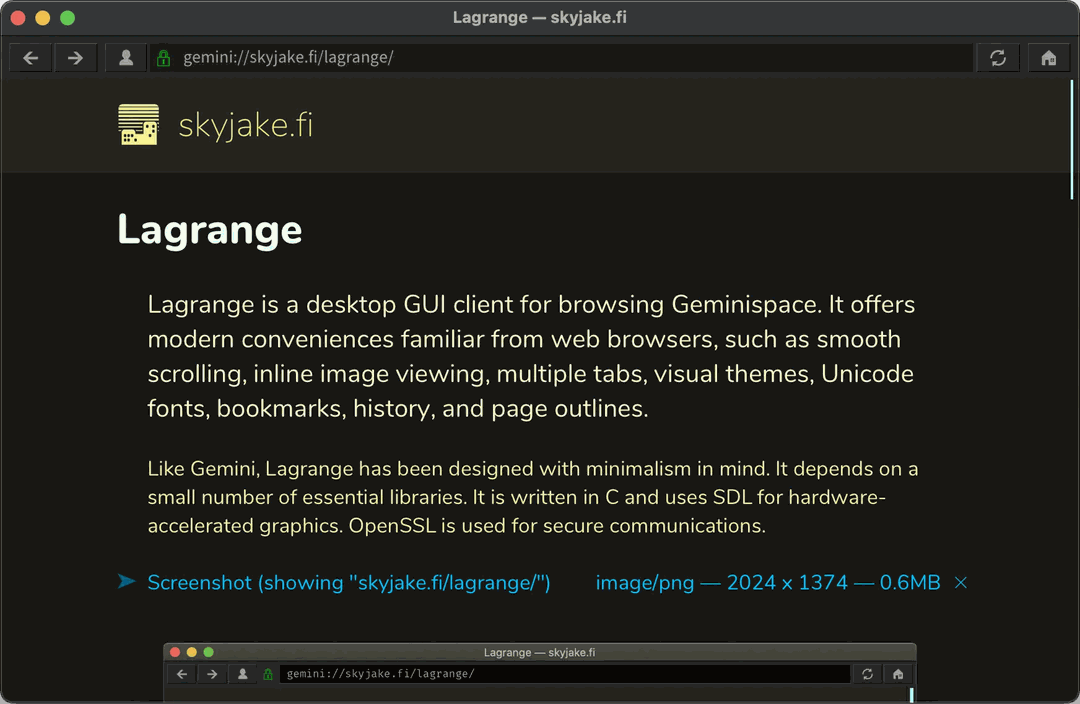
核心信息
| 软件名称 | Lagrange(skyjake/lagrange) |
| 当前版本 | v2.0.4 |
| 更新日期 | 2026-11-23 |
| 开源协议 | BSD-2-Clause |
| 软件分类 | Android 开源 APK |
| 关键词 | c11、client、desktop、gemini、gui、linux |
本次更新内容
- 新版本修复了连接游戏手柄时的启动崩溃和鼠标悬停异常,并解决了播放音频及书签同步中的潜在问题。
- 阅读器标签页切换后会自动恢复之前的侧边栏模式,触控板灵敏度调节范围也得到扩展。
- Linux 系统启动时能更准确地识别深色/浅色模式,同时更新了界面翻译。
查看官方英文更新日志(原文)
* Switching away from the reader tab restores the previous sidebar mode, if the reader tab switched it to Feeds.
* Trackpad sensitivity setting extended to 4x.
* Fixed: Crash when launching with a gamepad connected.
* Fixed: Mouse hover misbehaves when a gamepad is connected.
* Fixed: Potential crash when playing WAV audio. (Contributed by Martin Chang.)
* Fixed: Potential issues related to trashed bookmarks during sync/import.
* Fixed: Disambiguating Tinylog subscriptions with the same author. (Subscribed to multiple feeds with the same "@author@domain".)
* *Linux:* Improved system dark/light mode detection at launch.
* Updated UI translations.

[What's new in v2.0?](https://github.com/skyjake/lagrange/releases/tag/v2.0.0)

| OS  | Download | Details |
| --- | -------- | ------- |
| **Linux** Desktop | [x86_64 AppImage](https://github.com/skyjake/lagrange/releases/download/v2.0.4/Lagrange-2.0.4-x86_64.AppImage) | Built on Ubuntu 22.04. [(sig)](https://github.com/skyjake/lagrange/releases/download/v2.0.4/Lagrange-2.0.4-x86_64.AppImage.sig) [(zsync)](https://github.com/skyjake/lagrange/releases/download/v2.0.4/Lagrange-2.0.4-x86_64.AppImage.zsync) |
|     | [aarch64 AppImage](https://github.com/skyjake/lagrange/releases/download/v2.0.4/Lagrange-2.0.4-aarch64.AppImage) | Built on Debian 13 (Trixie). [(sig)](https://github.com/skyjake/lagrange/releases/download/v2.0.4/Lagrange-2.0.4-aarch64.AppImage.sig) [(zsync)](https://github.com/skyjake/lagrange/releases/download/v2.0.4/Lagrange-2.0.4-aarch64.AppImage.zsync) |
|     | [armhf AppImage](https://github.com/skyjake/lagrange/releases/download/v2.0.4/Lagrange-2.0.4-armhf.AppImage) | Built on Raspbian 10 (Buster). [(sig)](https://github.com/skyjake/lagrange/releases/download/v2.0.4/Lagrange-2.0.4-armhf.AppImage.sig) [(zsync)](https://github.com/skyjake/lagrange/releases/download/v2.0.4/Lagrange-2.0.4-armhf.AppImage.zsync) |
| **macOS** Desktop | [Apple arm64](https://github.com/skyjake/lagrange/releases/download/v2.0.4/lagrange_v2.0.4_macos11.0-arm64.tbz) | Requires macOS 11.0 or later. [(sig)](https://github.com/skyjake/lagrange/releases/download/v2.0.4/lagrange_v2.0.4_macos11.0-arm64.tbz.sig) |
|     | [Intel x86_64](https://github.com/skyjake/lagrange/releases/download/v2.0.4/lagrange_v2.0.4_macos10.13-x86_64.tbz) | Requires macOS 10.13 or later. [(sig)](https://github.com/skyjake/lagrange/releases/download/v2.0.4/lagrange_v2.0.4_macos10.13-x86_64.tbz.sig) |
| **Windows** Desktop | [setup.exe (64‑bit)](https://github.com/skyjake/lagrange/releases/download/v2.0.4/lagrange_v2.0.4_windows-x64_setup.exe) | Requires 64-bit Windows 7 or later. [(sig)](https://github.com/skyjake/lagrange/releases/download/v2.0.4/lagrange_v2.0.4_windows-x64_setup.exe.sig) |
|     | [portable.zip (64‑bit)](https://github.com/skyjake/lagrange/releases/download/v2.0.4/lagrange_v2.0.4_windows-x64_portable.zip) | Requires 64-bit Windows 7 or later. Can be extracted and run as-is — user files will be stored under the "userdata" s
下载地址
以下为官方原包,本站不二次打包,点击直接下载:
lagrange_v2.0.4_phone.apk(Android 安装包 | 21.1 MB)
✅ 上方 SHA256 与官方发布值一致,可自行核对。
快速上手
- 运行下载好的安装包,按提示完成安装并启动 Lagrange。
- 首次启动后,在地址栏输入 Gemini 地址并回车,即可浏览页面。
- 点击工具栏按钮或使用侧边栏,查看页面大纲、书签和历史记录。
- 在身份管理中创建 TLS 客户端证书,用于需要身份验证的站点。
- 打开 about:help 查看应用内帮助,了解全部功能与用法。
提示:输入网址时留意智能建议,可快速跳转到书签或历史记录。
讨论(0 条)