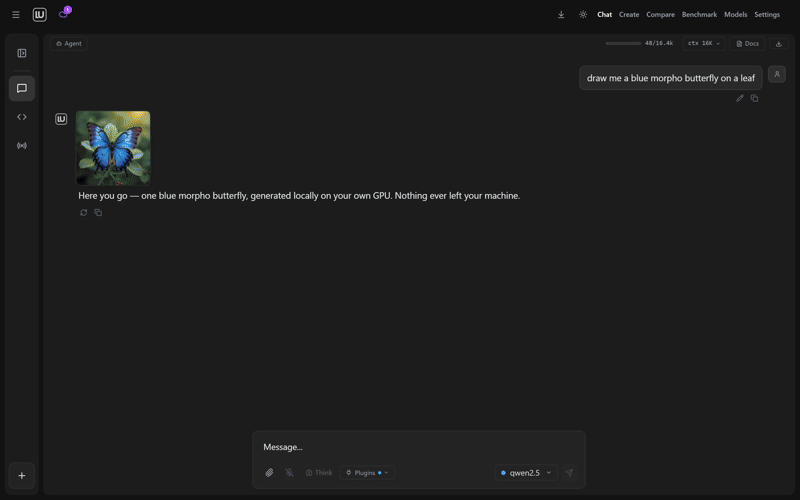
这是一款本地化 AI 桌面工作台,集聊天、绘图、视频生成及编程助手于一体。无需终端或复杂配置,安装即用,数据完全私有。适合追求隐私安全、希望零门槛体验本地大模型能力的用户。
核心亮点:
- 全功能集成,聊天绘图视频编程一站式搞定
- 本地运行零门槛,无需终端或复杂配置
- 支持编程助手,自动展示代码差异便于审查
- 可选云端算力补充,本地模式完全免费开源
当前版本 v3.1.3(2026-11-23 发布),开源协议 AGPL-3.0,GitHub 4,688 star。

核心信息
| 软件名称 | Locally Uncensored(PurpleDoubleD/locally-uncensored) |
| 当前版本 | v3.1.3 |
| 更新日期 | 2026-11-23 |
| 开源协议 | AGPL-3.0 |
| 软件分类 | Windows 效率工具 |
| 关键词 | agent、ai-chat、ai-studio、all-in-one、coding-agent、desktop-app |
本次更新内容
- 新增场景转视频功能,支持保留原画面布局生成短片,提升创作灵活性。
- 优化长对话记忆管理,允许自定义记忆长度并固定关键信息,减少上下文丢失。
- 改进智能体模式,支持设定单次运行令牌上限,避免资源过度消耗。
- 增强角色一致性控制,通过统一规则约束人物表现,减少模型自动切换带来的混乱。
查看官方英文更新日志(原文)
## Which file do I need?

**Windows 10 and 11:** the file ending in `_x64-setup.exe`. The `.msi` is the same app for a system wide install.

**Linux:** the `.AppImage` runs on most distributions: make it executable (`chmod +x`) and start it. The `.deb` is for Ubuntu and Debian, the `.rpm` for Fedora.

**macOS (Apple Silicon only, macOS 14 or newer):** the `.dmg`. Open it and drag LU to Applications. The app is signed with an Apple Developer ID and notarized by Apple. Intel Macs are not supported.

**Android 7.0 or newer (arm64):** the file ending in `-Android.apk`. Allow installs from your browser or file app when Android asks.

The other files (`.sig`, `.zip`, `.tar.gz`, `.cdx.json`, `latest.json`) are for the automatic update and for checks. You do not need them.

**Windows shows "Windows protected your PC"?** The installer has no code signing certificate yet, so SmartScreen does not know it. Click **More info**, then **Run anyway**. It is built by GitHub Actions from the public source: [how to check it](https://github.com/PurpleDoubleD/locally-uncensored/blob/master/SECURITY.md#antivirus--browser-false-positives).

**No GPU, or a model too big for yours?** Run it in LU Cloud from the same app: a credit pack for €15 with no subscription, or Hosted for €19 a month. [Plans and packs](https://lu-labs.ai/pricing?src=github&utm_source=github&utm_medium=release)

> All versions are portable-friendly, no admin rights required. LU by LU Labs.

## Locally Uncensored 3.1.3 (2026-11-23)

Scene to Video comes to the desktop app, and Agent mode asks in the chat where it works. Everything in 3.1.2 and 3.1.1 is in the [3.1.2 release notes](https://github.com/PurpleDoubleD/locally-uncensored/releases/tag/v3.1.2) and the [3.1.1 release notes](https://github.com/PurpleDoubleD/locally-uncensored/releases/tag/v3.1.1).

### Added
- **Scene to Video in Create.** Drop in a short video of a scene, for example a grey room from Blender, add a prompt, and LU turns it into a finished clip that keeps the camera and the layout. On LU Cloud with the same models as on lu-labs.ai (Wan 3.0 Scene, Seedance 2.5 Flash, Wan 2.1 VACE, Aleph 2, FLUX 3 Video Edit), with an optional first frame of your own or one made from the prompt. On Windows and Linux it also runs locally through ComfyUI on Wan 2.1 VACE, driven by a depth video of the scene, for the first five seconds of the clip. On macOS it runs on LU Cloud.
- **One rule for the people in a video, for every model.** Each person is a row with a number, a place in the frame and a character. What a model cannot do is said at that row and at Create, together with a model that can. LU no longer switches the model by itself.
- **Memory in long story chats** ([#255](https://github.com/PurpleDoubleD/locally-uncensored/issues/255)). Memories are no longer cut at 500 characters without a word: the limit is a setting (3000 characters by default), and a cut memory says how much was left out. The brain icon shows what the last request really
下载地址
以下为官方原包,本站不二次打包;多个文件为不同包型,按需选择其中一个下载即可:
Locally.Uncensored_3.1.3_x64-setup.exe(安装版 | 27.0 MB)
Locally.Uncensored_3.1.3_x64-setup.nsis.zip(安装版 | 25.4 MB)
Locally.Uncensored_3.1.3_x64_en-US.msi(安装版 | 42.4 MB)
Locally.Uncensored_3.1.3_x64_en-US.msi.zip(便携版·解压即用 | 40.7 MB)
✅ 上方 SHA256 与官方发布值一致,可自行核对。
快速上手
- 双击运行下载好的安装包,按照向导提示完成软件安装。
- 启动软件后,在界面中点击选择并加载所需的 AI 模型。
- 在聊天窗口输入指令,即可开始使用聊天、绘图或编码功能。
提示:确保电脑显卡显存充足,以获得流畅的本地 AI 体验。
讨论(0 条)