MacSai 是一款开源的 Mac 清理、优化与恶意软件扫描工具,用 SwiftUI 打造,被视作 CleanMyMac 的免费替代品。它把磁盘清理、重复文件查找、系统优化和安全扫描整合在一起,界面原生、无广告、无遥测,适合不想为清理软件付费又在意隐私的 Mac 用户。
核心亮点:
- 清理、优化、恶意软件扫描三合一
- 开源免费,无订阅无内购无广告
- 零遥测,不收集任何使用数据
- 原生 SwiftUI 界面,已通过苹果公证
当前版本 v1.32.0(2026-11-12 发布),开源协议 BSD-3-Clause,GitHub 2,161 star。


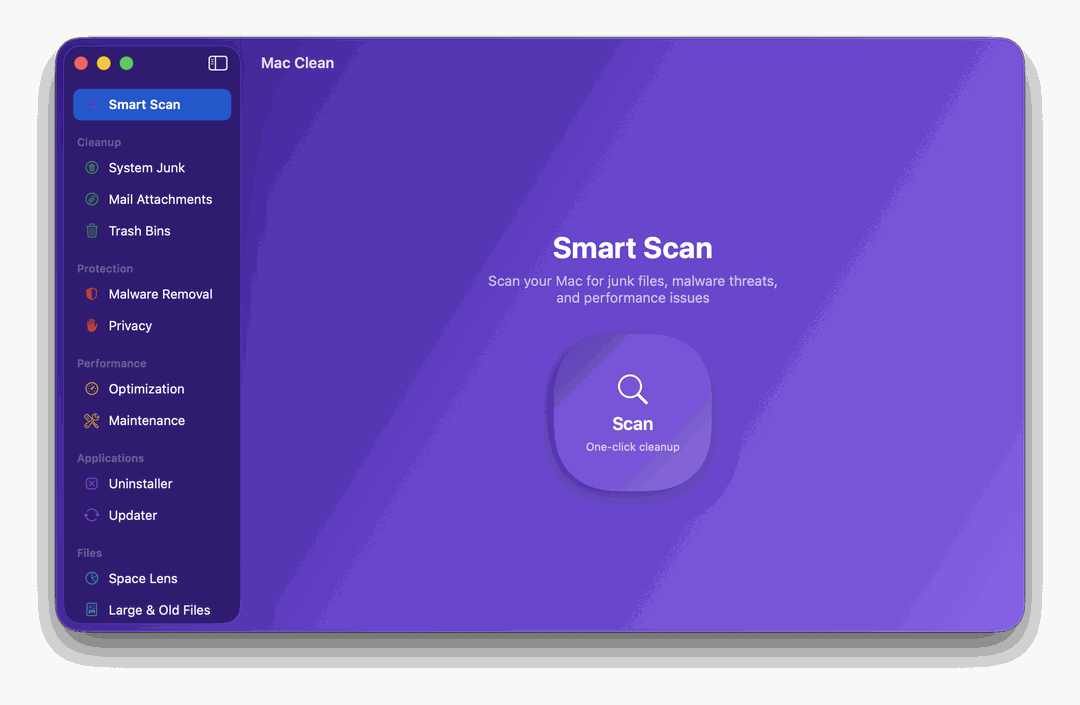
核心信息
| 软件名称 | MacSai(iliyami/MacSai) |
| 当前版本 | v1.32.0 |
| 更新日期 | 2026-11-12 |
| 开源协议 | BSD-3-Clause |
| 软件分类 | macOS 软件 |
| 关键词 | appkit、cleanmymac、cleanmymac-alternative、darwin、disk-cleaner、duplicate-finder |
本次更新内容
- 新版本支持在应用内检查、下载并安装更新,更新经过签名验证,自动检查可关闭,安装后自动重启生效。
- 新增多种界面语言并支持从右到左布局,可在设置中选择或跟随系统语言。
- 清理功能能发现更多隐藏的磁盘占用,并修正了重复计算导致文件夹大小显示不准的问题。
- 设置中新增支持者名单,感谢为软件提供帮助的成员,名单随版本内置无需联网。
查看官方英文更新日志(原文)
## Mac Sai v1.32.0

### Download (fastest)

Download **MacSai-1.32.0.dmg** below, open it, and drag Mac Sai to your Applications folder. Updating? Quit Mac Sai first and replace the old copy.

### Homebrew

```
brew install --cask mac-sai      # new install
brew upgrade --cask mac-sai      # already installed with Homebrew
```

Homebrew picks up new releases automatically, usually within a day or two. Until then it still serves the previous version, so if `brew` doesn't offer 1.32.0 yet, use the DMG above. If you installed from the DMG, keep updating with the DMG: `brew install` refuses to replace an app it didn't install.

### Requirements
- macOS 14 (Sonoma) or later
- Grant Full Disk Access in System Settings for complete scan results

### Safety
All deletions go to Trash by default. Protected system paths are blocklisted. Every operation is logged.
## What's new
- **Updates from inside the app.** Mac Sai can now check for updates, show what's new, download a signed update and relaunch into it, all without leaving the app. Every update is verified with an EdDSA signature before it installs, automatic checks run once a day and can be turned off in Settings, and automatic installing stays off unless you turn it on. Homebrew installs keep updating through Homebrew (#255)
- **Six more languages, 13 in total.** Mac Sai now speaks Spanish, Brazilian Portuguese, Japanese, Korean and Turkish (#243, #244, #245, #246, #247), and Farsi with a full right-to-left layout (#274). Pick one in Settings → Interface Language, or let Mac Sai follow your Mac's language
- **More hidden disk usage found.** OpenClaw logs, the uv cache and old pnpm stores (each version listed separately) now show up in cleanup, and Docker Desktop's disk image size is shown even when Docker isn't running (Mac Sai never deletes it). Hard-linked files are no longer counted more than once, so folders like Spotlight's index show their real size (#266)
- **Supporters list.** Settings → About now thanks the members who support Mac Sai. Names are compiled into each release, so the list makes no network calls (#268)

## Good to know
This is the first version with in-app updates, so install this one the usual way: download the DMG above (or `brew upgrade --cask mac-sai`). From here on, Mac Sai can update itself.

Thanks to @helloworldxdwastaken for five new translations, to @mehdiraized for the new disk usage finds and the hard link fix, and to @mrglonin for in-app updates!

## New Contributors
* @helloworldxdwastaken made their first contribution in https://github.com/iliyami/MacSai/pull/243
* @mehdiraized made their first contribution in https://github.com/iliyami/MacSai/pull/266

**Full Changelog**: https://github.com/iliyami/MacSai/compare/v1.28.0...v1.32.0
下载地址
以下为官方原包,本站不二次打包,点击直接下载:
MacSai-1.32.0.dmg(官方原包 | 18.5 MB)
✅ 上方 SHA256 与官方发布值一致,可自行核对。
快速上手
- 双击打开下载好的磁盘映像,把 Mac Sai 拖入「应用程序」文件夹完成安装。
- 首次启动后如出现系统询问,选择允许其扫描所需文件夹,随后进入主界面。
- 在主界面点「智能扫描」,一键检查系统垃圾、邮件附件、废纸篓等项目。
- 扫描完成后查看结果,确认要清理的内容,再执行清理,文件会优先移入废纸篓。
- 按需切换到防护或性能模块,使用恶意软件清理、隐私清理或登录项优化。
提示:清理前先浏览扫描结果,误删可从废纸篓或清理历史恢复。
讨论(0 条)