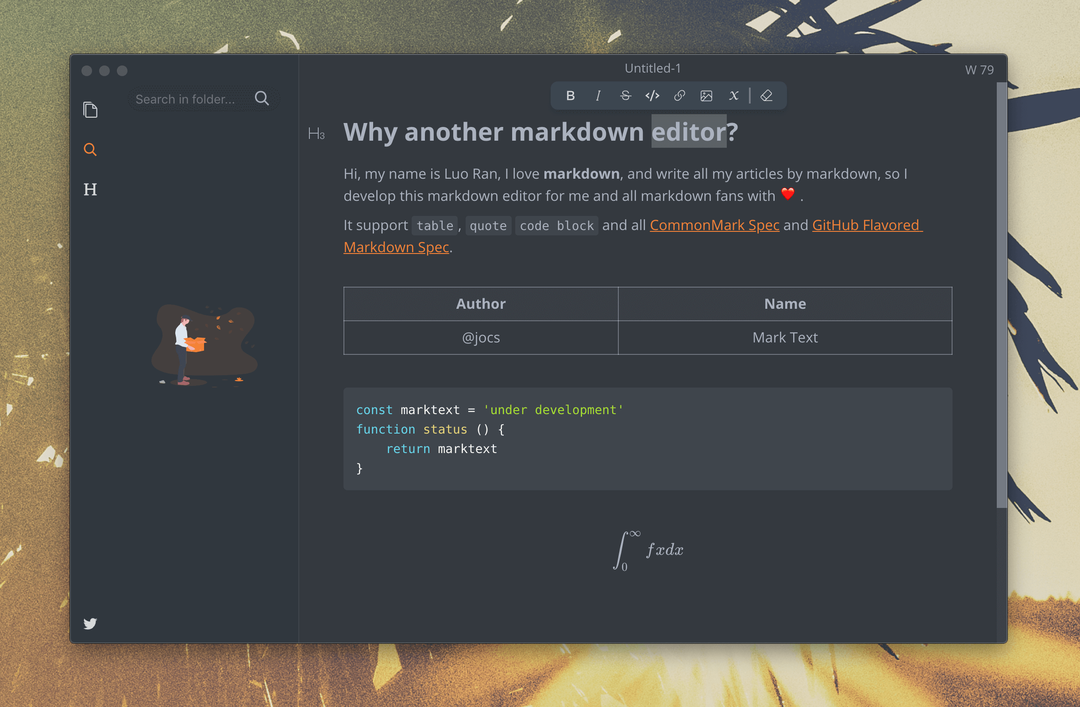
MarkText 是一款简洁优雅的开源 Markdown 编辑器,主打实时预览和专注写作体验。它支持数学公式、图表、多种主题与导出格式,界面干净、上手轻快,适合经常写技术文档、笔记或博客的开发者与写作者,跨平台可用。
核心亮点:
- 实时预览与所见即所得,边写边看排版效果
- 专注模式屏蔽干扰,让写作更沉浸
- 支持数学公式与图表,技术文档友好
- 多主题与多种导出格式,跨平台可用
当前版本 v0.23.0(2026-10-21 发布),开源协议 MIT,GitHub 63,470 star。

核心信息
| 软件名称 | MarkText(marktext/marktext) |
| 当前版本 | v0.23.0 |
| 更新日期 | 2026-10-21 |
| 开源协议 | MIT |
| 软件分类 | Windows 效率工具 |
| 关键词 | editor、electron、focus-mode、latex、linux、mac |
本次更新内容
- 新版本支持折叠标题、独立文档大纲和只读阅读模式,方便长文浏览与专注阅读。
- 新增 Linux ARM 安装包,并补齐 Linux 运行依赖,更多设备可直接安装使用。
- 侧边栏导航与搜索布局更简洁,文档统计改为本地化弹窗,界面更清爽。
- 代码块与标题的复制反馈统一,图标按钮补充无障碍名称与提示,操作更友好。
- macOS 安装包未签名,首次拖入应用后需手动清除隔离标记才能正常打开。
查看官方英文更新日志(原文)
## ⚠️ Note for macOS users
Builds are unsigned (no Apple Developer ID). After dragging MarkText into Applications, clear the quarantine flag once:
```
xattr -d com.apple.quarantine /Applications/MarkText.app
```

## Verifying downloads
All artifacts are listed with their SHA-256 in `SHA256SUMS.txt`. Verify with:
```
sha256sum -c SHA256SUMS.txt --ignore-missing
```


## What's Changed
* chore(release): v0.22.0 by @Jocs in https://github.com/marktext/marktext/pull/5779
* chore: begin v0.23.0 development by @Jocs in https://github.com/marktext/marktext/pull/5780
* fix(release): explicitly select the previous stable version by @Jocs in https://github.com/marktext/marktext/pull/5781
* feat: #5695 ship Linux arm64 packages in releases by @kukirin-ui in https://github.com/marktext/marktext/pull/5778
* fix: unify inline and block code font families by @Jocs in https://github.com/marktext/marktext/pull/5783
* fix: #4997 give icon-only controls accessible names by @Pranav435 in https://github.com/marktext/marktext/pull/5739
* fix: #4997 theme icon tooltips and delay hover hints by @Jocs in https://github.com/marktext/marktext/pull/5788
* feat: foldable headings in the WYSIWYG editor (#1869) by @rkristelijn in https://github.com/marktext/marktext/pull/5276
* feat: #3743 add an independent responsive document outline by @Jocs in https://github.com/marktext/marktext/pull/5791
* feat: simplify sidebar navigation and search layout by @Jocs in https://github.com/marktext/marktext/pull/5792
* feat: add localized document statistics popover by @Jocs in https://github.com/marktext/marktext/pull/5794
* [1/5] fix(muya): validate asynchronous edit targets by @Jocs in https://github.com/marktext/marktext/pull/5799
* [2/5] feat(muya): add accessible code copy and clipboard feedback by @Jocs in https://github.com/marktext/marktext/pull/5800
* refactor(notification): use Element Plus Notification for global notices by @Jocs in https://github.com/marktext/marktext/pull/5798
* fix(menu): localize recent documents and polish theme labels by @Jocs in https://github.com/marktext/marktext/pull/5803
* fix(desktop): stabilize tab and sidebar dirty actions by @Jocs in https://github.com/marktext/marktext/pull/5804
* [3/5] feat(muya): add read-only document mode by @Jocs in https://github.com/marktext/marktext/pull/5801
* [4/5] feat: integrate per-tab document modes and protected saves by @Jocs in https://github.com/marktext/marktext/pull/5802
* [5/5] feat: expose per-tab Reading Mode controls and menu eligibility by @Jocs in https://github.com/marktext/marktext/pull/5793
* fix: #5784 declare ALSA and libgbm dependencies in Linux packages by @kukirin-ui in https://github.com/marktext/marktext/pull/5785
* fix: prevent duplicate sidebar trash confirmations by @Jocs in https://github.com/marktext/marktext/pull/5806
* fix: unify heading and code copy feedback by @Jocs in https://github.com/marktext/marktext/pull/5805
* refactor(muya): type mutation sources with ChangeSource by @Jocs in
下载地址
以下为官方原包,本站不二次打包;多个文件为不同包型,按需选择其中一个下载即可:
marktext-win-arm64-0.23.0-setup.exe(安装版 | 120.2 MB)
marktext-win-x64-0.23.0-setup.exe(安装版 | 126.3 MB)
✅ 上方 SHA256 与官方发布值一致,可自行核对。
快速上手
- 运行下载好的安装包,按向导提示完成安装并启动 MarkText。
- 首次启动后进入编辑界面,在实时预览模式下直接输入 Markdown 内容,所见即所得。
- 通过菜单切换源码模式与预览模式,按需查看和编辑原始 Markdown 文本。
- 编辑完成后保存文件,选择存放位置并命名,即可保留你的 Markdown 文档。
提示:善用实时预览边写边看效果,切换源码模式可核对语法。
讨论(0 条)