massCode 是一款本地优先的开发者工作台,把代码片段、笔记、HTTP 请求、计算、绘图和开发小工具收进同一个桌面应用。所有内容以纯 Markdown 文件存在本地,数据自己掌控,还提供 VS Code 和 Raycast 扩展。适合需要随手存代码、记笔记又不想依赖云服务的开发者。
核心亮点:
- 代码片段与笔记统一管理,支持文件夹与标签分类
- 内置 HTTP 请求工具,调试接口无需切换应用
- 数据以纯 Markdown 本地存储,便于备份与迁移
- 提供 VS Code 与 Raycast 扩展,随手调用片段
当前版本 v6.4.0(2026-11-24 发布),开源协议 AGPL-3.0,GitHub 7,112 star。


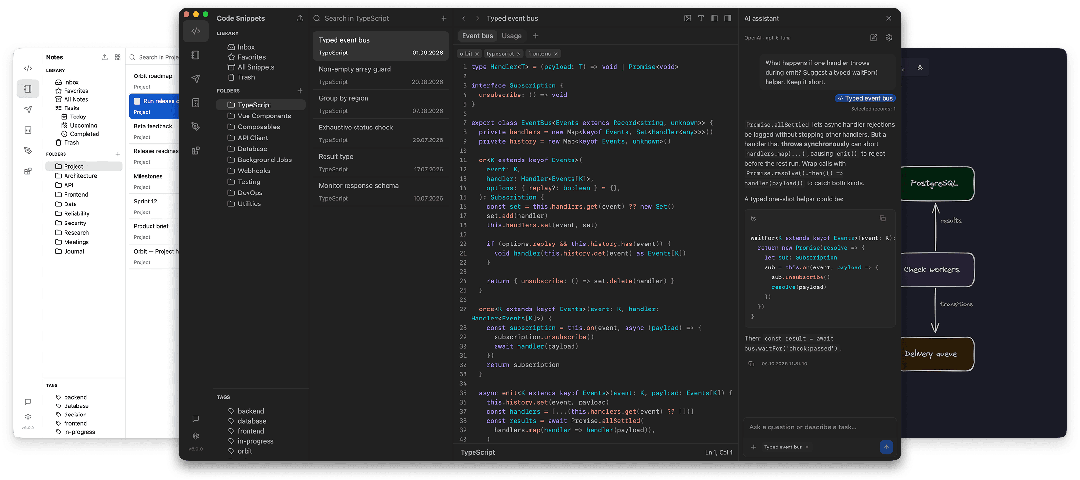
核心信息
| 软件名称 | massCode(massCodeIO/massCode) |
| 当前版本 | v6.4.0 |
| 更新日期 | 2026-11-24 |
| 开源协议 | AGPL-3.0 |
| 软件分类 | macOS 软件 |
| 关键词 | api-client、code-snippets、developer-tools、electron、http-client、knowledge-base |
本次更新内容
- 新增社区主题画廊,支持一键浏览、安装、更新及卸载主题,并可便捷提交个人作品。
- 系统模式下自动切换自定义外观,支持设置独立的浅色与深色主题,适配系统变化。
- 优化代码工作流,新增 MCP 快速入门及实用指南,方便结合代码代理使用片段。
- 修复笔记图表标签重叠、编辑器宽度及数学笔记本计算逻辑等多项体验问题。
查看官方英文更新日志(原文)
## Meet Torsher

Torsher is an open-source, self-hosted media center for your TV. It runs in a Docker container on your own hardware and brings browsing, playback, and your media library together. You can start watching while a file downloads and follow shows to pick up new episodes automatically. [Explore Torsher](https://torsher.app/).

<p align="center">
<img width="1200" height="630" alt="site-og-image-1200x630" src="https://github.com/user-attachments/assets/7058f9da-45aa-4e3f-9680-22d780dbcf97" />
</p>

## massCode on Reddit

The massCode subreddit is open. Share your setup, show off a theme, ask questions, or talk about how you use the app. [Join r/massCode](https://www.reddit.com/r/massCode/).

## Community Themes Gallery

Browse themes by name or author, preview their colors, and install and apply them in one click from **Settings → Appearance → Community Themes**. You can also update or uninstall themes from the gallery. If you've edited a theme locally, massCode asks before replacing or removing it.

<p align="center">
<img width="1024" height="642" alt="image" src="https://github.com/user-attachments/assets/430ac906-c673-4075-aa87-61a1a672cd4d" />
</p>


To share a theme you've made, apply it and click **Submit to Community**. massCode opens a prefilled pull request on GitHub for you to review and submit.

## Custom Themes in System Mode

Choose your own light and dark themes in **Settings → Appearance**. In **System** mode, massCode switches between your choices automatically when your operating system changes appearance. You can use built-in, custom, or community themes for either choice.

## Workflow Improvements

- Added an MCP quickstart and practical workflows for using snippets, Markdown notes, and saved HTTP requests with a coding agent. [Browse the MCP guides](https://github.com/massCodeIO/massCode/tree/v6.4.0/docs/website/documentation/mcp).
- Updated the Japanese translation across the app.

## Fixes

- The Notes dashboard graph preview displays the full graph, and labels no longer overlap. Long note titles wrap to stay readable.
- The raw Markdown editor in Notes uses the available width and gives three-digit line numbers enough room.
- Tag entry respects input method composition, so confirming a Japanese character candidate with `Enter` doesn't create a tag prematurely.
- Math Notebook evaluates decimal commas and grouped numbers in expressions such as `2,50 + 1,25` and `1.234,56 + 1`.
- Math Notebook distinguishes modulo from percentages and simplifies speed multiplied by time to a distance.
- Same-currency arithmetic and conversions with a manually specified exchange rate work when live rates are unavailable.
- A calculation error in Math Notebook stays on its own line, and hovering over it shows the full message.
- Math Notebook saves pending edits before quitting or switching vaults. Editing one sheet also preserves external changes to other sheets.

## What's Changed
* docs
下载地址
以下为官方原包,本站不二次打包;多个文件为不同包型,按需选择其中一个下载即可:
massCode-6.4.0-arm64-mac.zip(便携版·解压即用 | 257.2 MB)
massCode-6.4.0-arm64.dmg(官方原包 | 266.4 MB)
massCode-6.4.0-mac.zip(便携版·解压即用 | 263.5 MB)
massCode-6.4.0.dmg(官方原包 | 272.6 MB)
✅ 上方 SHA256 与官方发布值一致,可自行核对。
快速上手
- 运行下载好的安装包,按提示完成安装后启动 massCode,首次打开会看到本地工作区界面。
- 在左侧边栏创建文件夹或直接新建片段,把常用代码保存为片段并添加标签方便检索。
- 切换到笔记模块记录日常内容,工作区以本地 Markdown 文件形式保存。
- 使用 HTTP 请求模块发起接口调试,或用计算与绘图工具完成日常小任务。
提示:工作区数据保存在本地 Markdown 文件中,建议定期备份。
讨论(0 条)