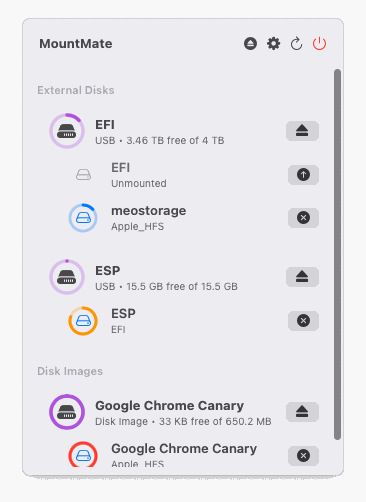
MountMate 是一款 macOS 菜单栏小工具,点一下就能挂载、卸载或强制弹出外置硬盘,省去开终端和磁盘工具的麻烦。它还能查看剩余空间、管理网络共享、设置休眠自动卸载,适合外接硬盘常驻的用户。
核心亮点:
- 菜单栏一键挂载、卸载、只读挂载和强制弹出外置盘
- 显示磁盘与网络共享剩余空间,支持全部挂载或弹出
- 可设置休眠、锁屏或闲置时自动卸载,唤醒后恢复
- 支持加密 APFS 解锁、登录自动挂载 SMB/NFS/WebDAV
当前版本 v6.6(2026-11-13 发布),开源协议 MIT,GitHub 526 star。

核心信息
| 软件名称 | Mountmate(homielab/mountmate) |
| 当前版本 | v6.6 |
| 更新日期 | 2026-11-13 |
| 开源协议 | MIT |
| 软件分类 | macOS 软件 |
| 关键词 | apfs、disk、eject、external-drive、free、homebrew |
本次更新内容
- 新增对 WebDAV 网络共享的支持,可连接 Nextcloud、群晖等常见网盘服务。
- Mac 睡眠或锁屏时可自动断开网络共享,唤醒后再自动重新连接。
- NFS 共享在服务器不可达时不再卡住访达,旧共享可在设置中开启此改进。
- 驱动器无法弹出时的提示改用通俗名称说明占用者,并显示对应图标。
- 诊断信息中新增磁盘连接情况、保活间隔和低空间警告阈值等详情。
查看官方英文更新日志(原文)
### Added

- Mount WebDAV shares, such as Nextcloud or Synology, next to SMB, NFS and AFP.
- Optionally unmount network shares too when your Mac sleeps or locks, and mount them again on wake.
- **NFS shares no longer freeze Finder when the NAS goes away**: new shares give up on an unreachable server instead of waiting forever. Turn it on for older shares in their settings.
- **Clearer "in use" alerts**: when a drive can't be ejected, the alert names what is using it in plain words, such as "Spotlight indexing" or "Quick Look" instead of "mds", and shows its icon.
- **Copy Diagnostics** now also lists how many disks are connected by type and file system, the Keep Alive interval and the low-space warning threshold.

---

Download the DMG and drag MountMate.app into your Applications folder, or update from inside the app.
Please report bugs at https://github.com/homielab/mountmate/issues

**Full Changelog**: https://github.com/homielab/mountmate/compare/v6.5...v6.6
下载地址
以下为官方原包,本站不二次打包;多个文件为不同包型,按需选择其中一个下载即可:
MountMate_6.6.dmg(官方原包 | 5.9 MB)
MountMate_6.6.zip(便携版·解压即用 | 5.5 MB)
✅ 上方 SHA256 与官方发布值一致,可自行核对。
快速上手
- 运行下载好的安装包,把 MountMate 拖入「应用程序」文件夹完成安装。
- 首次启动后,在菜单栏找到 MountMate 图标并点击,弹出窗口会列出外接磁盘。
- 在列表中点击某个磁盘,即可一键挂载、卸载、只读挂载或强制推出。
- 在弹出窗口中使用全部卸载、全部挂载或全部推出,也可用全局快捷键操作。
- 打开设置,可让磁盘在 Mac 睡眠、锁屏或闲置后自动卸载,并在唤醒或解锁时重新挂载。
提示:加密 APFS 卷可在应用内解锁,密码可存入钥匙串,省去每次输入。
讨论(0 条)