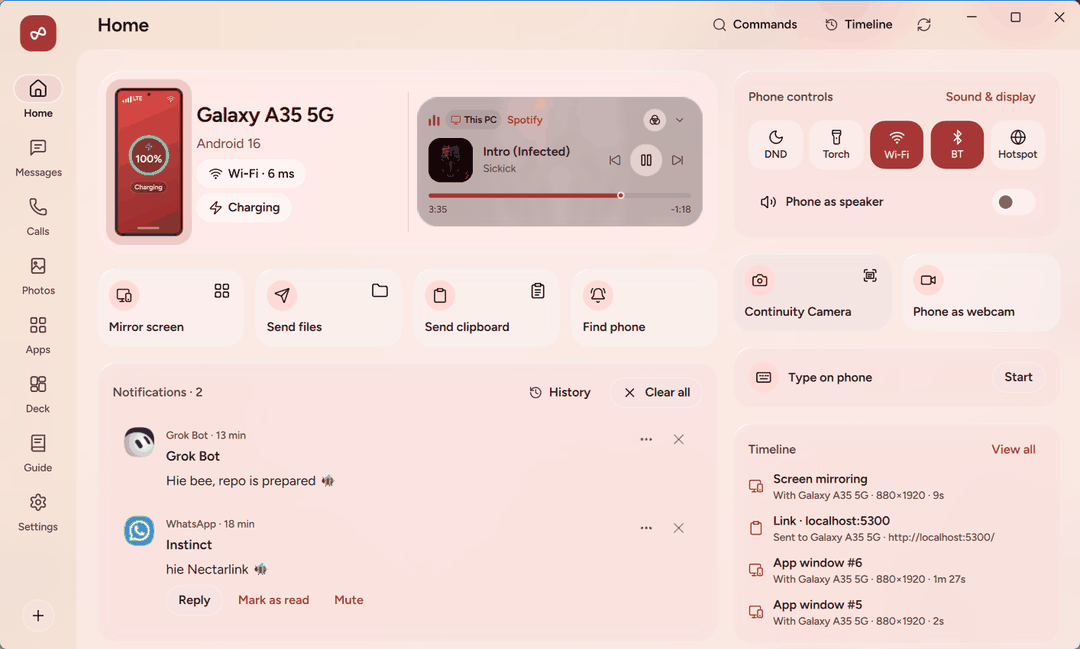
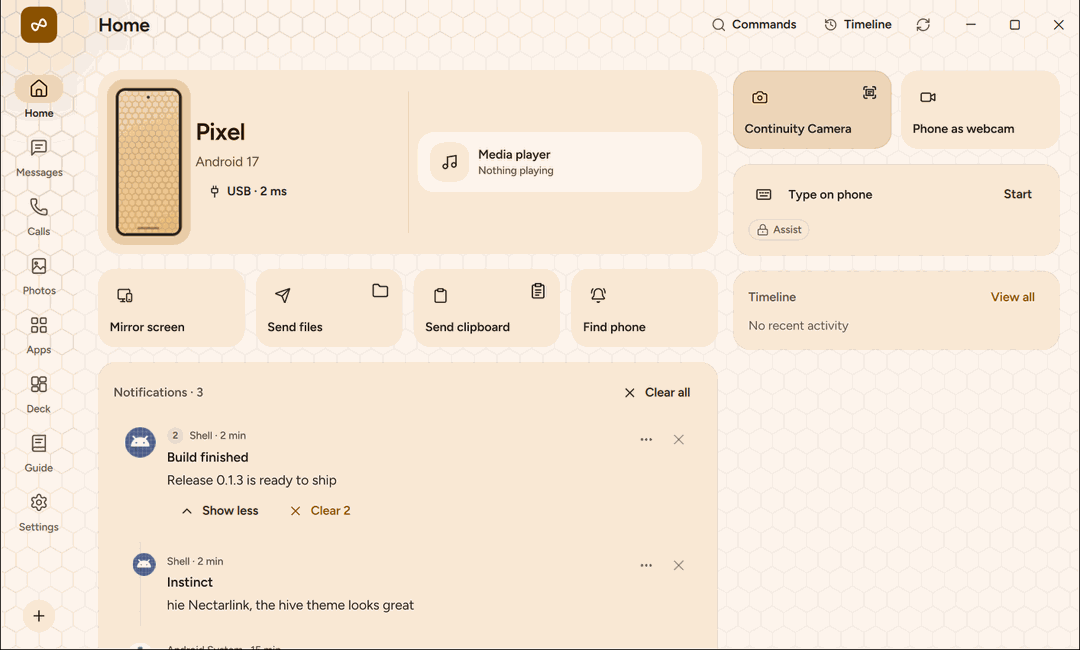
NectarLink 是一款把安卓手机和电脑连成一体的本地协同工具,通知、消息、剪贴板、文件互传、屏幕镜像和手机应用窗口都能在一个软件里搞定。全程端到端加密、不依赖账号和云,适合想摆脱多款工具来回切换的 Windows 和 Linux 用户。
核心亮点:
- 通知、短信、来电和剪贴板在手机与电脑间同步
- 支持文件照片互传、屏幕镜像和手机应用窗口化
- 本地优先端到端加密,无需账号也不经过云端
- 覆盖 Windows 与 Linux,安装包和自更新都齐全
当前版本 v0.1.5(2026-11-05 发布),开源协议 GPL-3.0,GitHub 4,271 star。

核心信息
| 软件名称 | Nectarlink(thtbee/nectarlink) |
| 当前版本 | v0.1.5 |
| 更新日期 | 2026-11-05 |
| 开源协议 | GPL-3.0 |
| 软件分类 | Windows 效率工具 |
| 关键词 | android、jetpack-compose、kde-connect-features、kotlin、linux、localsend |
本次更新内容
- 新增手机声音直传电脑功能,无需投屏即可用电脑音箱播放手机音频,手机端会临时静音。
- 电脑端可删除手机照片,删除后进入手机回收站仍可恢复,需授予文件访问权限。
- 文件管理器能直接浏览手机存储卡和U盘内容,作为独立文件夹显示。
- 新增土耳其语界面,应用可跟随系统语言自动切换。
- 电脑端新增Linux和ARM版Windows支持,并加入手机当麦克风、手机端播放等实用功能。
查看官方英文更新日志(原文)
The PC app on Linux and on Windows on ARM, Phone as microphone, Play on phone, your phone's sound on the PC, a Nightly channel, and the fixes for what people reported since 0.1.4.

### Downloads

| Download | For | Needs |
|---|---|---|
| [Nectarlink-0.1.5-x64-setup.exe](https://github.com/thtbee/nectarlink/releases/download/v0.1.5/Nectarlink-0.1.5-x64-setup.exe) | Windows | Windows 10 (2004+) or 11, 64-bit Intel or AMD (Phone as webcam needs Windows 11) |
| [Nectarlink-0.1.5-arm64-setup.exe](https://github.com/thtbee/nectarlink/releases/download/v0.1.5/Nectarlink-0.1.5-arm64-setup.exe) | Windows on ARM | Windows 11 on ARM (Snapdragon) |
| [nectarlink_0.1.5_amd64.deb](https://github.com/thtbee/nectarlink/releases/download/v0.1.5/nectarlink_0.1.5_amd64.deb) | Ubuntu, Debian | Ubuntu 24.04 or newer, Debian 13, 64-bit Intel or AMD |
| [nectarlink-0.1.5-1.x86_64.rpm](https://github.com/thtbee/nectarlink/releases/download/v0.1.5/nectarlink-0.1.5-1.x86_64.rpm) | Fedora, openSUSE | Fedora 40 or newer, 64-bit Intel or AMD |
| [Nectarlink-0.1.5-x86_64.AppImage](https://github.com/thtbee/nectarlink/releases/download/v0.1.5/Nectarlink-0.1.5-x86_64.AppImage) | Other Linux | A distribution from 2024 or newer, 64-bit Intel or AMD |
| [Nectarlink-0.1.5-linux-x86_64.tar.gz](https://github.com/thtbee/nectarlink/releases/download/v0.1.5/Nectarlink-0.1.5-linux-x86_64.tar.gz) | Other Linux | As the AppImage |
| [Nectarlink-0.1.5-android.apk](https://github.com/thtbee/nectarlink/releases/download/v0.1.5/Nectarlink-0.1.5-android.apk) | Android | Android 8.0 or newer |

All are listed with their SHA-256 hashes in [SHA256SUMS.txt](https://github.com/thtbee/nectarlink/releases/download/v0.1.5/SHA256SUMS.txt). On Linux, `curl -fsSL https://github.com/thtbee/nectarlink/releases/latest/download/install.sh | sh` picks the right one. Installed copies update themselves.

### New

- **Nix flake.** `nix run` starts the PC app on Linux, and `nix develop` gives a development shell. Thanks to [@m-uvex](https://github.com/m-uvex) ([#173](https://github.com/thtbee/nectarlink/pull/173)).
- **Delete photos from the PC.** Select them on the Photos page and they go to the phone's trash, where you can still restore them. It needs All files access on the phone ([#174](https://github.com/thtbee/nectarlink/issues/174)).
- **SD cards in File Explorer.** With All files access, an SD card or USB drive in the phone shows as a folder of its own (such as **SD card**) beside the internal storage's folders. Before Android 11, Android lets apps only read SD cards ([D#149](https://github.com/thtbee/nectarlink/discussions/149)).
- **Turkish.** The Android and PC apps speak Turkish (Türkçe): pick it in Settings, or they follow the system's language. Thanks to [@sedatdagg](https://github.com/sedatdagg).
- **Your phone's sound on the PC, without mirroring.** **Phone sound on this PC** on Home plays what the phone plays through the PC's speakers or headphones, with no mirror window. With Elevated it starts
下载地址
以下为官方原包,本站不二次打包;多个文件为不同包型,按需选择其中一个下载即可:
Nectarlink-0.1.5-arm64-setup.exe(安装版 | 36.6 MB)
Nectarlink-0.1.5-x64-setup.exe(安装版 | 39.9 MB)
✅ 上方 SHA256 与官方发布值一致,可自行核对。
快速上手
- 运行下载好的安装包,若出现 SmartScreen 提示,点“更多信息”后继续完成安装。
- 首次启动 NectarLink,在电脑端界面中按提示准备与手机配对连接。
- 在 Android 手机上安装并打开配套应用,与电脑端完成配对,建立本地加密连接。
- 连接成功后,在电脑端查看手机通知与消息、同步剪贴板、互传文件与照片。
- 需要时在电脑端窗口中打开手机应用、镜像手机屏幕,或把手机当作摄像头、键鼠使用。
提示:配对需手机与电脑处于同一局域网,无需账号和云端。
讨论(0 条)