Net-merge 是一款把多条网络连接合并使用的效率工具,Wi-Fi、有线网和手机热点可以同时工作,让下载、游戏和浏览获得叠加后的总带宽。它无需账号、服务器或 VPN,跨平台支持 Windows、macOS、Linux 和 Android,适合经常下载大文件、更新游戏或需要稳定高速网络的用户。
核心亮点:
- 合并 Wi-Fi、有线与手机热点,多链路同时传输
- 按连接分流,多线程下载可跑满所有链路总带宽
- 无需账号、服务器或 VPN,本地聚合更省心
- 跨 Windows、macOS、Linux 与 Android 多平台
当前版本 v0.4.0(2026-11-27 发布),开源协议 MIT,GitHub 4,165 star。


核心信息
| 软件名称 | Net-merge(net-merge/net-merge) |
| 当前版本 | v0.4.0 |
| 更新日期 | 2026-11-27 |
| 开源协议 | MIT |
| 软件分类 | Windows 效率工具 |
| 关键词 | android、bandwidth-aggregation、downloader、golang、linux、load-balancing |
本次更新内容
- 界面全面焕新,支持深色模式及多平台图标,提升视觉体验与识别效率
- 新增游戏模式与热点节能功能,智能调度流量,兼顾性能与设备续航
- 显示实时网速及运营商信息,支持自定义连接名称,让网络状态一目了然
- 修复连接分配不均及误判离线等稳定性问题,确保合并过程流畅可靠
- 新增系统托盘模块支持,优化更新检测机制,提升日常使用便捷性
查看官方英文更新日志(原文)
**Install:** download `net-merge-setup-0.4.0.exe` below and run it (needs admin; it upgrades an existing install in place). A portable zip is attached too. Not code-signed yet, so SmartScreen will warn: *More info > Run anyway*.

**macOS:** download `net-merge-0.4.0-macos-universal.tar.gz` (or `brew install net-merge/tap/net-merge`). **Linux:** install with apt, dnf, zypper, apk or pacman, or download the `net-merge-0.4.0-linux-<cpu>.tar.gz` for your CPU, or a `.deb` / `.rpm` / `.apk` / `.pkg.tar.zst`. The steps are in the Install section of the README.

### Added
- **A new tray menu on Windows** that looks like Windows 11's own: acrylic, rounded corners, Fluent
  icons, light and dark. With a screen reader or high contrast on, the plain Windows menu is shown
  instead. Thanks @misal1337 (#92).
- **Icons on every menu row**, on Windows, macOS and Linux. Each adapter shows what it is: Wi-Fi,
  Ethernet, phone or other. Thanks @xAlokyx (#87).
- **Show Speed** on Windows and macOS: `↓79 ↑7.0` in Mbps beside the icon. All connections while
  merging, your default one while paused. On Windows it is a second small icon; drag it out from under
  the `^` arrow to keep it in view.
- **Provider names** beside each connection (`Wi-Fi · Airtel`). The tray asks `ipwho.is`, or `ipinfo.io`
  if that fails, which sees that connection's public IP address. On by default: untick *Show ISP Names*,
  untick it in the Windows installer, or run `net-merge isp-names off`.
- **Your own names for adapters:** `net-merge alias <adapter> [name]`. Thanks @xAlokyx (#87).
- **Game Mode** (off by default): while a connection carries a game or a call, new connections go over
  your other ones. Thanks @Xrc375 (#86).
- **iPhone hotspots rest more, at no cost in speed:** fewer checks and keep-alives, and small connections
  go to your other link when it is at least as fast. *Cool Down Phone* (off by default) also holds a
  hard-working phone to 20 Mbit/s until it has had a rest. Thanks @La2o (#82).
- **Check For Updates** (on by default): the version line says *(Update Available)* and opens
  [net-merge.org/changelog](https://net-merge.org/changelog).
- **A waybar module** for Sway and Hyprland: `net-merge status -waybar` (see Troubleshooting in the README).
- The Windows installer shows a privacy page first.

### Changed
- **A shorter tray menu.** Rows show just the name and speeds, with *max 20* or *cooling 20* when
  capped. The tick boxes have short names; hover one to read what it does. `net-merge status` still
  shows how many connections each adapter carries.

### Fixed
- **Merging no longer gets stuck on one connection** after a lopsided start. Thanks @misal1337 (#93).
- **A full connection is no longer treated as offline.** A busy link could answer the internet check too
  late, get no new connections, and merging could pause by itself, cutting open downloads (#81).
- **Running the install command again now updates** on dnf, yum and apk too.

---
**From the same developer:*
下载地址
以下为官方原包,本站不二次打包;多个文件为不同包型,按需选择其中一个下载即可:
net-merge-0.4.0-portable.zip(便携版·解压即用 | 9.9 MB)
net-merge-portable.zip(便携版·解压即用 | 9.9 MB)
net-merge-setup-0.4.0.exe(安装版 | 9.2 MB)
net-merge-setup.exe(安装版 | 9.2 MB)
✅ 上方 SHA256 与官方发布值一致,可自行核对。
快速上手
- 运行下载好的安装包,按向导完成安装,安装结束后在开始菜单或桌面找到 Net-merge 并启动。
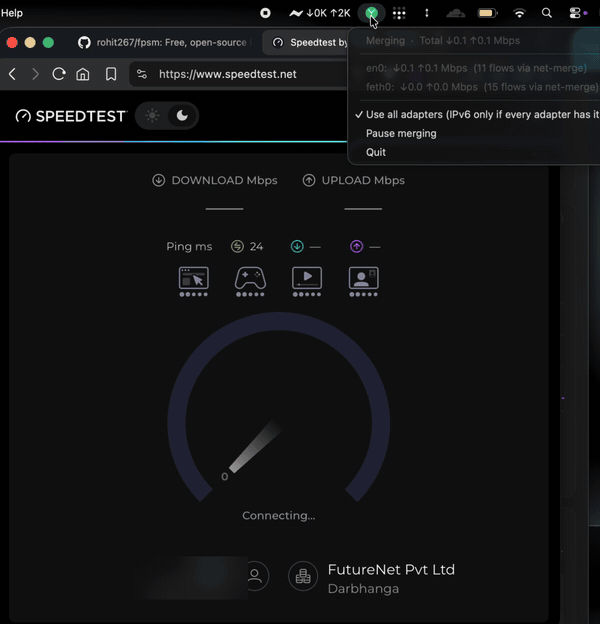
- 首次启动后,程序会驻留在系统托盘;把鼠标悬停在托盘图标上,可查看各网卡当前速度与合并后的总速度。
- 右键点击托盘图标打开菜单,确认已自动识别并启用 Wi-Fi、以太网等网络适配器,菜单中会显示每个适配器的速度与连接数。
- 再接入一个网络(如手机热点或 USB 共享网络),等待其出现在菜单中,即可与原有连接同时分担流量。
- 需要临时停止合并时,在托盘菜单中点击暂停合并;恢复或退出程序同样在该菜单中操作。
提示:合并只对多连接任务有效,单连接下载速度不会叠加。
讨论(0 条)