Next Player 是一款用 Kotlin 编写的开源安卓视频播放器,界面简洁,对电视遥控器操作做了专门适配。它基于 ExoPlayer 并集成 FFmpeg 解码,能播放本地和网络视频,还支持文件夹浏览与搜索。适合想在电视盒子或手机上找个轻量、无广告播放器的人。
核心亮点:
- 遥控器友好界面,大屏操作顺手
- 基于 ExoPlayer 加 FFmpeg,格式兼容广
- 支持本地与网络视频播放
- 开源免费,可从多个应用商店获取
当前版本 v0.21.0(2026-11-14 发布),开源协议 GPL-3.0,GitHub 4,741 star。


核心信息
| 软件名称 | Next Player(anilbeesetti/nextplayer) |
| 当前版本 | v0.21.0 |
| 更新日期 | 2026-11-14 |
| 开源协议 | GPL-3.0 |
| 软件分类 | TV 盒子软件 |
| 关键词 | android、exoplayer、ffmpeg、ffmpeg-android、jetpack-compose、jni-android |
本次更新内容
- 新增设置导出与导入功能,可备份偏好并选择是否保留已保存的网络连接,换设备时更方便。
- 字幕体验升级:普通文本字幕支持拖动调整位置,特效字幕样式和位图字幕位置也能正确显示。
- 界面细节优化:屏幕切换更贴合系统导航,窄屏下章节标题保持可读,播放速度和旋转按钮移入可滚动控制区。
- 修复多项问题:移动文件不再重置媒体日期或误删原文件,跨应用打开的视频可正常拖动进度,横屏时导航栏不再遮挡内容。
- 修复缩放、动态取色和媒体通知封面异常,播放器更稳定,个性化设置也能正常生效。
查看官方英文更新日志(原文)
## New features
* Added settings export and import, with optional saved network connections by @DearZack in https://github.com/anilbeesetti/nextplayer/pull/2062
* Added drag-to-reposition support for ordinary text subtitles by @SairamVemula in https://github.com/anilbeesetti/nextplayer/pull/2067
* Added FFmpeg subtitle support, preserving authored ASS/SSA styling and bitmap subtitle placement by @anilbeesetti in https://github.com/anilbeesetti/nextplayer/pull/2083

## Improvements
* Improved screen transitions to match system navigation by @anilbeesetti in https://github.com/anilbeesetti/nextplayer/pull/2076
* Kept chapter titles readable on narrow players, with speed and rotation in the scrollable bottom controls by @anilbeesetti in https://github.com/anilbeesetti/nextplayer/pull/2116

## Fixes
* Fixed file moves resetting media dates and sending originals to Trash on the same storage volume by @anilbeesetti in https://github.com/anilbeesetti/nextplayer/pull/2065
* Fixed seeking failures for videos opened from other apps after the player activity closes by @DevasMIN in https://github.com/anilbeesetti/nextplayer/pull/2069
* Fixed the navigation rail overlapping library content in landscape by @anilbeesetti in https://github.com/anilbeesetti/nextplayer/pull/2090
* Fixed pinch zoom after changing video scale by @anilbeesetti in https://github.com/anilbeesetti/nextplayer/pull/2094
* Fixed the player ignoring the dynamic-color preference by @anilbeesetti in https://github.com/anilbeesetti/nextplayer/pull/2095
* Fixed media-session artwork crashes on some custom Android 15 ROMs by @anilbeesetti in https://github.com/anilbeesetti/nextplayer/pull/2101

## New Contributors
* @DevasMIN made their first contribution in https://github.com/anilbeesetti/nextplayer/pull/2069
* @SairamVemula made their first contribution in https://github.com/anilbeesetti/nextplayer/pull/2067
* @DearZack made their first contribution in https://github.com/anilbeesetti/nextplayer/pull/2062

**Full Changelog**: https://github.com/anilbeesetti/nextplayer/compare/v0.20.0...v0.21.0
下载地址
以下为官方原包,本站不二次打包;多个文件为不同包型,按需选择其中一个下载即可:
nextplayer-v0.21.0-arm64-v8a.apk(Android 安装包 | 19.7 MB)
nextplayer-v0.21.0-armeabi-v7a.apk(Android 安装包 | 18.5 MB)
nextplayer-v0.21.0-universal.apk(Android 安装包 | 61.9 MB)
nextplayer-v0.21.0-x86.apk(Android 安装包 | 21.1 MB)
nextplayer-v0.21.0-x86_64.apk(Android 安装包 | 23.6 MB)
✅ 上方 SHA256 与官方发布值一致,可自行核对。
快速上手
- 运行下载好的安装包完成安装,若系统提示未知来源需在设置中允许安装。
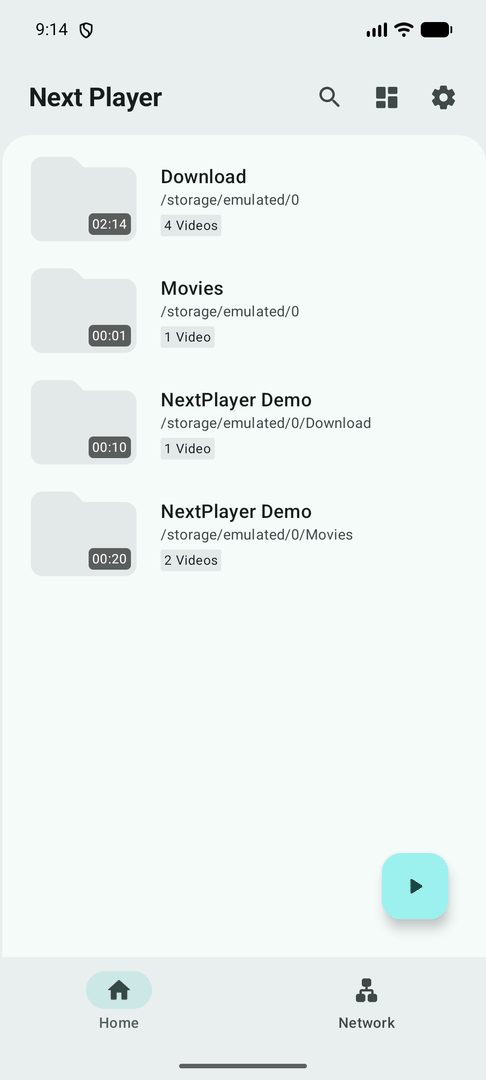
- 首次启动后进入首页,可看到按文件夹分类的视频列表,点击文件夹浏览其中的视频。
- 点击任意视频即可开始播放,播放界面提供进度条与播放控制按钮。
- 在首页或设置中可切换网格视图、调整外观等显示选项,按需选择。
- 如需播放局域网内容,可在首页添加网络连接并填写地址后访问。
提示:安装包需与设备处理器架构匹配,不确定时选通用版。
讨论(0 条)