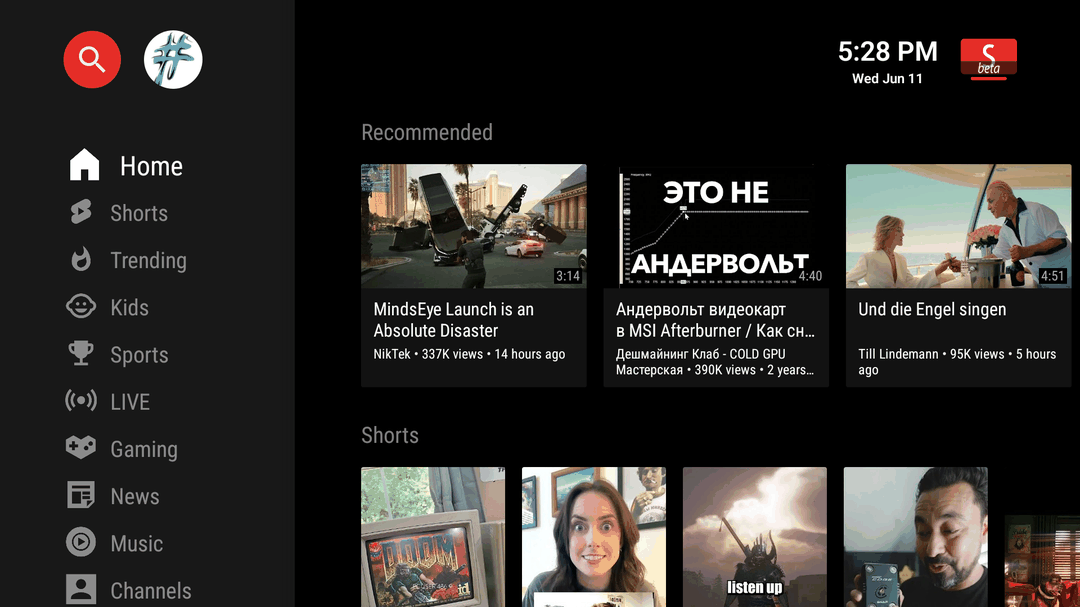
SmartTube 是一款面向 Android TV 和电视盒子的开源流媒体增强客户端,专为大屏遥控操作优化界面。它支持高分辨率与高帧率播放、HDR、SponsorBlock 跳过赞助片段、可调播放速度,且无需谷歌服务框架,适合想在电视上获得更清爽观看体验的用户。
核心亮点:
- 大屏电视优化界面,遥控操作顺手
- 内置 SponsorBlock,自动跳过赞助片段
- 支持高分辨率高帧率与 HDR 播放
- 无需谷歌服务,老设备也能安装
当前版本 v32.80s(2026-11-19 发布),开源协议 MIT,GitHub 36,465 star。


核心信息
| 软件名称 | SmartTube(yuliskov/SmartTube) |
| 当前版本 | v32.80s |
| 更新日期 | 2026-11-19 |
| 开源协议 | MIT |
| 软件分类 | TV 盒子软件 |
| 关键词 | android、android-tv、android-tv-box、java、kotlin、retrofit2 |
本次更新内容
- 修复了从手机投屏到电视时生成配对码失败的问题,投屏连接更稳定可靠。
- 新增快捷跳过章节功能,可在设置中把遥控器上键映射为跳到下一章节,追剧更方便。
- 包含若干播放稳定性改进,减少卡顿和异常,观看体验更顺畅。
查看官方英文更新日志(原文)
- Fix code generation for casting from phone by @kamikaze4441 - Added option to quickly skip chapters to Settings/General/Mapping/Next chapter with UP button - Minor playback fixes Downloader code: **28544** | [F-Droid](https://f-droid.org/packages/app.smarttube.fdroid/) | [Translation](https://jtbrinkmann.de/tools/android-strings.xml-translator.html) ## 🛡️ VirusTotal Analysis | Build Variant | VirusTotal Status | Detailed Report | | :--- | :--- | :--- | | [SmartTube_stable_32.80_arm64-v8a.apk](https://github.com/yuliskov/SmartTube/releases/download/32.80s/SmartTube_stable_32.80_arm64-v8a.apk) | [](https://www.virustotal.com/gui/file/c1e1dfdf51aeadf7dc90a27ee2e28bd885dad6a4991d4b8084045a4e3a8f7ad4/detection) | [View Report](https://www.virustotal.com/gui/file/c1e1dfdf51aeadf7dc90a27ee2e28bd885dad6a4991d4b8084045a4e3a8f7ad4/detection) | | [SmartTube_stable_32.80_armeabi-v7a.apk](https://github.com/yuliskov/SmartTube/releases/download/32.80s/SmartTube_stable_32.80_armeabi-v7a.apk) | [](https://www.virustotal.com/gui/file/f90eea37b474f848ba37e8bfc37df5ab31517aa41e12d0d38e185e62378488b8/detection) | [View Report](https://www.virustotal.com/gui/file/f90eea37b474f848ba37e8bfc37df5ab31517aa41e12d0d38e185e62378488b8/detection) | | [SmartTube_stable_32.80_universal.apk](https://github.com/yuliskov/SmartTube/releases/download/32.80s/SmartTube_stable_32.80_universal.apk) | [](https://www.virustotal.com/gui/file/a91a1412dc43a2ae4fd2a1ab836fcbb9a0196cf45df17d3ee5d69ef491a4f28a/detection) | [View Report](https://www.virustotal.com/gui/file/a91a1412dc43a2ae4fd2a1ab836fcbb9a0196cf45df17d3ee5d69ef491a4f28a/detection) | | [SmartTube_stable_32.80_x86.apk](https://github.com/yuliskov/SmartTube/releases/download/32.80s/SmartTube_stable_32.80_x86.apk) | [](https://www.virustotal.com/gui/file/bc0457a71df784febebf74735c1e0b2db272da65a23d5708e0e50f09d6911282/detection) | [View Report](https://www.virustotal.com/gui/file/bc0457a71df784febebf74735c1e0b2db272da65a23d5708e0e50f09d6911282/detection) |
下载地址
以下为官方原包,本站不二次打包;多个文件为不同包型,按需选择其中一个下载即可:
SmartTube_stable_32.80_arm64-v8a.apk(Android 安装包 | 25.5 MB)
SmartTube_stable_32.80_armeabi-v7a.apk(Android 安装包 | 24.4 MB)
SmartTube_stable_32.80_universal.apk(Android 安装包 | 33.8 MB)
SmartTube_stable_32.80_x86.apk(Android 安装包 | 27.1 MB)
✅ 上方 SHA256 与官方发布值一致,可自行核对。
快速上手
- 在电视或电视盒子上运行下载好的安装包,按屏幕提示完成安装
- 首次启动后,用遥控器浏览首页内容,选中想看的视频即可播放
- 在播放界面用遥控器调出控制栏,可调整播放速度、查看实时聊天
- 进入设置可自定义按钮,并按需开启 SponsorBlock 跳过赞助片段
提示:本应用不适用于手机和平板,仅支持安卓电视与电视盒子。
讨论(0 条)