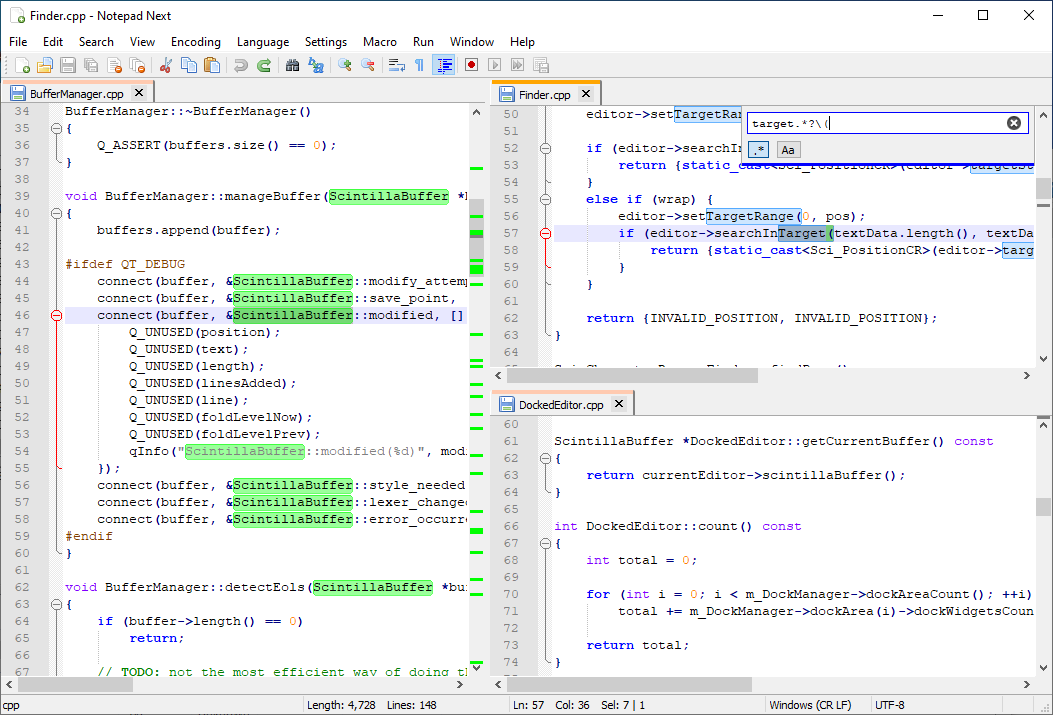
Notepad Next 是用 Qt 重写的跨平台 Notepad++ 替代品,界面和操作习惯贴近原版,能在 Windows、Linux、macOS 上运行。它支持多标签编辑、语法高亮和常用文本处理功能,适合习惯 Notepad++ 但需要跨平台或偏好开源软件的用户。项目仍在完善中,不建议用于关键任务。
核心亮点:
- 跨平台运行,覆盖 Windows、Linux 和 macOS
- 界面与操作贴近 Notepad++,上手成本低
- 支持多标签编辑与语法高亮等常用功能
- 开源免费,提供安装包和多种包管理器渠道
当前版本 v0.15(2026-09-22 发布),开源协议 GPL-3.0,GitHub 14,753 star。

核心信息
| 软件名称 | Notepad Next(dail8859/NotepadNext) |
| 当前版本 | v0.15 |
| 更新日期 | 2026-09-22 |
| 开源协议 | GPL-3.0 |
| 软件分类 | Windows 效率工具 |
| 关键词 | desktop、editor、linux、macos、notepad、notepad-plus-plus |
本次更新内容
- 新增分屏编辑、标签页快捷操作与批量关闭,多文件处理更顺手。
- 搜索可标记行并一次复制多条结果,查找替换在小屏幕上更好用。
- 自动补全可开关并支持语言关键字提示,重命名文件时旧文件会被正确清理。
- 新增多种编码支持与 Windows ARM 平台适配,并改善 macOS 和 Linux 使用体验。
- 修复启动崩溃、全部展开失效、新建文件名异常及右键菜单光标位置等问题。
查看官方英文更新日志(原文)
## What's Changed
- Added split editor shortcuts.
- Added quick tab controls to the toolbar.
- Added bulk close options for tabs.
- Improved file renaming by pre-filling the rename dialog and correctly removing the old file.
- Added the ability to search and bookmark lines.
- Added a setting to enable or disable auto-completion.
- Improved auto-completion with language keyword suggestions.
- Added `Shift+Enter` as a shortcut for backward search.
- Added `Shift+Scroll` for horizontal scrolling.
- Multiple search results can now be copied at once.
- Improved Find/Replace dialog sizing and behavior on smaller screens.
- Fixed the caret position when opening the context menu inside a text selection.
- Fixed the Unfold All action.
- Fixed an issue where new file names could incorrectly restart instead of incrementing.
- Fixed a crash when a session file cannot be read during startup.
- Added UTF-16 Little Endian and Big Endian encoding support.
- Added initial Windows ARM64 support.
- Improved macOS support, including text navigation key bindings and build reliability.
- Improved Linux AppImage support and added Linux build documentation.
- Updated ADS to version 5.1.1.
- Updated translations across the application.
- Fixed several build and release issues across supported platforms.


**Full Changelog**: https://github.com/dail8859/NotepadNext/compare/v0.14...v0.15
下载地址
以下为官方原包,本站不二次打包;多个文件为不同包型,按需选择其中一个下载即可:
NotepadNext-v0.15-Installer-arm64.exe(安装版 | 16.8 MB)
NotepadNext-v0.15-Installer.exe(安装版 | 10.4 MB)
NotepadNext-v0.15-win64-arm64.zip(便携版·解压即用 | 25.6 MB)
NotepadNext-v0.15-win64.zip(便携版·解压即用 | 14.0 MB)
✅ 上方 SHA256 与官方发布值一致,可自行核对。
快速上手
- 运行下载好的安装包,按向导完成安装;安装程序会附加自动更新和右键菜单集成组件。
- 首次启动后,即可像使用记事本一样新建、打开和编辑文本文件。
- 在编辑区输入或修改内容后,通过菜单保存文件。
- 如需快速打开文件,可在文件管理器中右键文件,使用已集成的右键菜单选项。
提示:安装版支持自动更新,建议保持开启以获取改进。
讨论(0 条)