OpenShot 是一款跨平台的开源视频剪辑软件,界面友好、上手门槛低,内置基于 FFmpeg 的广泛格式支持、关键帧动画、多轨道合成与字幕标题功能,还提供实时预览的转场效果。适合想免费剪视频的普通用户、学生和内容创作者,也适合愿意参与开源项目的开发者。
核心亮点:
- 跨平台运行,支持众多音视频与图片格式
- 曲线关键帧动画,可做缩放旋转与速度调整
- 无限轨道与图层,支持合成、水印和字幕
- 实时预览转场,支持逐帧精确剪辑
当前版本 v4.1.1(2026-11-02 发布),开源协议 GPL-3.0,GitHub 6,725 star。

核心信息
| 软件名称 | OpenShot(OpenShot/openshot-qt) |
| 当前版本 | v4.1.1 |
| 更新日期 | 2026-11-02 |
| 开源协议 | GPL-3.0 |
| 软件分类 | Windows 效率工具 |
| 关键词 | c-plus-plus、ffmpeg、gplv3、openshot、python、qt5 |
本次更新内容
- 新版本新增对 AMD 和英伟达等显卡硬件导出的支持,导出时优先使用已验证的显卡方案,失败才回退到处理器编码。
- 显卡导出标识在高分屏上显示更清晰,导出目标与标识会跟随实际使用的编码器变化。
- 修复了在 Windows 和网络共享上保存项目的问题,遇到文件被占用时会短暂重试,保存更可靠。
- 解决了文字缩略图同时更新时的冲突,并恢复新版界面框架下提示与焦点事件的兼容性。
- 修正了各平台打包时的运行库与资源路径处理,并更新了支持者名单。
查看官方英文更新日志(原文)
Highlights & Features:
===
- **Updated builds:** a small maintenance release rebuilt on new runners with updated FFmpeg dependencies and stronger packaging checks.
- **GPU exports:** added AMD AMF and HEVC NVENC/QSV presets, sharper GPU badges on high-DPI displays, and validated GPU alternatives before falling back to CPU encoding. Export targets and badges now follow the actual encoder.
- **Reliability fixes:** improved saving on Windows and network shares, handled concurrent text-thumbnail updates, restored Qt6 event compatibility, and fixed long macOS agent socket paths.
- **Packaging and credits:** corrected bundled runtime and resource handling across platforms and refreshed supporter credits.
- **Library dependency:** this release uses libopenshot 1.1.1, including Mac VideoToolbox export crash fix.

openshot-qt Changelog (Version: 4.1.1)
---
- eead0c71d  2026-11-01 Jonathan Thomas          Prefer validated GPU export replacements and synchronize target badges HEAD, origin/release-20261101
- 539fea56d  2026-11-01 Jonathan Thomas          Keep GPU badges sharp on high-DPI displays
- 7d0b723d5  2026-11-01 Jonathan Thomas          Restore the Python inline-code flag in Linux package checks
- 334ca14f8  2026-11-01 Jonathan Thomas          Address release packaging static analysis findings
- c52fbc211  2026-11-01 Jonathan Thomas          Compare packaged resource paths by filesystem identity
- 15954e7e0  2026-11-01 Jonathan Thomas          Respect macOS bundle resource paths before and after DMG packaging
- e90a19748  2026-11-01 Jonathan Thomas          Include native DLL setup in isolated launcher fixtures
- 19fd18595  2026-11-01 Jonathan Thomas          Add hardware export preset names to the translation template
- 6a3added5  2026-11-01 Jonathan Thomas          Resolve frozen application assets beside the executable
- 338b0bfcf  2026-11-01 Jonathan Thomas          Verify Linux hardware exports in the packaged runtime
- 0e45eb459  2026-11-01 Jonathan Thomas          Preserve hardware FFmpeg runtimes and check frozen export presets
- 101dec824  2026-11-01 Jonathan Thomas          Expose AMF and HEVC export presets and restore the Mac GPU badge
- 2c3f7ae6c  2026-11-01 Jonathan Thomas          Refresh supporter credits for OpenShot 4.1.1
- 866fe1d8e  2026-11-01 Jonathan Thomas          Reuse concurrently rendered text thumbnails when Windows locks them
- 3953d52c0  2026-11-01 Jonathan Thomas          Allow atomic saves on shares without Unix permission support
- ad7fccc60  2026-11-01 Jonathan Thomas          Retry atomic saves briefly when Windows locks the destination
- 622a7210c  2026-11-01 Jonathan Thomas          Shorten agent socket names for macOS temporary paths
- 6c11a5c8b  2026-11-01 Jonathan Thomas          Restore Qt6 tooltip and focus event aliases
- e7a39e5f9  2026-11-01 Jonathan Thomas          Include dynamic PyOpenGL backends in frozen builds
- a63466d2a  2026-11-01 Jonathan Thomas          Bump OpenShot
下载地址
以下为官方原包,本站不二次打包,点击直接下载:
OpenShot-v4.1.1-x86_64.exe(官方安装程序 | 237.0 MB)
✅ 上方 SHA256 与官方发布值一致,可自行核对。
快速上手
- 运行下载好的安装包,按向导提示完成安装并启动 OpenShot。
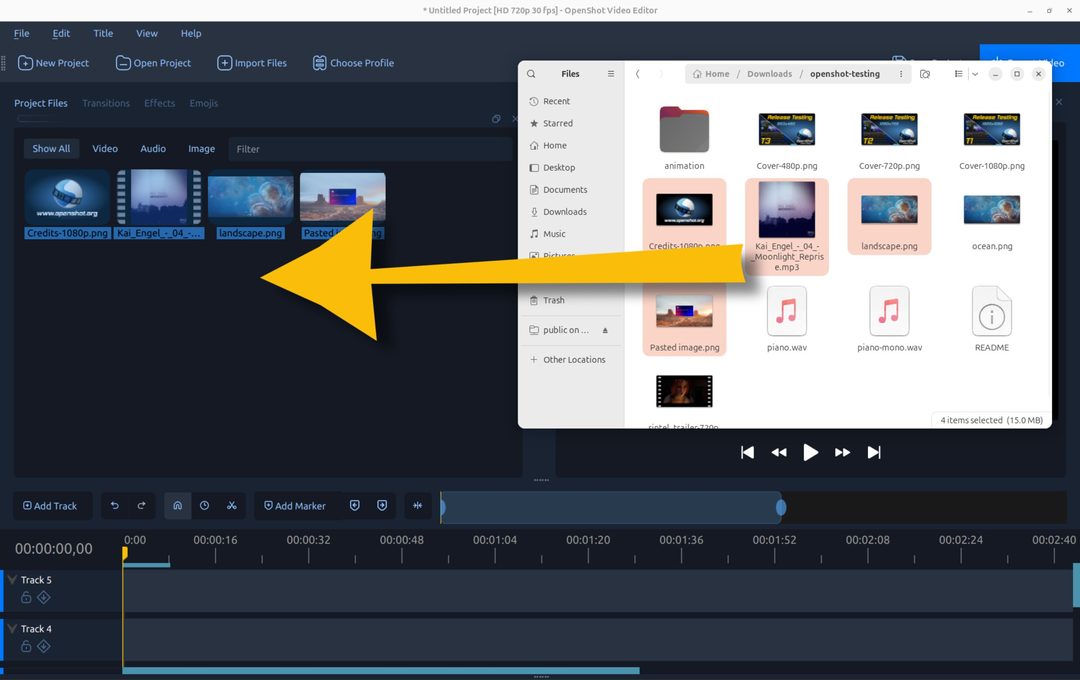
- 首次启动后,在高级时间线区域把视频、音频或图片文件拖入,即可添加为剪辑。
- 选中剪辑后拖动边缘进行裁剪、缩放与旋转,利用吸附对齐时间线位置。
- 在轨道间拖放视频转场,实时预览效果,并添加标题模板与字幕。
- 完成后选择导出,按需挑选格式与编解码器渲染输出视频。
提示:剪辑前先保存项目文件,避免渲染或编辑中断造成进度丢失。
讨论(0 条)